Bill Ageing
On this page
Bill Ageing shows how long each party’s bills have been unpaid. For every customer, supplier or farmer it splits the unpaid bills into five age ranges, such as 0 to 30 days and 31 to 60 days, as on the date you choose. Use it to decide whom to chase for payment and which suppliers you have kept waiting.
Open the report
Press Alt+7 for Special Reports, then G. The report opens for customers as on today’s date, grouped by area, with the ranges 0 - 30, 31 - 60, 61 - 90, 91 - 120 and 121 +.
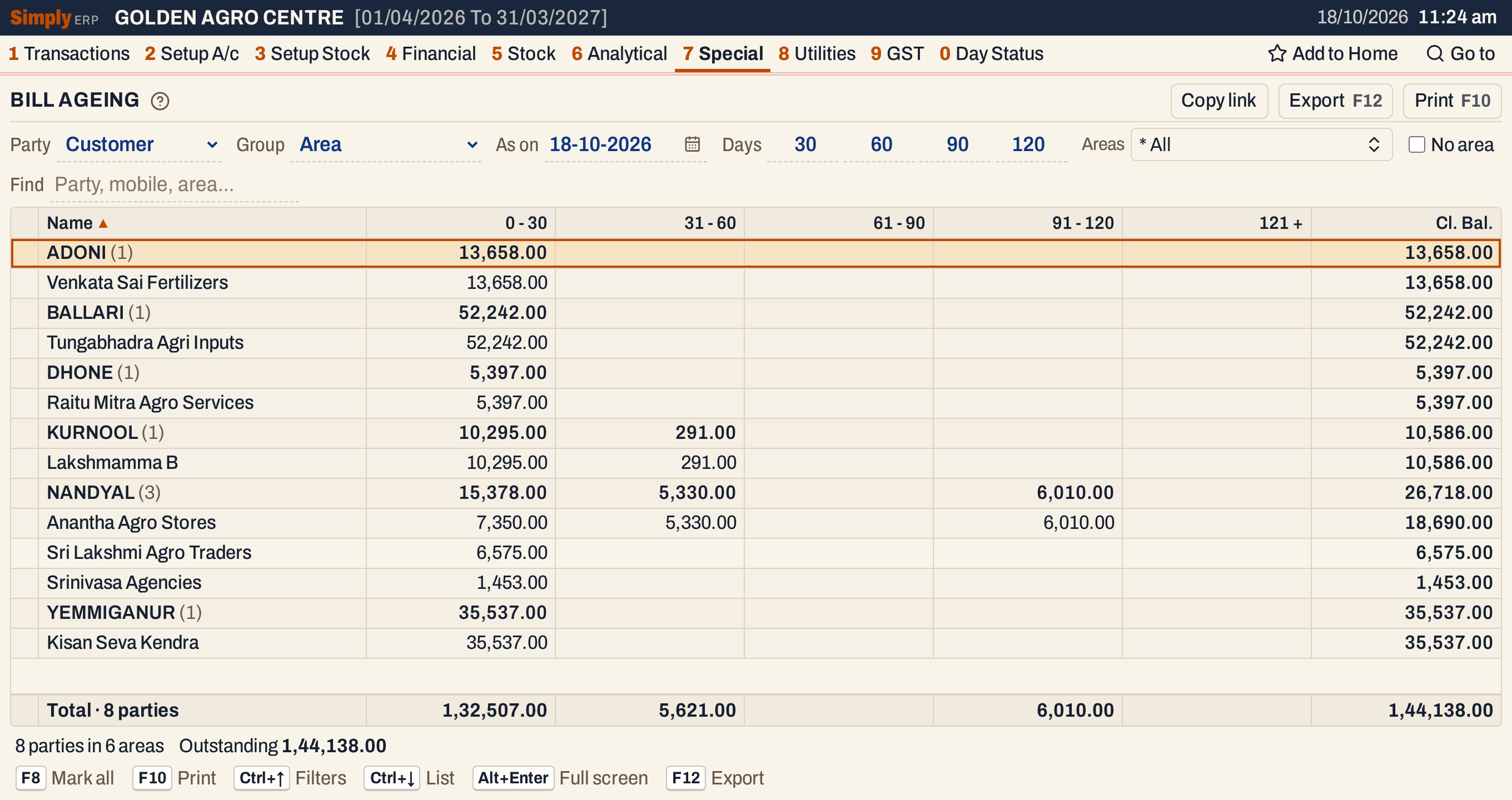 Each area is a heading with the number of parties under it and their totals.
What it lists
One line for each party that has unpaid bills as on the date. The report lists the unpaid bills, not the balance: a party whose bills are all paid is not listed.
- Customer lists accounts of type Customer and Customer - Supplier and reads their sale bills.
- Farmer lists accounts of type Farmer and reads their sale bills.
- Supplier lists accounts of type Supplier and Customer - Supplier and reads their purchase bills.
Parties are grouped by their Area, which is the City / town of the account. A party with no City / town is left out unless you tick No area. For customers you can group by Representative instead.
Columns
| Column | What it shows |
|---|---|
| Name | The party’s name. |
| Mobile | The party’s phone, or when that is blank the phone, then the alternate phone, of its default address. The column shows only when at least one listed party has a number. |
| 0 - 30 and the other ranges | The unpaid part of the bills whose age falls in the range. There are up to five ranges; the last, such as 121 +, holds every bill older than the fourth boundary. |
| Cl. Bal. | The total of the ranges: everything unpaid. |
The range titles follow the day boundaries you set. The ranges with the boundaries 30, 60, 90 and 120 are 0 - 30, 31 - 60, 61 - 90, 91 - 120 and 121 +. Click a column title to sort the parties inside each area, and click again to reverse.
Choices
| Choice | What it does |
|---|---|
| Party | Customer (the default), Supplier or Farmer. |
| Group | Area (the default) or Representative. Shown only for customers. |
| As on | The date the ages are counted to. It opens on today’s date, and the date is kept in the page address, so a copied link gives the same figures. Bills dated after it are not counted. |
| Days | Four day boundaries, 30, 60, 90 and 120 at first. Each is a number from 0 to 999 and must not be less than the one before it. A zero leaves its range unused. |
| Areas or Representatives | Only the groups you tick. * All is the default. |
| No area | Also lists the parties with no area (or no representative) under * General, last. |
| Find | Shows only the parties whose name, mobile number or area matches what you type. |
If a boundary is less than the one before it, the report says that each day boundary must be at least the one before it, and does not work out the ranges.
 The choices above the list.
Day boundaries
Change the boundaries to get other ranges. Here they are 15, 45, 0 and 120: the third is zero, so that range is left out, and the ranges are 0 - 15, 16 - 45, 46 - 120 and 121 +.
 The same bills in other ranges. The 5,330.00 bill of 58 days and the 6,010.00 of 103 days both fall in 46 - 120.
How the figures are worked out
For each party SimplyERP reads the party’s postings up to the As on date and works in four steps:
- The bills. For a customer or farmer these are the sale bills; for a supplier, the purchase bills. A debit opening balance of a customer or farmer, or a credit opening balance of a supplier, counts as one more bill. It is dated at the start of the financial year.
- The age. A bill’s age is the number of days from the bill’s date to the As on date, counting both days. A bill dated on the As on date is 1 day old.
- What has been settled. Everything posted to the party on the other side settles bills: receipts, sales returns, credit notes and journal credits for a customer, and payments for a supplier. A credit opening balance of a customer, or a debit opening balance of a supplier, settles too. A posting that goes the way of the bills but is not a bill, such as a debit note to a customer, takes away from what has been settled. The total settled is never below nil.
- Oldest first. The settled total is applied to the oldest bill first, then the next, until it is used up. What is left of each bill goes into the range its age falls in: the first range whose upper day is at least the age, or the last range when the age is beyond the fourth boundary.
Cl. Bal. is the total of the five ranges. It can differ from the party’s balance in the ledger: payments beyond all the bills are not shown here, and a debit that is not a sale bill is not placed in any range.
Example: Anantha Agro Stores has five credit sale bills as on 18-10-2026 and has paid 12,000.00 on account.
| Bill dated | Amount | Age in days |
|---|---|---|
| 14-05-2026 | 10,660.00 | 158 |
| 08-07-2026 | 7,350.00 | 103 |
| 22-08-2026 | 5,330.00 | 58 |
| 24-09-2026 | 4,900.00 | 25 |
| 12-10-2026 | 2,450.00 | 7 |
The 12,000.00 settles the bill of 14 May in full (10,660.00) and 1,340.00 of the bill of 8 July, which leaves 6,010.00. The unpaid parts go to the ranges: 6,010.00 in 91 - 120, 5,330.00 in 31 - 60, and 4,900.00 + 2,450.00 = 7,350.00 in 0 - 30. Cl. Bal. is 18,690.00.
 The payment has settled the oldest bills, so what remains is the newer bills and part of the bill of 8 July.
An area line adds up its parties. The totals line under the list does the same for every party listed, and the line under it gives the number of parties and areas and the total outstanding.
 Totals of each range, and the outstanding in all.
Find
Find narrows the list to the parties that match what you type. The totals are then those of the parties shown.
 One party found.
Suppliers and farmers
Choose Supplier to age what you owe. The ranges count the purchase bills that are not yet paid, with payments settling the oldest first.
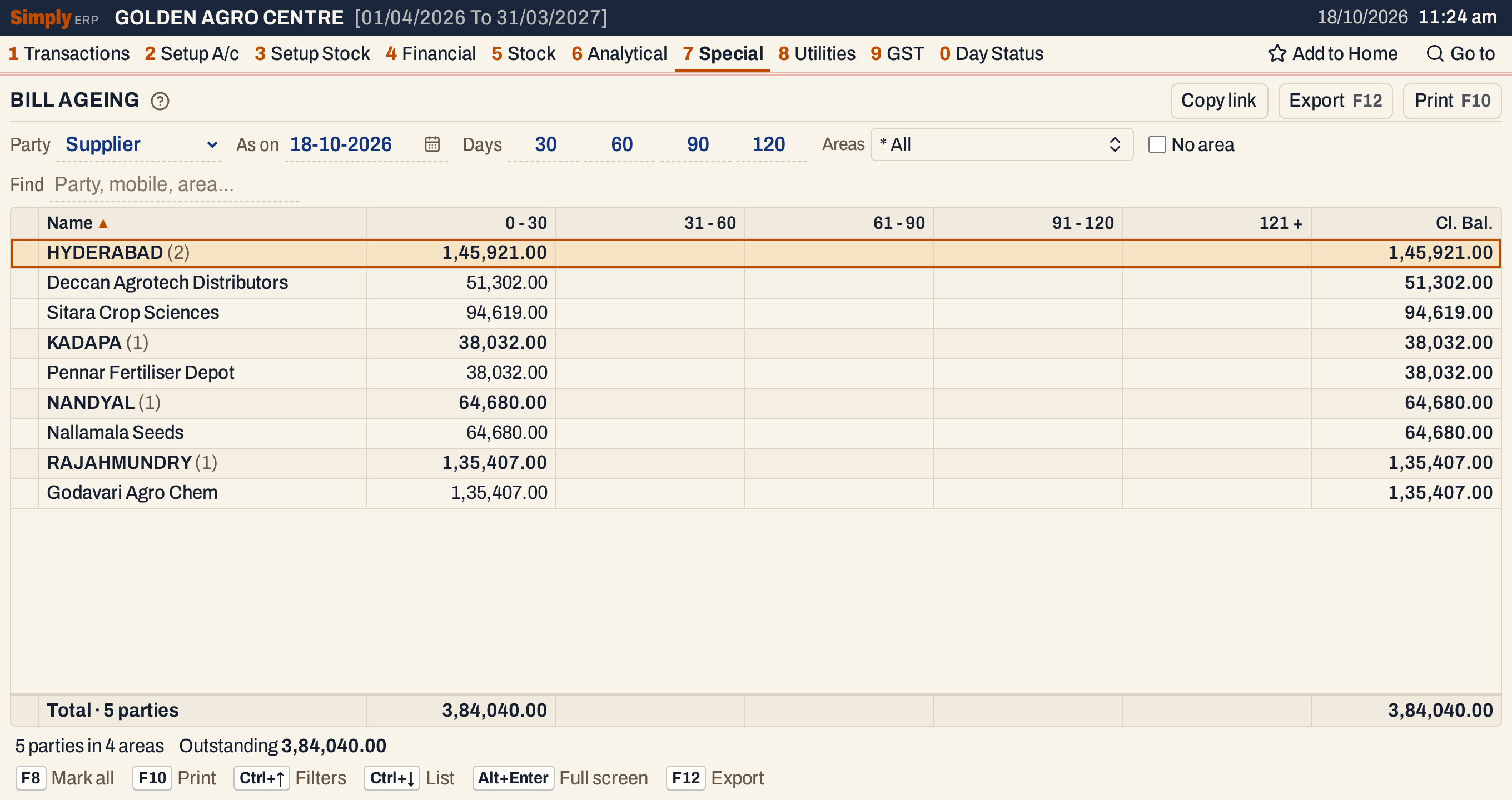 Suppliers: what you owe by age.
Choose Farmer for the farmers’ sale bills. Representative grouping is not offered for suppliers and farmers.
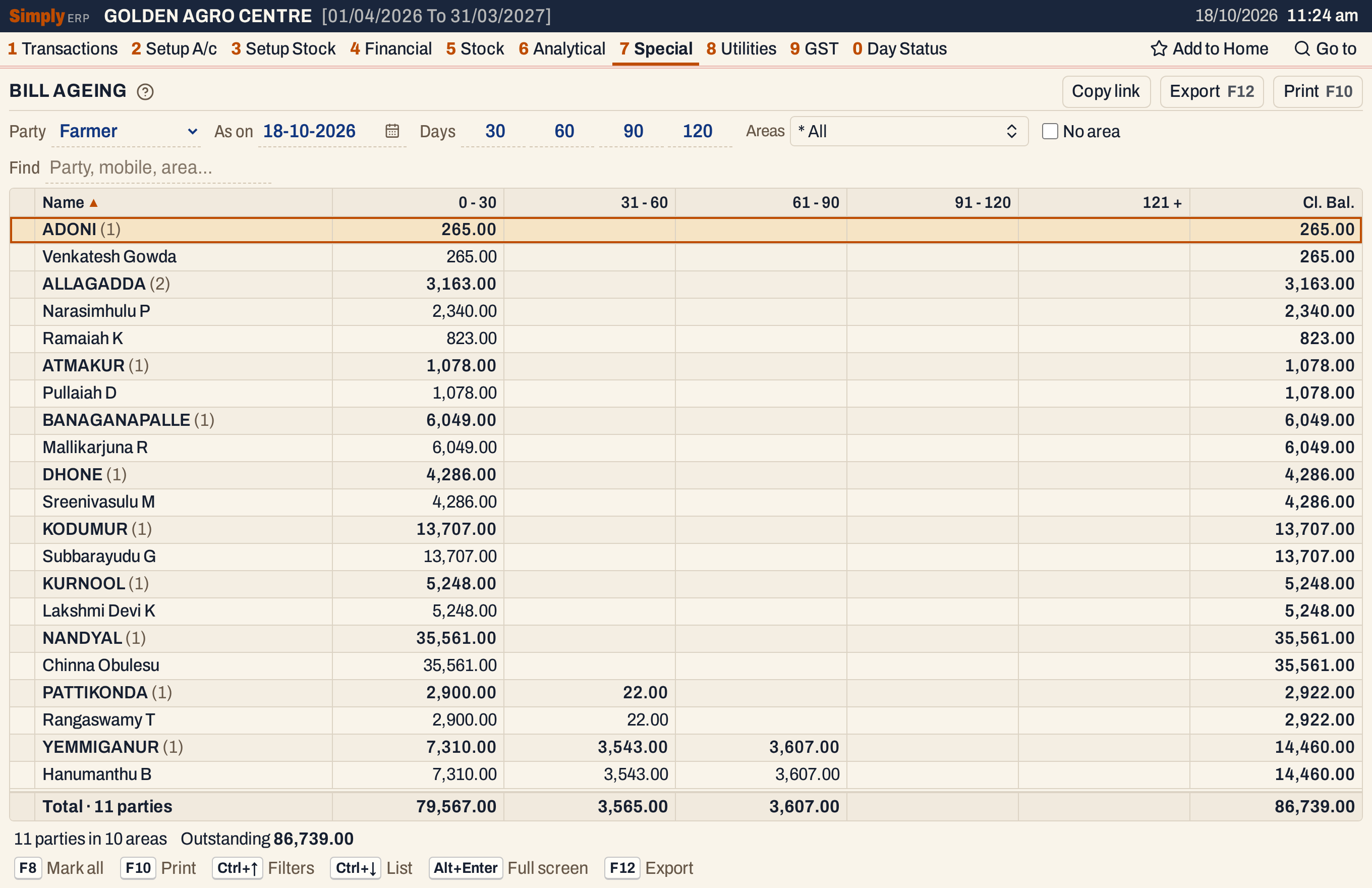 Farmers: some bills have waited longer than a month.
Open, mark, print and export
- Enter on a party opens its ledger from the start of the financial year to the As on date, where you can see the bills. Back returns to the same line.
- F2 or Space marks a party and F8 marks them all. F10 then prints only the marked parties, with their area lines worked out again. The status line shows how many are marked.
- F10 prints the report as it is on the screen, headed “As On” with the date, with the ranges as “0 To 30” and “121 & Above” and a Grand Totals line.
- F12 saves it as an Excel workbook; the Mobile column is in the workbook but not on the print.
- Alt+Enter gives the whole window to the list.
Updated 4 November 2026.