Creditors/Debtors St.
On this page
The Creditors/Debtors Statement lists every party with a balance on a date: the debit balances are what customers and farmers owe you, the credit balances are what you owe suppliers. You can print the two together, the creditors alone, the debtors alone, or the unsecured loans.
Open the report
Press Alt+7 for Special Reports, then A. The report opens as on today, for all parties, with both debit and credit balances, in name order.
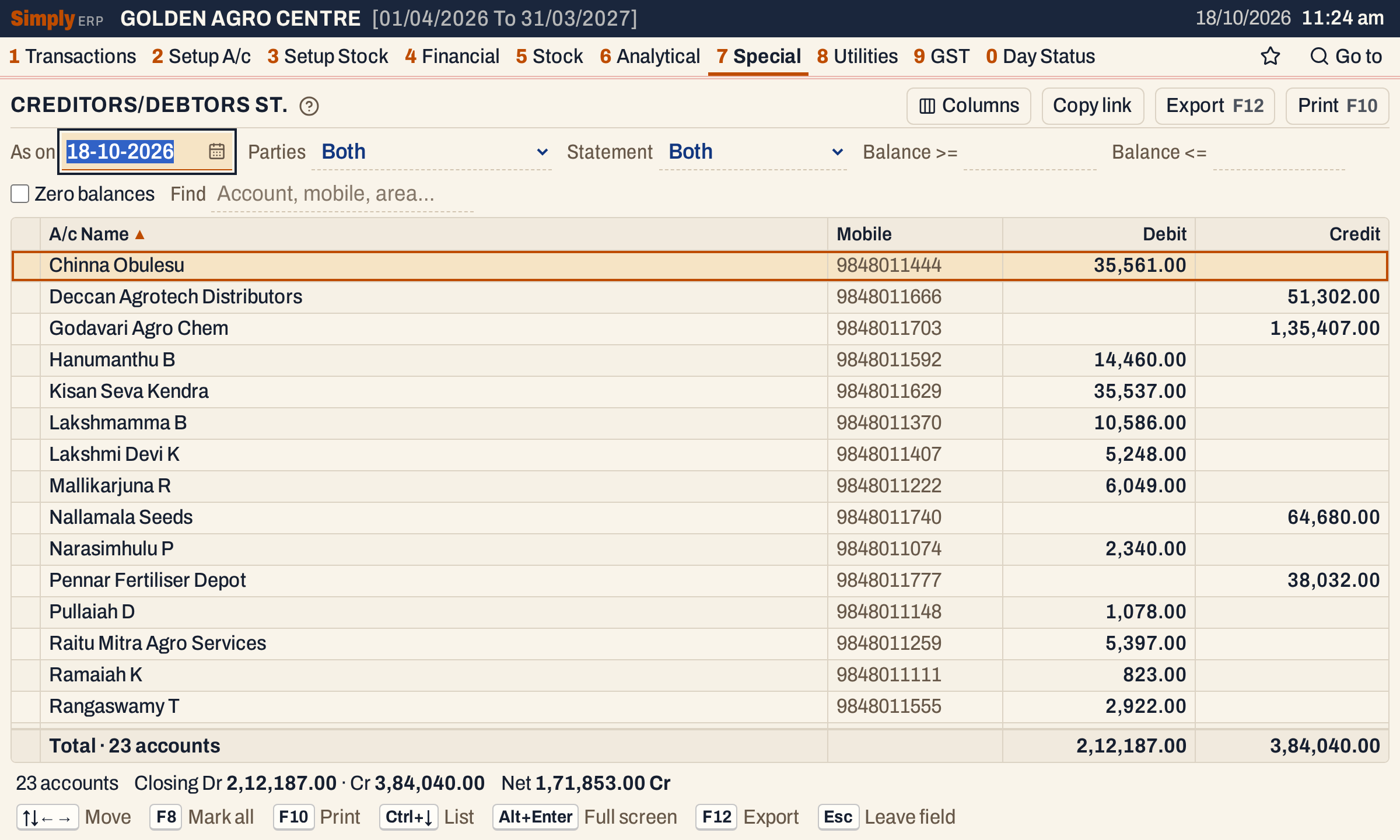 One line for each party. The status line gives the closing debit and credit and the net.
What it lists
One line for each account of type Customer, Supplier, Customer - Supplier or Farmer. Cash, bank, sales, expense and the other accounts are not in this report.
An account with a nil balance on the date is left out. Tick Zero balances to list them too.
The balance counts everything posted to the account up to the As on date, including its opening balance.
Columns
| Column | What it shows |
|---|---|
| A/c Name | The account’s name. |
| Mobile | The phone entered on the account. |
| Debit | The balance, when it is a debit: the party owes you. |
| Credit | The balance, when it is a credit: you owe the party. |
The totals line counts the accounts and adds up the Debit and Credit columns. There is no opening balance or period: the statement is a balance on one day.
Choices
| Choice | What it does |
|---|---|
| As on | The date of the balances. It must fall in the financial year and opens as today. |
| Parties | Both: all accounts. Trade: customers, customer-suppliers and suppliers. Others (farmers): only farmers. |
| Statement | Both: debit and credit balances. Debit: only debit balances (the debtors). Credit: only credit balances (the creditors). Unsecured loans: only credit balances of accounts whose account group name begins with UNSEC. |
| Balance >= | Only balances of at least this amount, debit or credit. Leave it empty for no minimum. |
| Balance <= | Only balances of at most this amount. It is used only when Balance >= is empty, and the box is greyed out while Balance >= has an amount. |
| Zero balances | Also lists the parties with a nil balance. |
| Find | Only accounts whose name or mobile matches what you type. |
| Columns | Hides the Mobile, Debit or Credit column. The print leaves it out too. |
Click a column title to sort by it, and click again to reverse. Every choice is kept in the page address, so Copy link gives a link that opens the same report.
 The choices above the grid.
How the figures are worked out
For each party, SimplyERP adds up every posting to the account dated on or before the As on date, with the account’s opening balance: credits count as positive and debits as negative. The result is rounded to paise.
- A positive result is a credit balance, shown in the Credit column.
- A negative result is a debit balance, shown in the Debit column.
A party is then listed only if it passes every choice: its type matches Parties; its balance is on the side the Statement asks for (Debit and Credit leave out nil balances, and so do Unsecured loans); the size of the balance, on whichever side, is within the limits; and a nil balance is listed only when Zero balances is ticked.
The status line gives Closing Dr, the sum of the debit balances, Cr, the sum of the credit balances, and the Net of the two. In the pictures the customers and farmers owe 2,12,187.00, you owe the suppliers 3,84,040.00, and the net is 1,71,853.00 Cr.
Creditors statement
Choose Statement Credit to list only the balances you owe. On the showcase books these are the five suppliers, 3,84,040.00 in all.
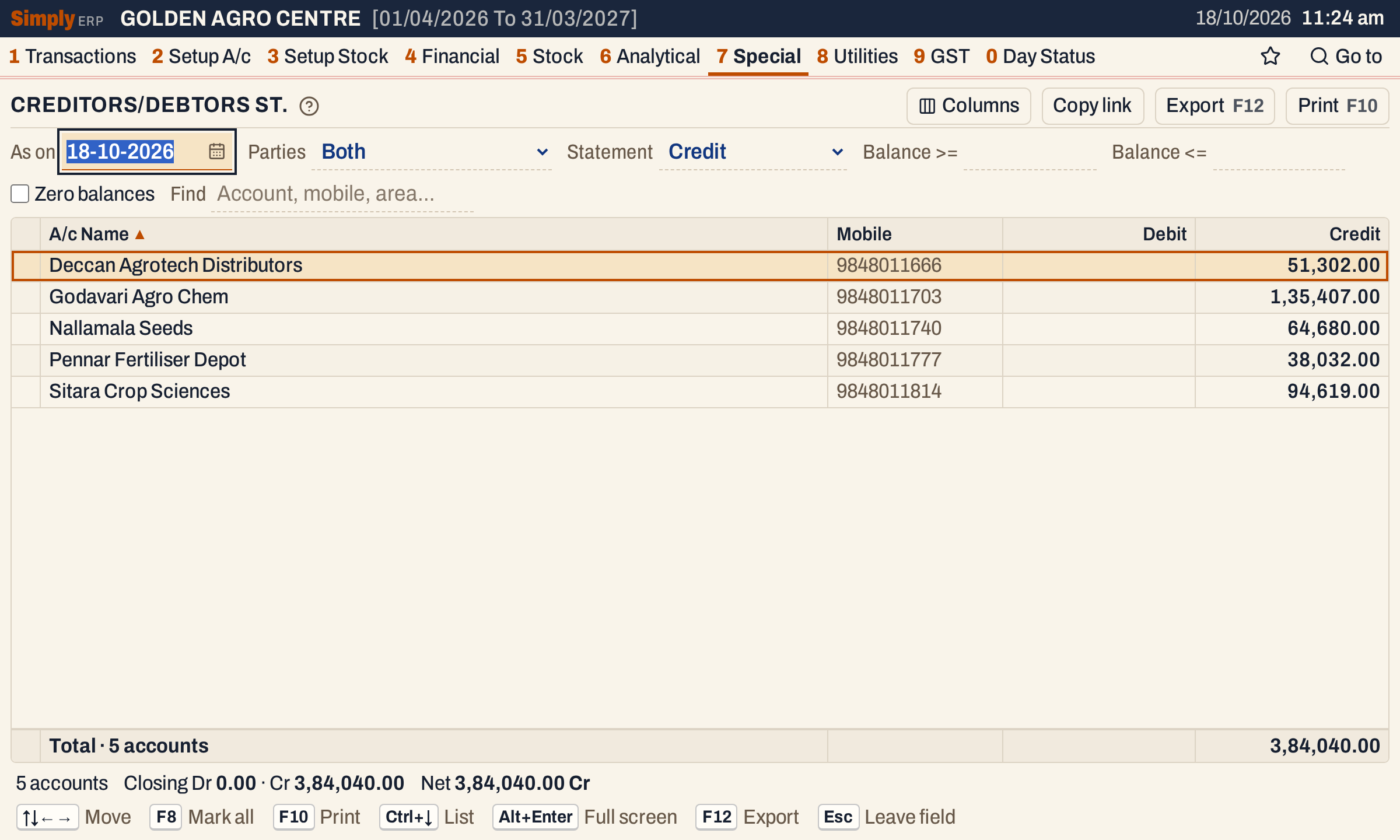 Only credit balances are listed, so the Debit column is empty.
Debtors over an amount
Choose Statement Debit and type an amount in Balance >= to list only the large debtors. Here, debit balances of 10,000.00 or more are seven accounts, 1,75,751.00 in all. Parties owing less, such as Lakshmi Devi K with 5,248.00, are left out.
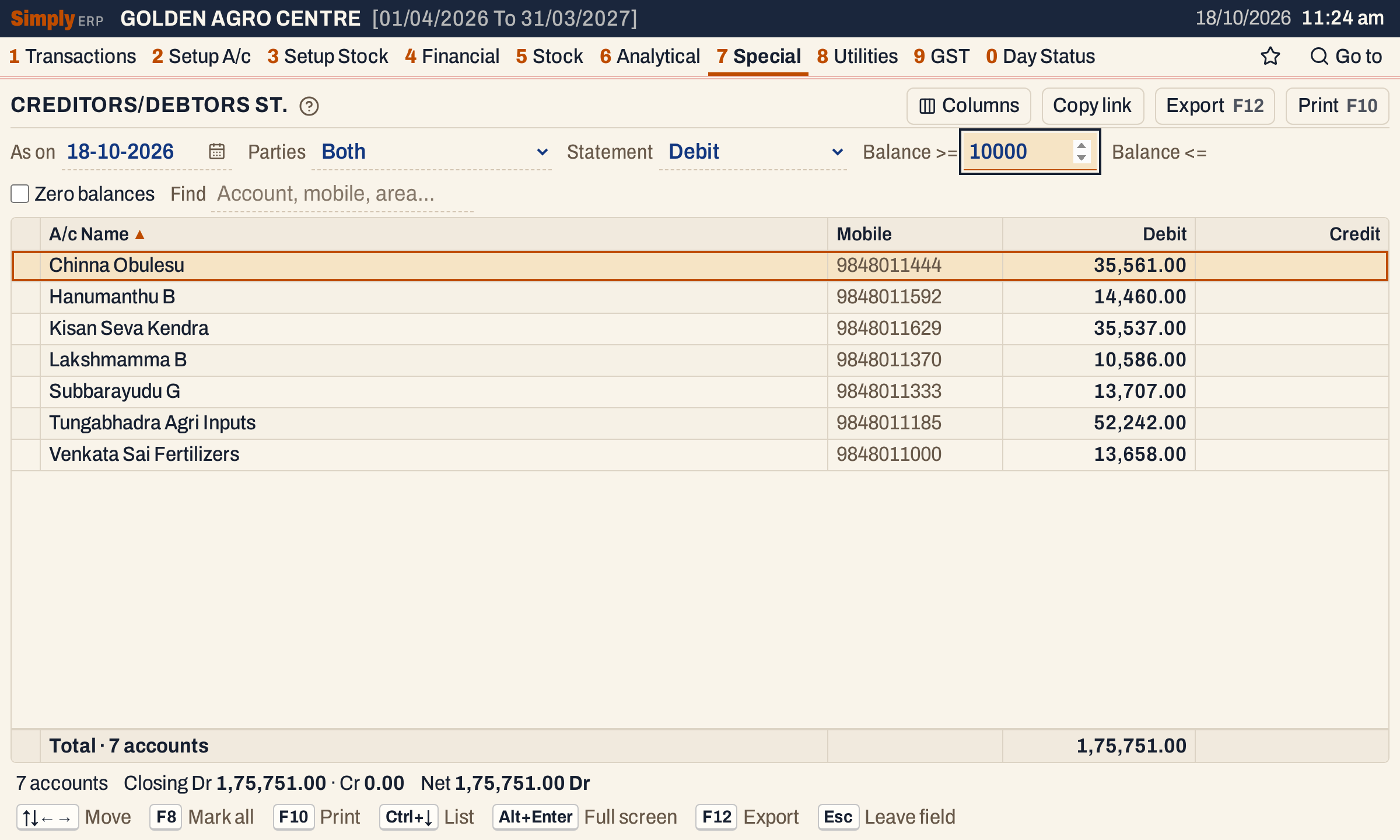 Balances below 10,000.00 are left out. A balance of exactly 10,000.00 would be listed.
Open, mark, print and export
- Enter on a party opens their Ledger, from the first day of the financial year to the As on date.
- F2 marks a party and F8 marks them all. F10 then prints only the marked parties.
- F10 prints the report with the title that matches the Statement: CREDITORS / DEBTORS STATEMENT for Both, DEBTORS STATEMENT for Debit, CREDITORS STATEMENT for Credit and UN - SECURED LOANS STATEMENT for Unsecured loans. The Debit, Credit and Unsecured loans prints have one Amount column and one total. The heading shows the date and your choices (Parties, Balance >= or Balance <=, Zero balances, Find).
- F12 saves what the print shows as an Excel workbook, with the figures as numbers.
- Alt+Enter gives the whole window to the list.
Updated 4 November 2026.