Tech. Stock Statement
On this page
The Tech. Stock Statement shows the stock of one category by technical name, with a line for each company that makes the product: what you opened with, what came in, what went out, what is left, and how much you have sold since the start of the year. In its Company wise view it gives one line for each company, with the sales to dealers and to farmers. Use it to answer “how much Acephate 75% SP do I have, and whose is it?” or to review one company’s stock and sales.
Open the report
Press Alt+5 for Stock Reports, then J. The report opens for the financial year from its first day to today, for one category (PESTICIDES on the showcase books), in the Item wise view.
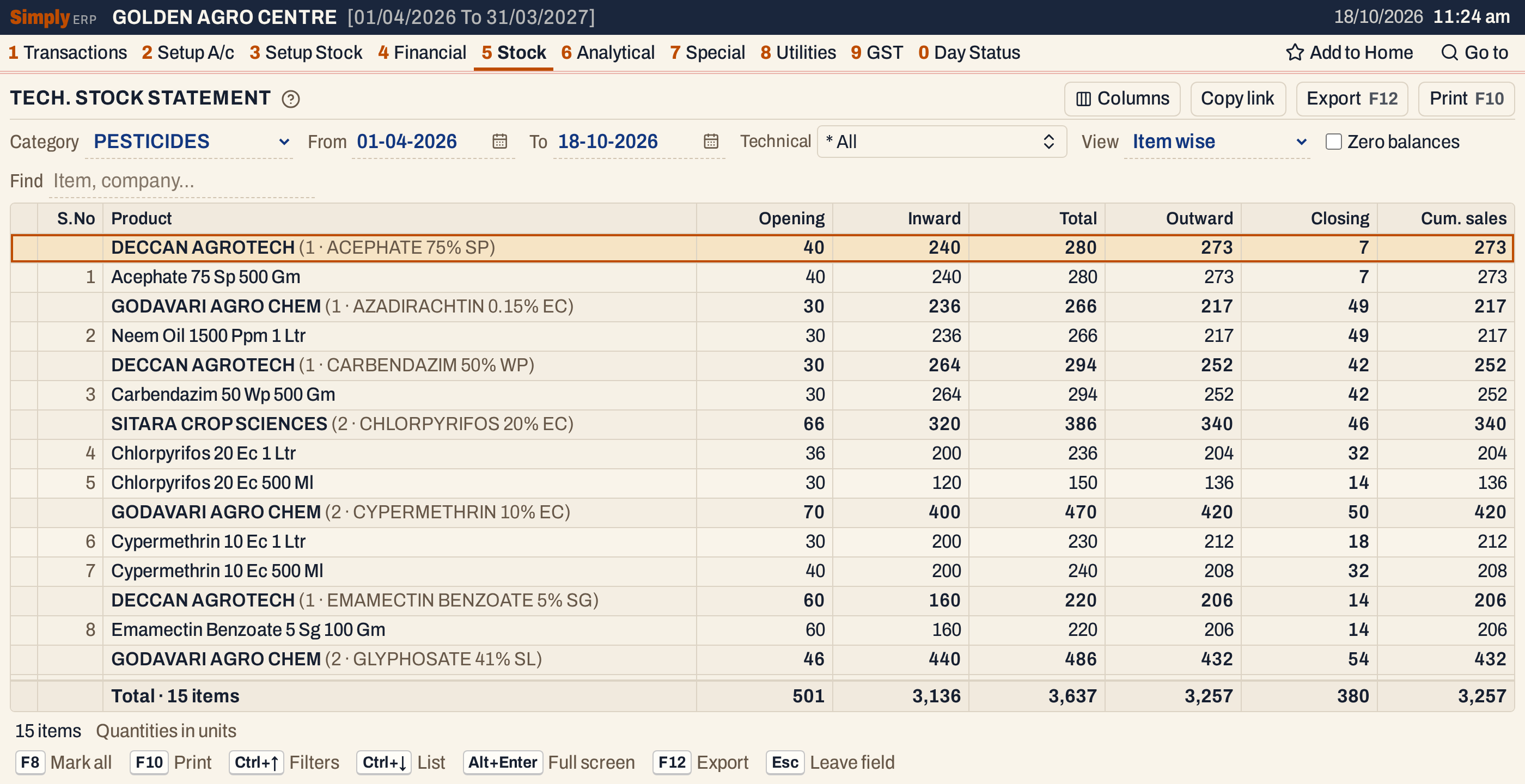 Each heading is a company with the number of items and the technical name. The Technical name column is hidden here so that the whole heading shows.
What it lists
Item wise: one line for each item of the chosen category, under a heading for its company and technical name.
- Items are in technical name order. Within a technical name, the companies and then the items are in name order.
- An item with no technical name is under * UNDEFINED GROUP, which comes first, and an item with no company under (No manufacturer).
- An item whose opening, inward, outward and closing stock are all zero is left out, unless you tick Zero balances.
Company wise: one line for each company, adding up its items.
Columns
| Column | What it shows |
|---|---|
| S.No | The line’s number. In Item wise, headings are not numbered; in Company wise, each company is numbered. |
| Product | The item’s name. In Company wise this column is Company. A heading shows the company, the number of its items and the technical name. |
| Technical name | The item’s technical name. Item wise only. |
| Opening | The stock at the start of the From date. |
| Inward | Purchases plus sales returns in the period. |
| Total | Opening plus Inward. |
| Outward | Sales, purchase returns and damage in the period. Item wise only. |
| To dealers | Units sold in the period on bills made to a customer with an account. Company wise only. |
| To farmers | Units sold in the period on cash bills. Company wise only. |
| Closing | The stock at the end of the To date. In red when it is negative. |
| Cum. sales | The units sold, from every sales bill up to the To date. |
The totals line adds up every column, and the status line gives the number of items and, in Company wise, the number of companies.
 The totals of the 15 pesticide items.
Choices
| Choice | What it does |
|---|---|
| Category | The category to report. A category is always chosen. |
| From, To | The period. Both dates must fall in the financial year. It opens with the first day of the year and today. |
| Technical | Shows only the technical names you pick, from the names used by items of the category, and * UNDEFINED GROUP. |
| View | Item wise or Company wise. |
| Zero balances | Includes items with no opening stock, movement or closing stock. |
| Find | Shows only items whose name, company or technical name matches what you type. |
| Columns | Hides S.No, Technical name or any figure column, on the screen and in the print. |
Click a column title to sort by it, and click again to reverse. A figure column starts with the largest, and it also puts the headings in the order of their totals; a text column sorts the lines within each heading only. Every choice is kept in the page address, so Copy link gives a link that opens the same report.
 The choices above the grid.
How the figures are worked out
All quantities are in units. For each item, from its bills and stock entries:
- Opening = the item’s opening stock + purchases and sales returns dated before From − sales, purchase returns and damage dated before From.
- Inward = purchases + sales returns, dated From to To, both days included.
- Outward = sales + purchase returns + damage, dated From to To.
- Total = Opening + Inward.
- Closing = Total − Outward.
The dates are the bills’ posting dates. Goods received before billing count as purchases until they are billed, and the same for goods delivered before billing.
Cum. sales is the units on every sales bill dated up to the To date. It does not start at the From date, so changing From does not change it. When the period starts on the first day of the year, it is the same as the sales in Outward, and Outward is higher only by returns to suppliers, damage and goods delivered before billing.
In Company wise, an item’s Outward is replaced by two sales figures:
- To dealers: the units on sales bills dated From to To that were made to a customer with an account.
- To farmers: the units on sales bills dated From to To that were made on cash.
A bill made on cash to a customer with an account is counted in both. The two do not always add up to the sales: a bill that is not on cash and has no customer account is in neither.
A company’s line adds up the figures of its items in the category. Companies are in name order.
 One line per company, with its number of items in brackets. For DECCAN AGROTECH, Opening 155 + Inward 824 = Total 979.
Open, mark, print and export
- Enter on an item opens its Stock Ledger. In Company wise, Enter on a company shows that company’s items in the Item wise view, by putting the company’s name in Find.
- Type the first letters of a name to jump to it.
- F2 marks an item and F8 marks all items. F10 then prints only the marked items. In Company wise, lines are not marked.
- F10 prints the report, titled STOCK STATEMENT, or COMPANY WISE STOCK STATEMENT for the company view. Its heading has the category, the period and your choices. When the category’s name begins with PEST, FERT or SEED and you have recorded the matching licence number in your company details, the number is printed beside the category. Item wise prints each company heading in capitals, without the technical name, and Company wise prints the sales columns as Sale to Dealers and Sale to Farmers. The Total column is not printed.
- F12 saves it as an Excel workbook.
- Alt+Enter gives the whole window to the list.
Updated 4 November 2026.