Fertilizer Stock & Sales Register
On this page
The Fertilizer Stock & Sales Register is the statement a fertilizer dealer gives the agriculture department. For every product it shows the bags you opened with, the bags received, sold, returned and written off, and the bags left, with the weight in metric tonnes beside the bags. The print carries your letterhead, your iFMS ID, a declaration and a place for the officer’s signature, so it can be handed over as it comes out of the printer.
Open the report
Press Alt+5 for Stock Reports, then Y. The register opens for the financial year from its first day to today, for all categories. Choose the fertilizer category in Category to list only fertilizers.
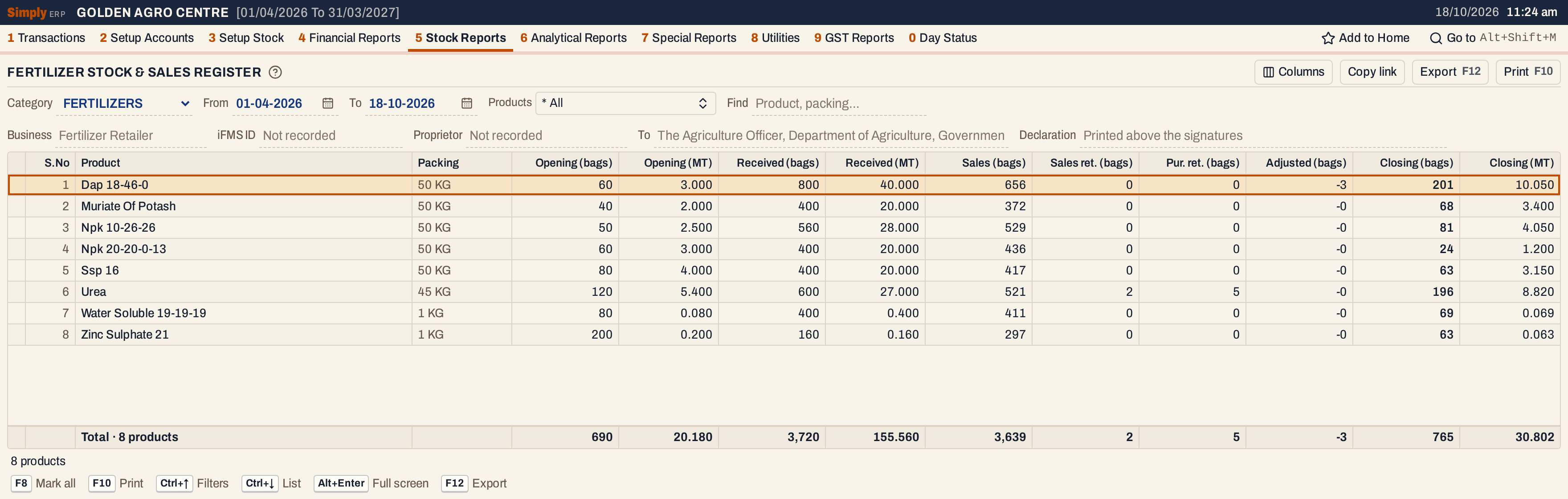 Eight fertilizers. Dap 18-46-0 opened with 60 bags and 800 were received. Of its 656 sold and 3 written off, 201 bags remain, which is 10.050 tonnes.
What it lists
One line for each item of the chosen category (an item is one product in one packing). An item is listed when it has an opening stock at the start of the period or any movement in the period, and left out when it has neither.
The movements are the ones the Stock Ledger lists, counted on the date each is posted:
- Received: purchase bills, and goods received on a challan (1 P). When the bill for goods already received arrives, only the units not received before are counted.
- Sales: sale bills, and goods delivered on a challan.
- Sales ret. and Pur. ret.: sales returns and purchase returns.
- Adjusted: damage and breakage entered in 1 V.
Quantities are in bags: the item’s own units. The tonnes are worked out from the weight of one bag.
Columns
| Column | What it shows |
|---|---|
| S.No | The line’s number. |
| Product | The product’s name, without the packing. Products come in name order, and each packing under its product. |
| Packing | The item’s packing, such as 50 KG. |
| Opening (bags) | The stock at the start of the From date. |
| Opening (MT) | The opening in metric tonnes. |
| Received (bags) | Bags received in the period. |
| Received (MT) | The bags received in metric tonnes. |
| Sales (bags) | Bags sold in the period. |
| Sales ret. (bags) | Bags customers returned. Shown only when some product listed has sales returns. |
| Pur. ret. (bags) | Bags returned to suppliers. Shown only when some product listed has purchase returns. |
| Adjusted (bags) | Bags lost to damage or breakage, as a negative figure. Shown only when some product listed has an adjustment. |
| Closing (bags) | The stock at the end of the To date. Red when it is below zero. |
| Closing (MT) | The closing stock in metric tonnes. |
The line under the grid counts the products and adds up every column. The status line gives the number of products listed and, when some have no pack weight, how many.
Choices
| Choice | What it does |
|---|---|
| Category | One category, or * All (the usual). |
| From, To | The period, both days included. Both dates must fall in the financial year. If you set From after To, the other date moves with it. |
| Products | Lists only the products you choose. The list holds each product with its packing. |
| Find | Shows only the products whose name or packing matches what you type. |
| Business, iFMS ID, Proprietor, To, Declaration | The particulars printed on the letterhead. See below. |
| Columns | Hides the Packing column or any of the bags and tonnes columns. The print leaves them out too. |
Every choice, including the particulars you type, is kept in the page address, so Copy link gives a link that opens the same register.
 The top row selects what is listed. The row below it holds what the print says about you.
The print particulars
The letterhead takes your company’s name, address, GSTIN and mobile number from Company Details. The fields below Category and the dates are what you can say differently on this print. A blank field uses the standard wording shown in grey:
- Business: the line under the heading. Blank, it reads Fertilizer Retailer.
- iFMS ID and Proprietor: your iFMS ID and the proprietor’s name, which come from Company Details when they are recorded there.
- To: who the register is addressed to. Blank, it reads The Agriculture Officer, Department of Agriculture, Government of your state.
- Declaration: a sentence printed above the signatures. It is printed only when you type one.
When you type an iFMS ID or a proprietor that differs from the company’s, Keep for the company appears. It saves them in Company Details so that they print every time.
 An iFMS ID, a proprietor and a declaration typed for the print. Keep for the company saves the first two.
How the figures are worked out
For each item, using units (bags):
- Opening = the item’s opening stock + purchases and goods received + sales returns − sales − purchase returns − damage, counting only what was posted before the From date.
- Received, Sales, Sales ret., Pur. ret. = the bags posted from the From date to the To date, both days included.
- Adjusted = minus the bags of damage in the same period.
- Closing = Opening + Received + Sales ret. − Sales − Pur. ret. + Adjusted.
For Urea in this register, after a sales return of 2 bags, a purchase return of 5 bags: 120 + 600 + 2 − 521 − 5 = 196. For Dap 18-46-0, with 3 bags damaged: 60 + 800 − 656 − 3 = 201.
The totals add up the lines. The Closing total is the sum of the closing stocks.
Metric tonnes
Opening, Received and Closing also show metric tonnes: bags × kg per bag ÷ 1,000, with three decimals. A 50 KG bag counts as 0.05 tonne, so Dap’s 201 bags are 10.050 tonnes. The weight of a bag is what one pack holds, as recorded for its packing in Packings (3 B), in kilograms or grams. Litre and millilitre packs have no weight in kilograms, and nor has a packing with no size recorded.
A product with no pack weight shows — in the tonnes columns, and the tonnes totals show — as soon as one such product is listed. The status line says how many products have no weight and tells you to set the packing in 3 A. Choose the fertilizer category, as in the screenshots, to leave such products out.
 With * All, the pesticides sold in litres have no weight, so the tonnes totals show —.
Fewer columns
Hide the columns the officer does not need with Columns. The print leaves them out too.
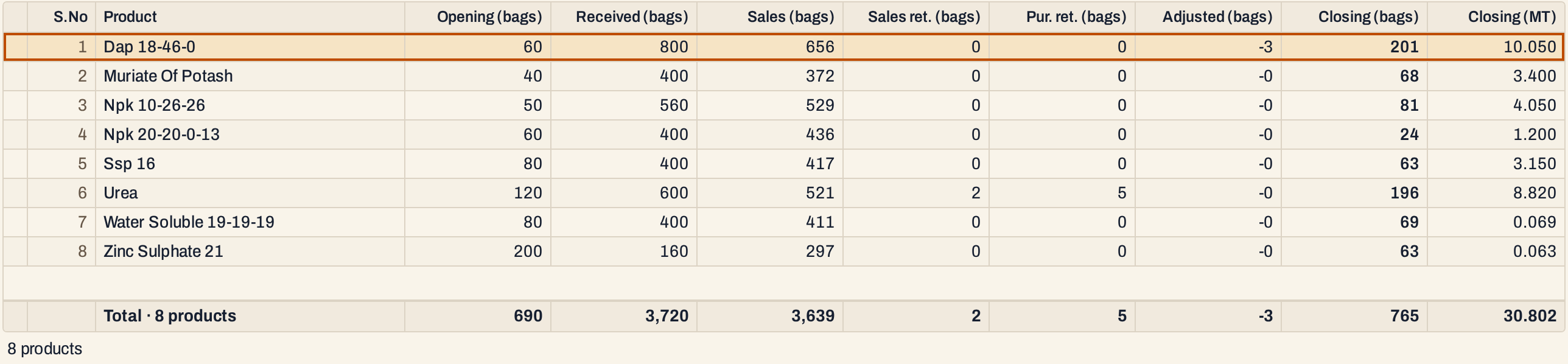 Packing, Opening (MT) and Received (MT) hidden. Closing (MT) remains.
Open, mark, print and export
- Enter on a product opens its Stock Ledger for the same period.
- F2 marks a product and F8 marks them all. F10 then prints only the marked products, or every product listed when none is marked.
- F10 prints the register on the letterhead: your company’s name and address, the heading FERTILIZER STOCK & SALES REGISTER with the business line and place, your GSTIN, iFMS ID, proprietor and mobile number, the period and category, and who it is addressed to. Under the table come a note that MT is metric tonnes (bags × kg per bag ÷ 1,000), the declaration when you typed one, and the signature of the Agriculture Officer with a space for the inspection and verification stamp, opposite your own signature.
- F12 saves what the print shows as an Excel workbook.
- Alt+Enter gives the whole window to the list.
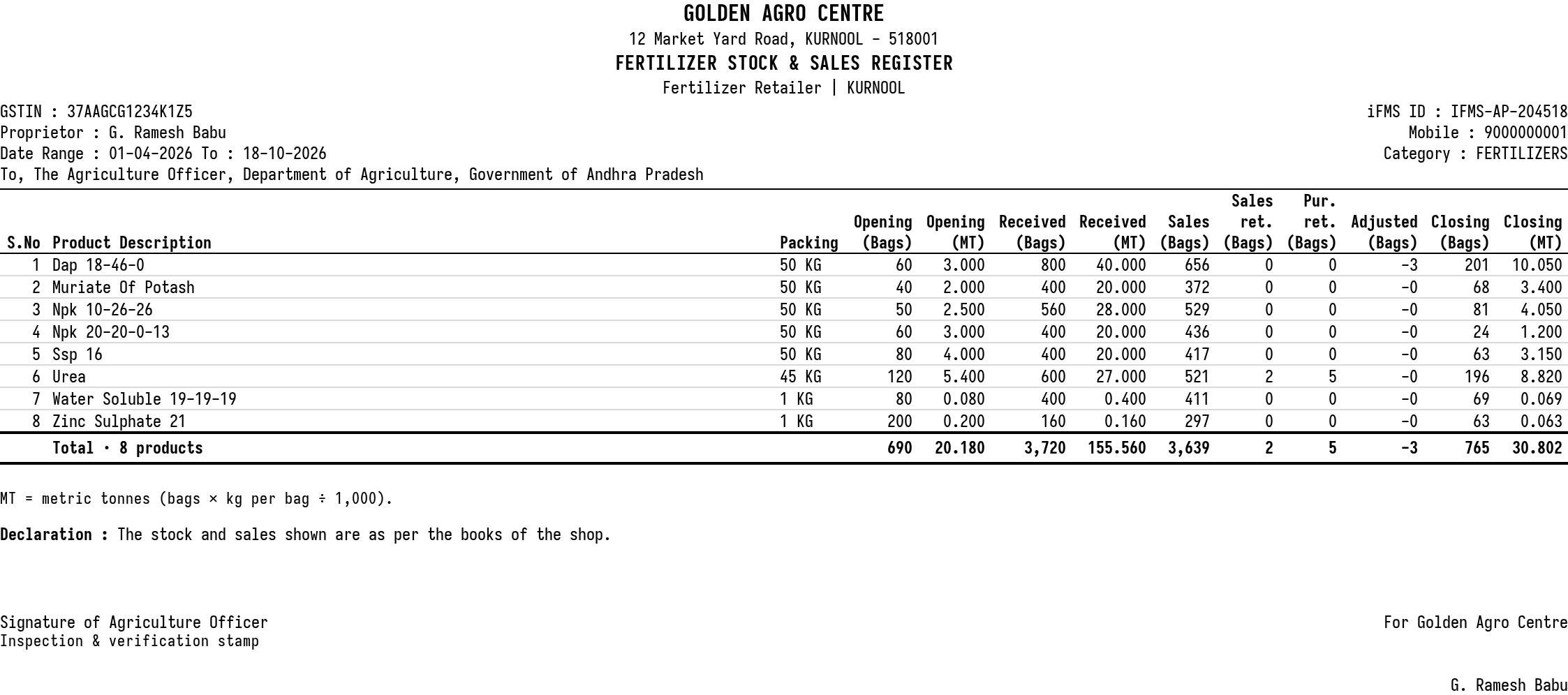 The print on landscape paper, with the particulars typed above.
Updated 4 November 2026.