Sales Statement
On this page
The Sales Statement lists the item lines of your sale bills for a period. It answers how many units of each item you sold, at what average rate, and for how much; and, one level down, which bills and customers made up those figures. Use it to compare items, to see what one customer bought, or to check a rate you gave.
Open the report
Press Alt+5 for Stock Reports, then E. The statement opens for the financial year from its first day to today, with one line for each item.
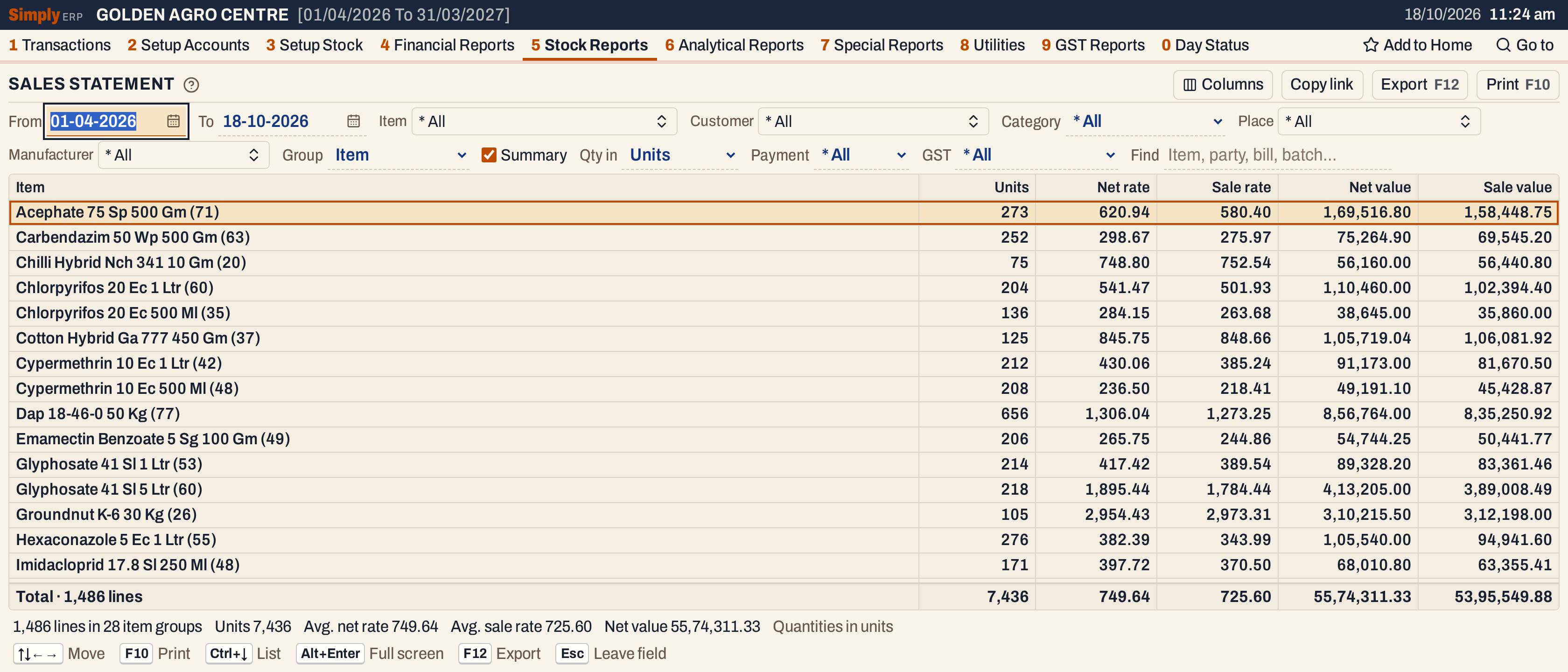 Each line is an item, with the number of bill lines behind it in brackets: Acephate 75 Sp 500 Gm was sold on 71 bill lines, 273 units in all.
What it lists
The report reads the item lines of sale bills posted in the period, by the date each bill is posted. One bill line is one line of the report: a bill with three items gives three lines, and an item sold from two batches on one bill gives two.
- Charge lines (such as freight) are not item lines and are not listed.
- Lines with no quantity are left out.
- Sales returns are not taken off. They have their own report, Sales Returns Statement.
- Goods delivered on a challan and not yet billed are not listed. They show in the Stock Statement and the Stock Ledger.
The customer is the name on the bill (the ship-to name when the bill has one). A bill with no name shows Cash Sales. The place is the ship-to place when the bill has one, otherwise the customer’s place on the bill, in capitals. When the bill has neither, it shows Ca.Sales.
Columns
| Column | What it shows |
|---|---|
| S.No | The line’s number. Not shown in Summary. |
| Date | The date the bill is posted. |
| Bill no | The bill number. |
| Book no | The bill’s book and number, when that differs from the bill number. Shown only when some line has one. |
| Customer | The customer. Hidden when Group is Party, where it is the heading. |
| Place | The place of the sale, as described above. |
| Item | The item. Hidden when Group is Item, where it is the heading. |
| Batch | The batch sold. Shown only when some line has one. |
| Units | The quantity sold, in the unit chosen in Qty in. |
| Net rate | What the customer paid for one unit: the line’s value after its discounts, with GST, divided by the units. |
| Sale rate | The rate on the bill line, for one unit. |
| Net value | Net rate times units. |
| Sale value | Sale rate times units. |
A heading line (when Group is set) shows the name with the number of lines in brackets, and the same figures added up. Its Net rate and Sale rate are averages. The totals line under the grid does the same for every line listed. The status line gives the number of lines and groups, the units, the average rates and the net value.
In Summary the screen has one line for each group, with the name, Units, Net rate, Sale rate, Net value and Sale value.
Choices
| Choice | What it does |
|---|---|
| From, To | The period, both days included. Both dates must fall in the financial year. If you set From after To, the other date moves with it. |
| Item | One or more items. The list holds the items sold in the period. |
| Customer | One or more customers. The list holds the customers who bought in the period. |
| Category | One item category, or * All. Changing it clears the Item and Manufacturer choices. |
| Place | One or more places. |
| Manufacturer | One or more manufacturers. |
| Group | None: every bill line in date order. Item (the usual): a heading for each item. Party: a heading for each customer. Manufacturer: a heading for each manufacturer. |
| Summary | One line for each group and no bill lines. Ticked when the report opens, with Group set to Item. The box shows only when Group is set. |
| Qty in | Units (the usual), Litres / kg, Tonnes or Quintals. The rates are per the unit chosen; the values do not change. |
| Payment | * All, Cash or Credit: only the bills with that payment. Bills paid another way (card or wallet) show only under * All. |
| GST | * All, Registered (bills of customers with a GSTIN) or Unregistered. |
| Find | Shows only the lines matching what you type in the item, customer, bill, book number, batch, place or manufacturer. |
| Columns | Hides the S.No, Date, Bill no, Book no, Customer, Place, Batch, Net rate, Sale rate, Net value or Sale value column. The Item (or heading) and Units columns always show. The print leaves them out too. |
Click a column title to sort by it, and click again to reverse. Shift+click another title to sort within it. Headings follow the sort of the figure columns, or their names. Every choice is kept in the page address, so Copy link gives a link that opens the same statement.
 Group, Summary and Qty in decide what a line stands for.
How the figures are worked out
For each bill line:
- Units = the quantity on the line, converted to the unit you chose. For litres or kilograms the units are multiplied by the item’s pack size; for tonnes, by the pack size divided by 1,000; for quintals, divided by 100. An item with no pack size recorded shows zero units and no rates, and the status line says how many lines are affected.
- Sale rate = the rate on the bill line (divided by the same pack size when you choose litres, kilograms, tonnes or quintals, so it is per that unit). On a bill to a customer with a GSTIN the rate is before GST. On a bill to a customer without a GSTIN the rate already includes GST.
- Sale value = Sale rate × Units, as billed, before any discount.
- Net rate = for a customer with a GSTIN, the line’s taxable value (after discounts) plus its GST, divided by the units; for a customer without a GSTIN, the line’s net amount divided by the units. The net rate is rounded to two decimals.
- Net value = Net rate × Units.
So Net rate is always the customer’s price with GST and after discounts, and Sale rate is the rate as written on the bill. For a customer without a GSTIN with no discount the two are the same. For a customer with a GSTIN, Sale rate is before GST, so Net rate is about 1.18 times Sale rate on 18% goods.
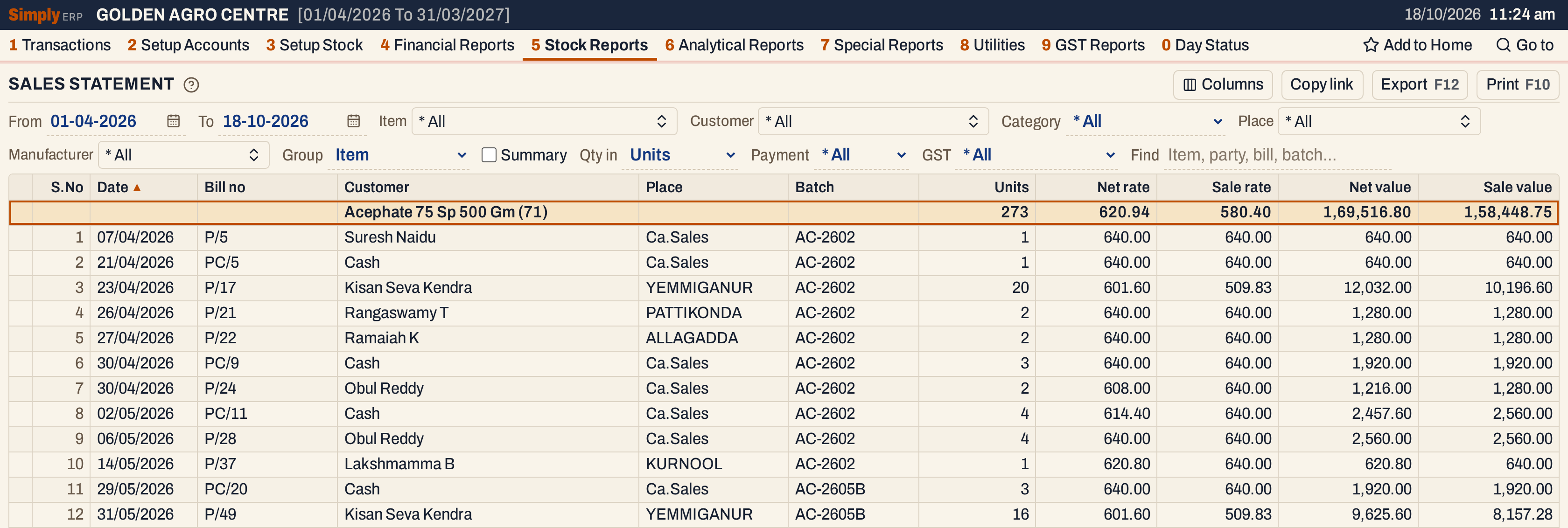 Clear Summary to see the bill lines. On P/17 the customer has a GSTIN: the sale rate is before GST (509.83 × 1.18 = 601.60). On P/24 the customer has none and a discount of 64 on 2 units takes the rate from 640.00 to 608.00.
For a heading line and the total line:
- Units, Net value and Sale value are sums of the lines under it.
- Net rate = the sum of the net values ÷ the sum of the units, and Sale rate = the sum of the sale values ÷ the sum of the units. These are weighted averages, not averages of the rates.
For Acephate 75 Sp 500 Gm: 1,69,516.80 ÷ 273 units = 620.94, and 1,58,448.75 ÷ 273 = 580.40.
Group by customer
Set Group to Party to see what each customer bought. Each heading is a customer, with their lines under it.
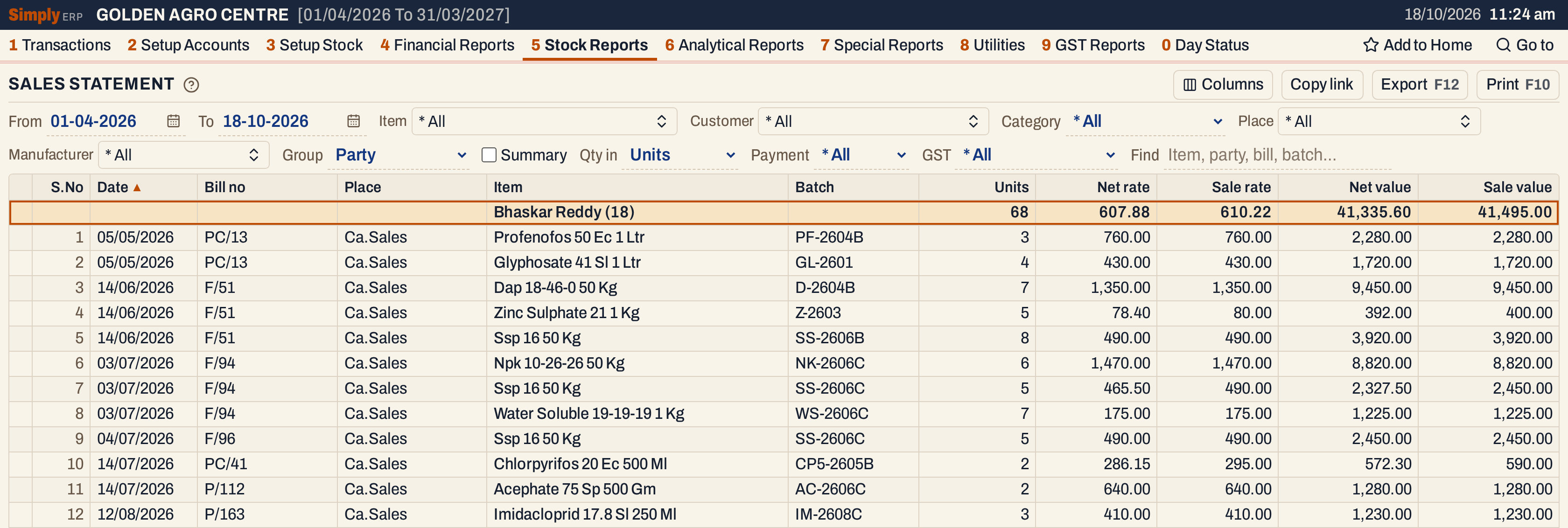 Bhaskar Reddy bought 68 units on 18 lines, for a net value of 41,335.60.
Cash, credit and registered customers
Payment and GST narrow the bills before anything is added up. Credit bills to registered customers show the sales to your customers that have a GSTIN.
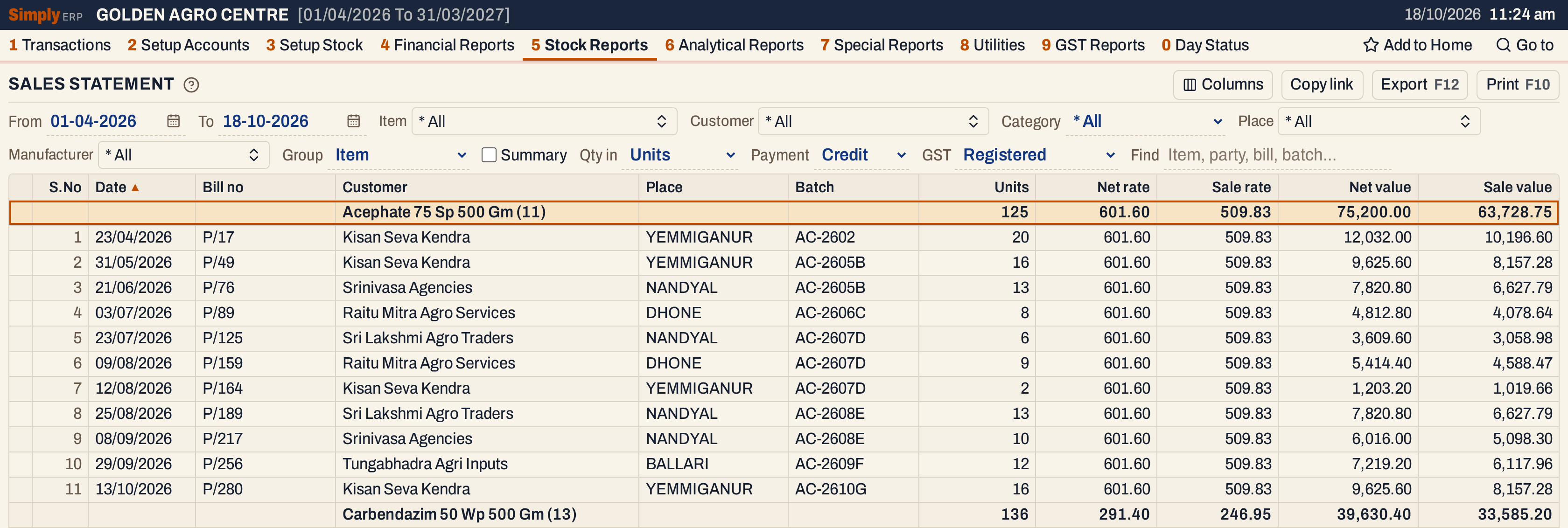 With Payment Credit and GST Registered the Acephate lines come down to 11 bills and 125 units.
Open, mark, print and export
- Enter on a bill line opens the saved bill. On a heading, or on a line of the Summary, it sets the Item, Customer or Manufacturer choice to that group and unticks Summary, so the group’s bill lines show. The browser’s Back button returns to the Summary.
- F2 marks a line and F8 marks them all. F10 then prints only the marked lines. Marking is not offered in the Summary.
- F10 prints the statement as it is on the screen, titled PRODUCT WISE SALES STATEMENT, with the item chosen (or * All), the period, the unit and your choices. The print has the columns that show on the screen.
- F12 saves it as an Excel workbook.
- Type letters in the list to jump to the next line that begins with them.
- Alt+Enter gives the whole window to the list.
Updated 4 November 2026.