Sales Ledger
On this page
The Sales Ledger shows a sales account as one line for each day, instead of one line for each bill. On a shop that makes a hundred bills a day, the Ledger of the sales account is pages long; the Sales Ledger gives the day’s sales in a single figure, with the balance running down the page. Use it to see how sales built up over a month, or to check what a sales account was credited each day.
Open the report
Press Alt+4 for Financial Reports, then S. The cursor is on A/c Name. Type part of the account’s name and press Enter, or press F2 to list the accounts. The period starts as the financial year’s first day to today. Until an account is chosen, the grid asks you to type one.
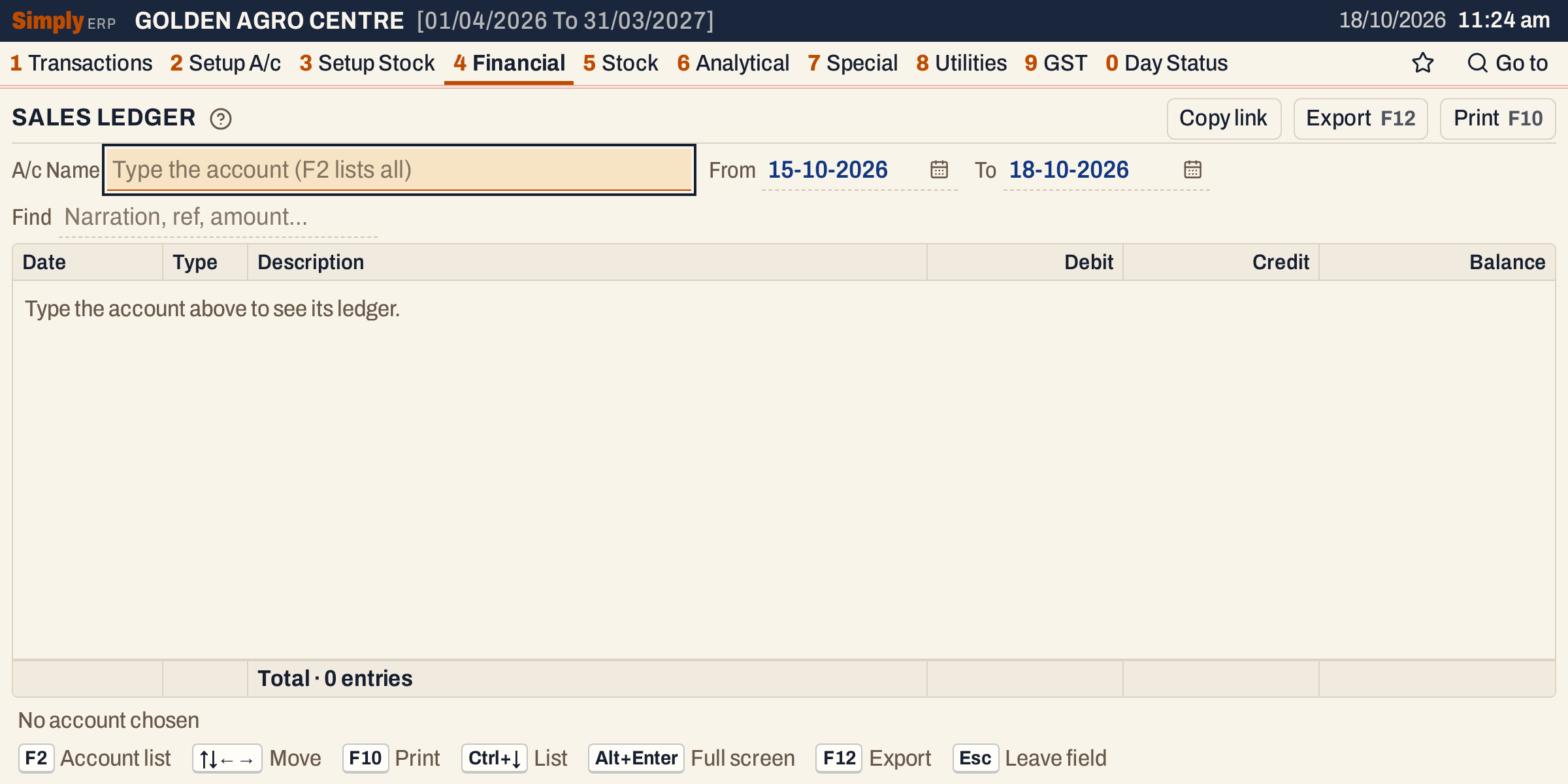 The report as it opens. The pictures use the period 15-10-2026 to 18-10-2026.
Only some accounts are offered: accounts of type Sales, and the accounts of type Liabilities and Current Assets, which on these books are the GST output and input accounts and Salary Payable. For any other account, use the Ledger.
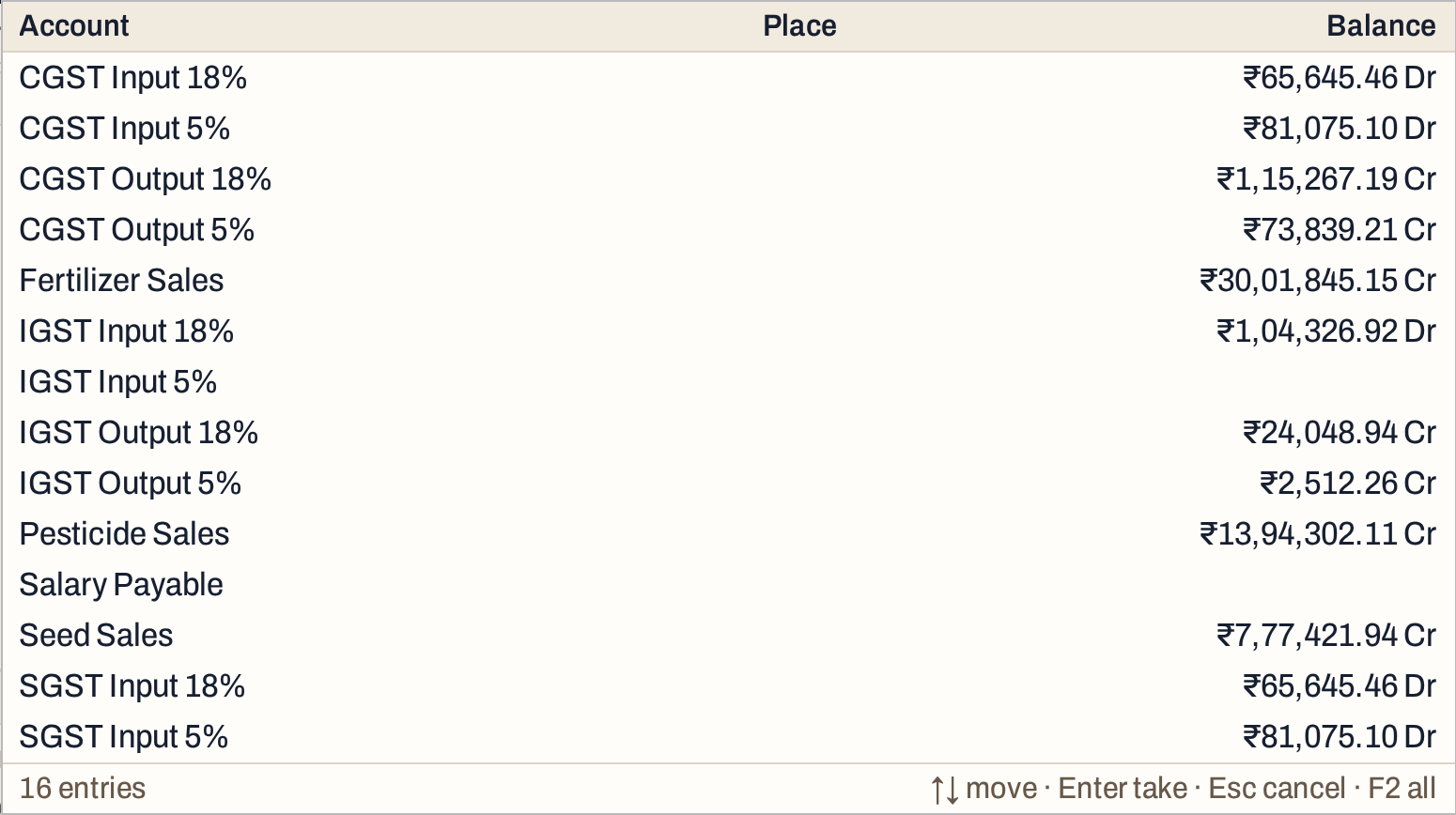 The account list, with each account’s balance. The list has 16 accounts; the picture shows the first fourteen.
Press Enter on an account and the ledger fills in.
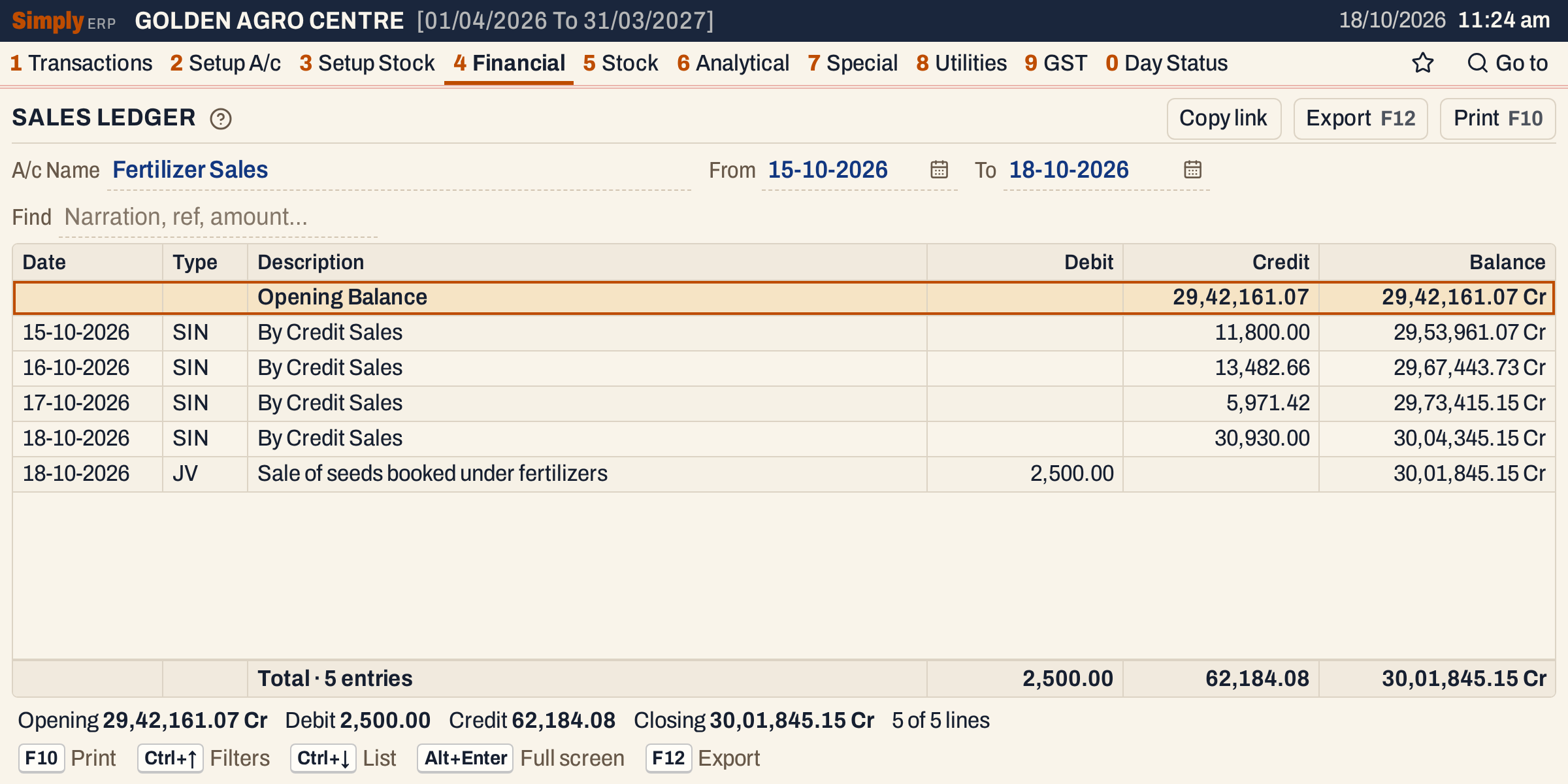 One line for each day, and the journal on its own line. Each line has the balance after it.
What it lists
The postings of the account whose date is in the period, both days included, added up like this:
- A sales account. The day’s credits (the sales of the day’s bills) are added into one line for the day and the kind of document, with the Description By Credit Sales, or By Cash Sales when the other account is a cash account (see below). The day’s debits that do not come from a journal are added into one line for the day, with the narration and type of the last debit posted that day. A sales return is debited to a Sales Returns account of its own on these books, not to the sales account.
- A GST or other liability or current asset account. Everything of a day and a kind of document (SIN sale bill, SR sales return, PIN purchase bill and so on) is added into one line, with the Description Day total. The day’s debits and credits of that kind of document sit on the same line. A day’s debits are added into one line before this, and so are a day’s credits from the same other account; if such postings come from two kinds of document, the line takes the type of the last one posted.
- Journal entries are not added up. Each posting of a journal is a line of its own, with the type JV and the narration typed on the journal row. A day’s journal lines come after that day’s other lines, debits first.
Postings of nil are left out. The first line is the Opening Balance. It is not counted in the totals.
The Description By Cash Sales is used when the other account of a day’s credits (the account in the Ledger’s Particulars column) has a name that begins with Cash On Hand, written like that. No other account counts as cash. On these books the cash account is named Cash, so cash bills, bills paid into UPI Settlement and credit bills of a day are all added into the one By Credit Sales line, as the picture shows. To see the bills of a day one by one, press Enter on its line.
Columns
| Column | What it shows |
|---|---|
| Date | The day of the line. Empty on the opening line. |
| Type | What posted the line: SIN sale bill, SR sales return, PIN purchase bill, PR purchase return, CNI, CNR, DNI, DNR credit and debit notes, JV journal. |
| Description | By Credit Sales or Day total, or for a journal line the journal’s narration. On the opening line, Opening Balance. |
| Debit | The amount debited to the account that day. The opening balance goes here when it is a debit balance. |
| Credit | The amount credited to the account that day. The opening balance goes here when it is a credit balance. |
| Balance | The balance after the line, marked Dr or Cr. |
The totals line under the grid counts the lines and adds up the Debit and Credit columns, and its last figure is the closing balance. The opening balance is not in the totals. The status line gives the opening balance, the debit and credit totals, the closing balance and how many lines are shown. When Find is set, the count, Debit and Credit cover only the lines shown; the opening and closing balances stay those of the whole period.
 The totals line.
 The status line: the opening and closing balances of the full period, and how many of the lines are shown.
Choices
| Choice | What it does |
|---|---|
| A/c Name | The account. Type to narrow the list, F2 lists all. |
| From, To | The period. Both dates must fall in the financial year. If you set one past the other, the other date follows it. The opening balance is the balance on the day before From. |
| Find | Shows only the lines that match what you type: date, type, narration or amount. The opening and closing balances and each line’s balance do not change. |
Every choice is kept in the page address, so Copy link gives a link that opens the same ledger.
How the figures are worked out
- Opening Balance = the account’s opening balance + everything posted to it before the From date, credits less debits. Credit balances are marked Cr. A sales account normally has a credit balance. When the balance is nil, the side is the one of the account’s opening balance, and Cr when it has none.
- Credit of a day = the sum of the credits posted to the account that day. Debit = the sum of the debits. A posting is a bill’s, a note’s, a return’s or a voucher’s line for this account.
- Balance = the balance of the line above + Credit − Debit. A positive result is Cr and a negative result is Dr. The first line starts from the opening balance.
- Closing = Opening + total Credit − total Debit.
On the example, 29,42,161.07 + 62,184.08 − 2,500.00 = 30,01,845.15 Cr. The four days’ credits are 11,800.00, 13,482.66, 5,971.42 and 30,930.00, which add up to 62,184.08, and the journal debits 2,500.00.
The journal on 18-10-2026 moved 2,500.00 of seed sales from Fertilizer Sales to Pesticide Sales: it debits Fertilizer Sales, so the line is under Debit and takes the balance down, and it credits Pesticide Sales. It has its own line because a journal is never added up with the day’s bills.
A GST account is added up the same way, with the Description Day total. A sales return takes some GST back, so on 16-10-2026 CGST Output 5% has two lines: the day’s sale bills (SIN) as a credit and the return (SR) as a debit.
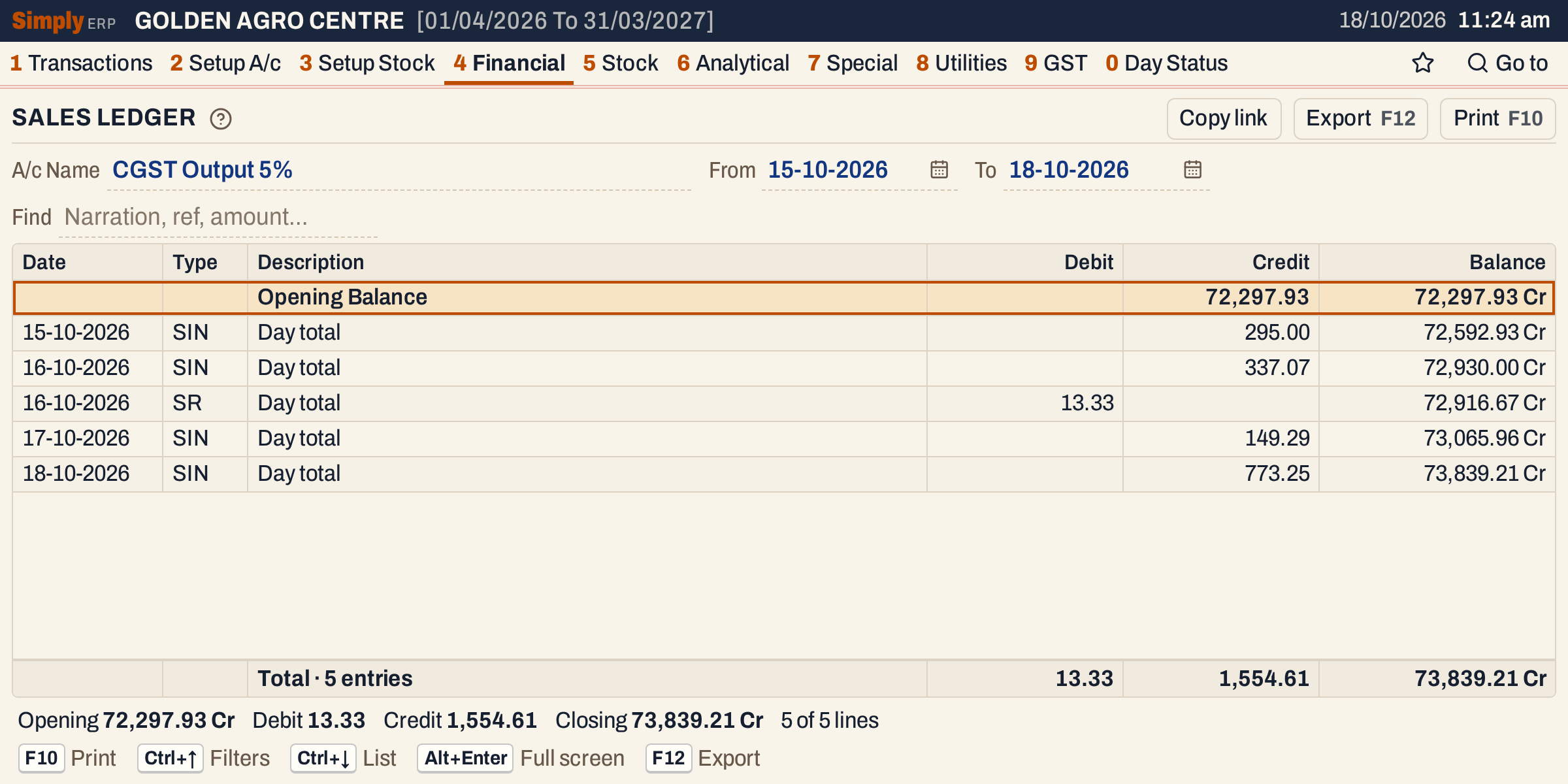 A GST account: one Day total line for each day and kind of document.
Open, print and export
- Enter on a day’s line opens that account’s Ledger for that day, where its bills are listed one by one. Back returns to the same line of the Sales Ledger. The opening line opens nothing.
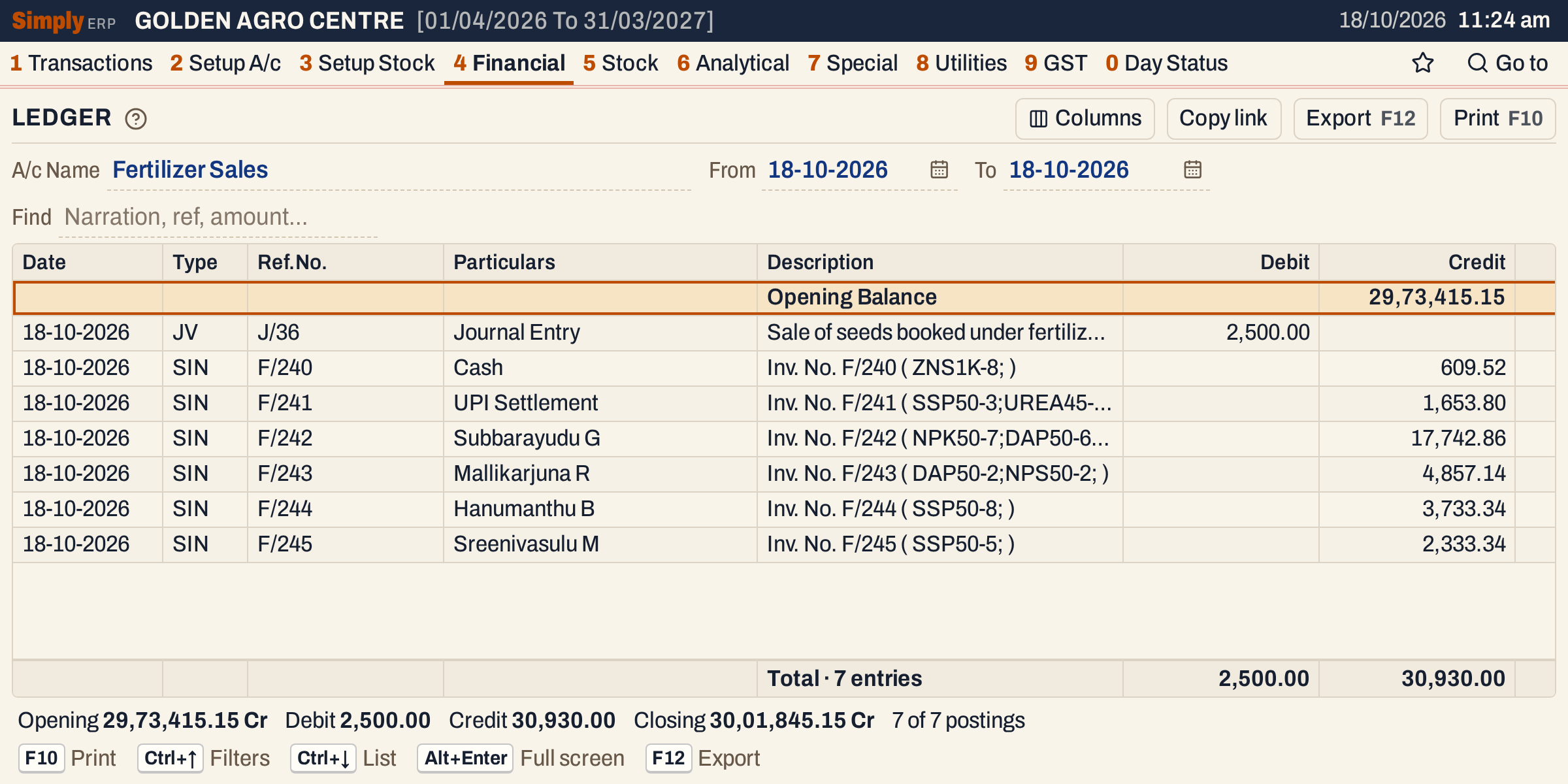 The day behind the line of 18-10-2026: six bills of the day. Their credits add up to the 30,930.00 of the day’s line, and the journal is the other line.
- F10 prints the ledger headed LEDGER, with the account’s name and the period in the heading. The print has no Type and Balance columns: it shows Tr.Date, Particulars, Credit and Debit, ends with a Totals line, which adds the opening balance on its own side to the period’s debits and credits, and the closing balance, marked Dr or Cr, in the Credit or Debit column.
- F12 saves the same layout as an Excel workbook, with the figures as numbers.
- Alt+Enter gives the whole window to the list.
Updated 4 November 2026.