Cash Book
On this page
The Cash Book shows the cash that came in and went out, day by day, and what was left in the drawer at the end of each day. Use it to count the day’s cash against the books, or to see where a payment went. Its balance is the balance of the Cash account.
Open the report
Press Alt+4 for Financial Reports, then B. The report opens for the financial year from its first day to today. The picture shows two days, from 29-09-2026 to 30-09-2026.
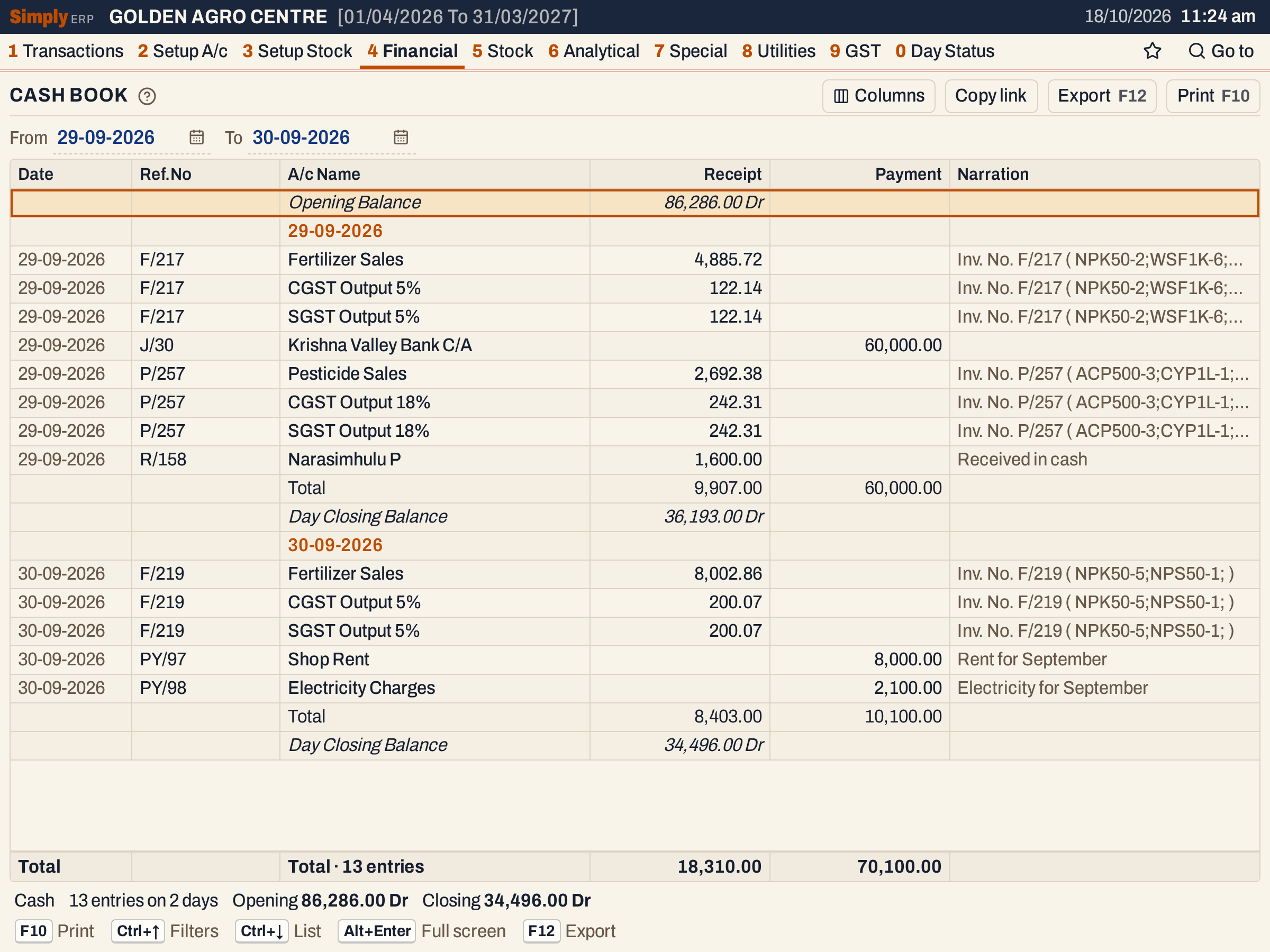 Two days of the cash book. Each day has a heading, its lines, its total and the balance it closed on.
What it lists
The Cash Book looks at every bill and voucher that has a posting to the Cash account, and lists the other side of each one:
- a cash sale bill lists the accounts it credited: the sales account, each GST account and any charge, under Receipt. A cash purchase bill lists the accounts it debited (purchases, GST input), under Payment. A round-off that takes a bill’s total down is a debit and is listed under Payment. The cash itself is not a line, because it is what the columns add up to;
- a receipt lists the party account that paid, under Receipt;
- a payment lists the account that was paid (a supplier, an expense account), under Payment;
- a journal that has a cash row, such as the cash deposited in the bank on 29-09-2026, lists its other accounts: here the bank, under Payment.
A bill paid by card or wallet is posted to its settlement account (for example UPI Settlement), and a credit bill to the customer, so neither is in the Cash Book. The Cash Day Book includes the bills settled through a bank.
Cash postings that belong to no bill or voucher are listed as they are. The book is checked against the Cash account’s own balance: if they differ, for example because a voucher’s postings do not balance, the status line adds Cash ledger differs by the amount.
Columns
| Column | What it shows |
|---|---|
| Date | The day of the line. |
| Ref.No | The bill’s or voucher’s number: F/217 for a sale bill, R/158 for a receipt, PY/97 for a payment, J/30 for a journal. |
| A/c Name | The account on the other side of the cash. |
| Receipt | The amount, when the account was credited: cash that came in. |
| Payment | The amount, when the account was debited: cash that went out. |
| Narration | The narration of the posting: the bill’s Inv. No. F/217 ( NPK50-2;WSF1K-6;… ) (the bill number and each item’s code and units) or the text typed on the voucher. |
| Cheque | The cheque number and date of the voucher. Shown only when a line has one. |
Each day starts with a heading, then its lines, then a Total of that day’s receipts and payments and the Day Closing Balance. The first line of the book is the Opening Balance. The totals line at the foot adds all the lines shown and counts them.
 The period’s receipts and payments, and the opening and closing balances.
Choices
| Choice | What it does |
|---|---|
| Cash A/c | The cash account. Shown only when the books have more than one; otherwise the one account is used. |
| From, To | The period. Both dates must fall in the financial year. The opening balance is the cash on the day before From. |
| Columns | Hides the Date, Ref.No or Narration column (and Cheque when shown). The print leaves them out too. |
 The choices above the grid. These books have one cash account, so there is no Cash A/c field.
Click a column title (Ref.No, A/c Name, Receipt or Payment) to sort the lines within each day, and click again to reverse. The day headings, totals and balances stay where they are.
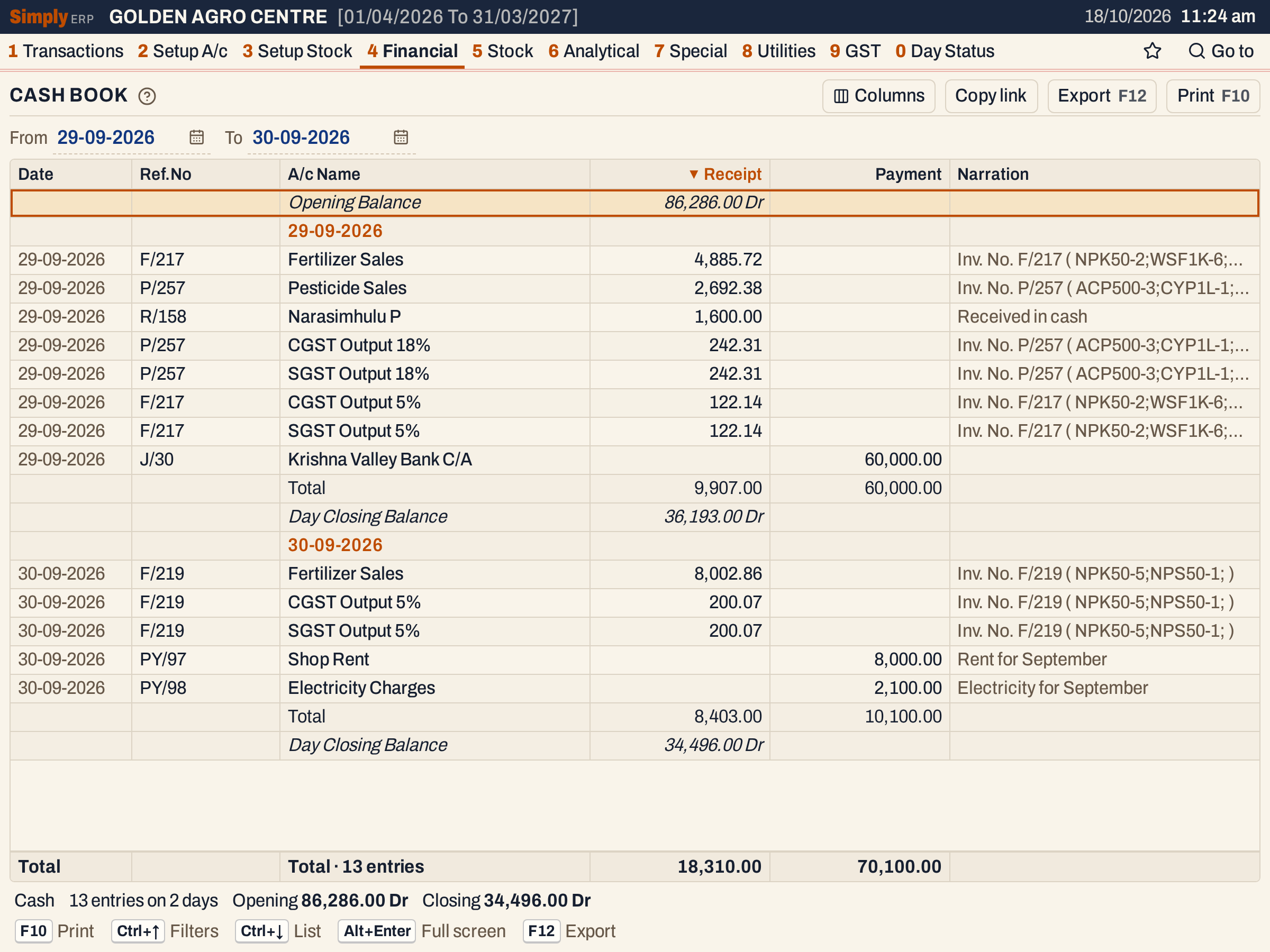 Sorted by Receipt, largest first. The Total and Day Closing Balance of each day do not change.
Every choice is kept in the page address, so Copy link gives a link that opens the same book.
How the figures are worked out
- Opening Balance = the Cash account’s opening balance + all it received − all it paid before the From date. A balance with cash in hand is Dr; a negative balance would be marked Cr.
- Receipt is the credit side of the other account, and Payment its debit side. A cash sale of ₹5,130.00 credits the sales account 4,885.72 and each GST account 122.14, which is 5,130.00 in all, so that is what lands in the drawer.
- Day Total = the day’s receipts, and the day’s payments, separately.
- Day Closing Balance = the balance of the day before + the day’s receipts − the day’s payments. The next day starts from it.
- Closing (in the status line) = Opening + all receipts − all payments of the period. For the two days: 86,286.00 + 18,310.00 − 70,100.00 = 34,496.00 Dr.
Lines of one day come in book order: by the series of the bill or voucher, then its number. A day’s lines are therefore grouped by document, whatever time they were made.
Open, print and export
- Enter on a line opens the bill or voucher behind it. Back returns to the same line.
- F10 prints the book with the account and the period in the heading. Receipts print under Debit and payments under Credit (the Credit column comes first), with the account’s name and its narration under it. The print closes with the opening balance, the totals and the closing balance.
- F12 saves it as an Excel workbook, with the figures as numbers.
- Alt+Enter gives the whole window to the list.
Updated 4 November 2026.