Interest Report
On this page
The Interest Report works out simple interest on an account’s ledger, from the day each amount arose to a date you choose. Single charges each running balance of one account, Bill Wise charges each posting of one account on its own, and Multiple charges the accounts of one type together. The interest is worked out on the screen and in the print only; it is never posted to the books.
Open the report
Press Alt+8 for Utilities, then B. The report opens on Single, for the financial year from its first day to today, with no account chosen. Type the account’s name in A/c Name and press Enter, and the statement appears.
Single: one account’s balances
Single charges interest on each balance of one account. The first line is the opening balance on the From date. Each posting after it changes the balance, and the new balance earns interest until the next posting, or until the To date for the last one.
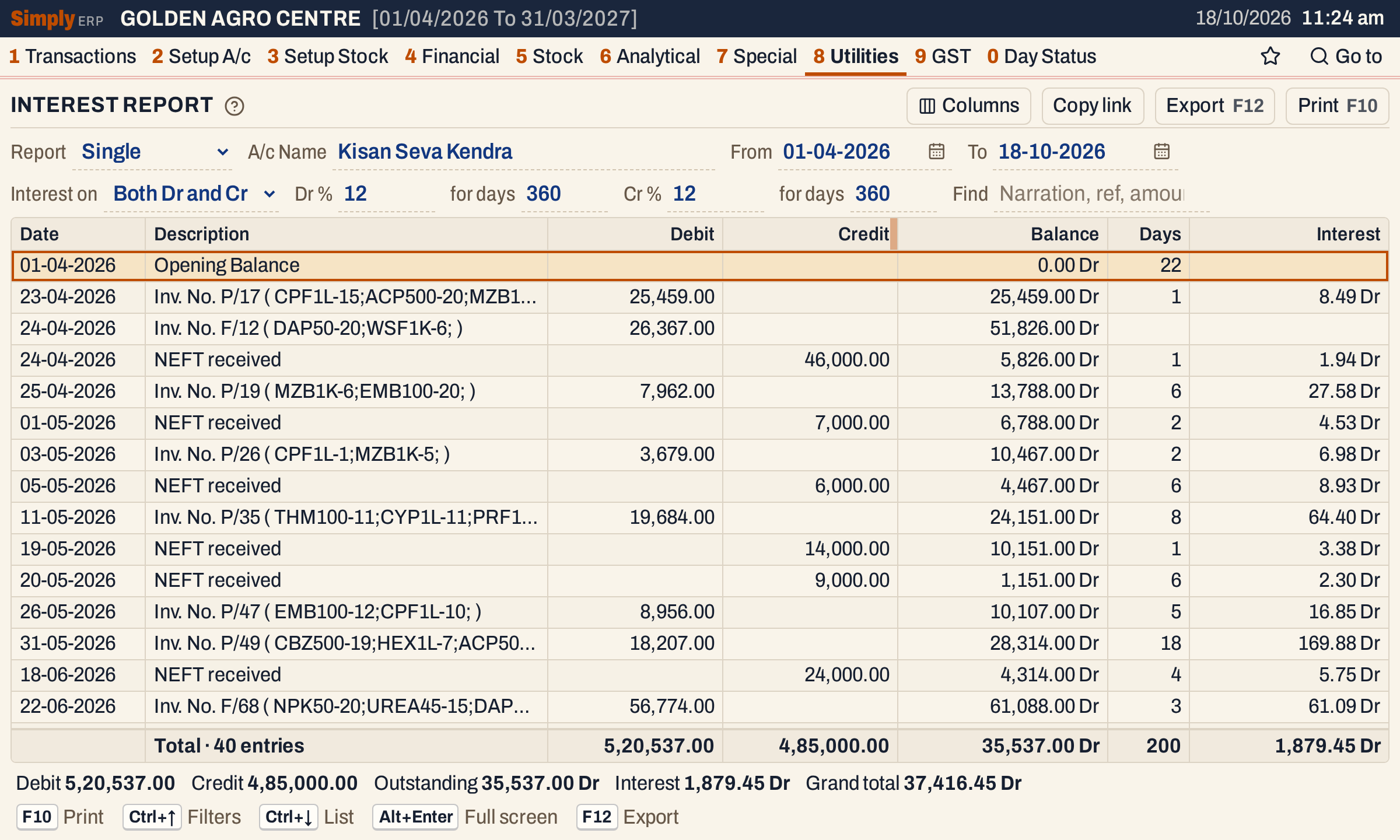 P/17 takes the balance to ₹25,459.00 Dr. It earns ₹8.49 for the one day before the next posting. Type and Ref.No. are hidden here with Columns so that the Interest column fits.
The choices are above the statement.
 The rates are 12% for a 360-day year on both sides, the defaults.
The totals line under the grid gives the debits, the credits, the closing balance, the days and the net interest. The status line below it adds the Outstanding balance and the Grand total. The entry count includes the opening balance line.
 The grand total is the outstanding balance with the interest added: ₹35,537.00 plus ₹1,879.45 is ₹37,416.45.
Bill Wise: each posting on its own
Bill Wise charges each posting’s own amount from its date to the To date, not the running balance. Cr.Days are the credit days you allow: they are taken off the days of each debit posting, so a bill earns interest only after its credit period. Credit postings, such as receipts, get no credit days and earn interest on the Cr side.
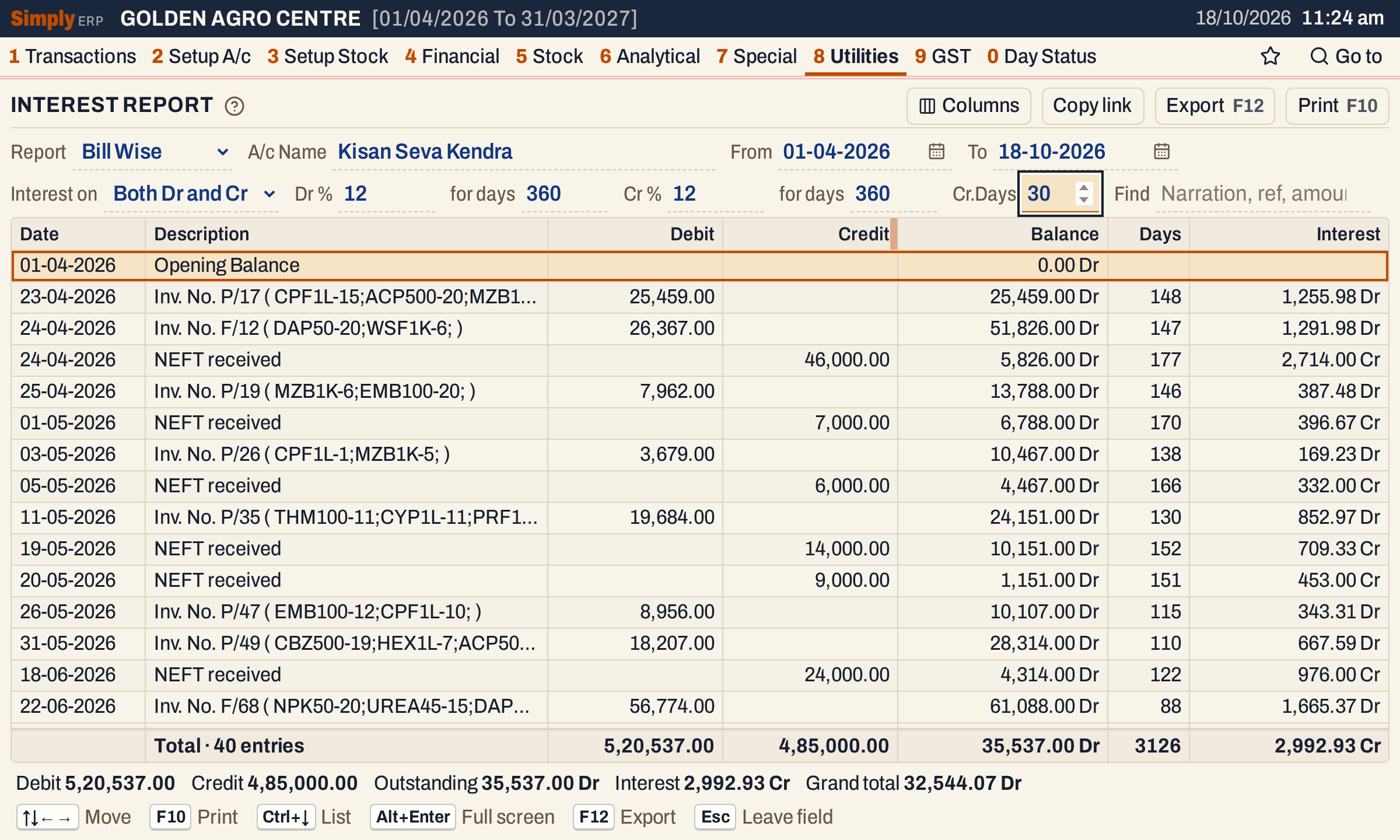 With 30 Cr.Days, P/17 of ₹25,459.00 is charged for 148 days (178 less 30) and earns ₹1,255.98. Each receipt earns Cr interest for its days to the To date.
Dr and Cr interest are added up separately and the Interest total is the difference. Here the receipts earn more than the invoices, so the net interest is ₹2,992.93 Cr and the grand total is ₹35,537.00 less ₹2,992.93, which is ₹32,544.07 Dr.
Multiple: many accounts at once
Multiple charges the balances of several accounts at once, with one rate on both sides. Choose the A/c Type, such as Customer, and every account of that type is listed under its name. Choose Accounts to list only some of them.
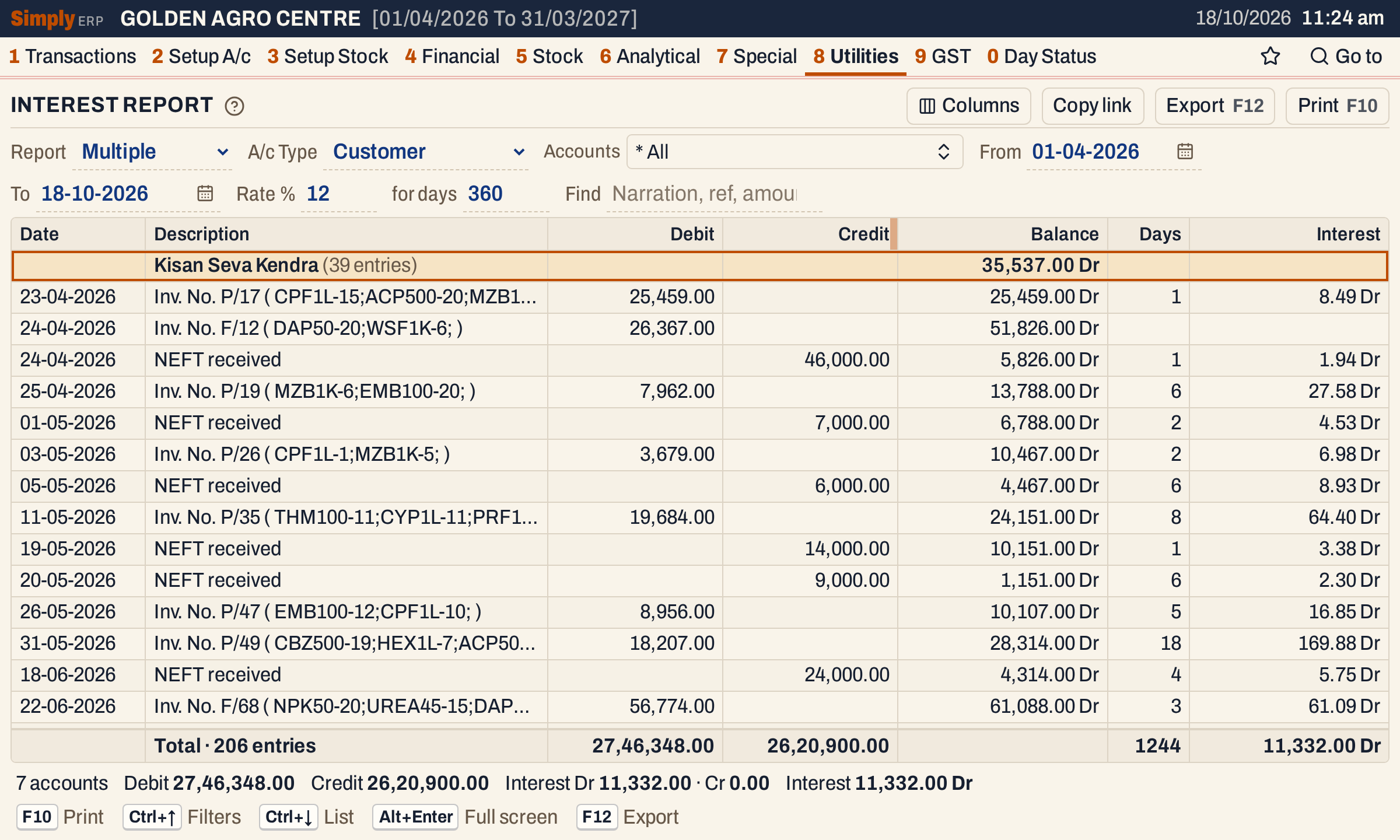 Each account is a heading with its number of entries and its closing balance, followed by its postings.
 The status line counts the accounts and gives the interest on each side, and the net.
Choices
| Choice | What it does |
|---|---|
| Report | Single (the default), Multiple or Bill Wise. |
| A/c Name | The account, for Single and Bill Wise. F2 lists the accounts. |
| A/c Type | For Multiple: the account type, or * All (the default) for every type. |
| Accounts | For Multiple: the accounts to charge. * All (the default) charges every account of the chosen type. |
| From, To | The period. Both dates must fall in the financial year. They open as the first day of the financial year and today. |
| Interest on | For Single and Bill Wise: On Dr balance, On Cr balance or Both Dr and Cr (the default). A side you do not choose earns no interest, and its rate and days boxes are hidden. |
| Dr % and for days | The rate on a debit balance and the number of days in the year it is counted on. The defaults are 12 and 360. |
| Cr % and for days | The same for a credit balance. The defaults are 12 and 360. For Multiple one Rate % and for days apply to both sides. |
| Cr.Days | For Bill Wise only: the credit days taken off each debit posting. The default is 0. |
| Find | Shows only the postings that match what you type in their date, type, reference, description or amount. The Debit, Credit and Days totals count only the lines shown; the Outstanding balance, the Interest and the Grand total stay those of the whole statement. |
A rate can be from 0 to 99.99, and the days in a year from 1 to 999.
What it lists
Single and Bill Wise list one account’s postings in the period, with the opening balance as the first line, even when it is nil. Multiple lists each account that has a balance on the From date or a posting in the period, by name. An account with neither is left out, and an account whose opening balance is nil has no opening line.
The postings are everything posted to the account’s ledger in the period: bills, notes, receipts, payments and journal entries. Opening balances are not postings: the opening balance is the balance brought forward.
Columns
| Column | What it shows |
|---|---|
| Date | The date of the posting, or the From date for the opening balance. |
| Type | The voucher type, such as SIN for a sale or BR for a receipt. Hide it with Columns. |
| Ref.No. | The bill or voucher number. Hide it with Columns. |
| Description | The invoice number and its items, or the receipt’s narration. |
| Debit, Credit | The amount of the posting on its side. |
| Balance | The running balance after the posting, with Dr or Cr. |
| Days | The days the line earns interest. |
| Interest | The interest on the line, with Dr or Cr. |
The print calls Description Particulars and Days No.days, and leaves out the columns you hid.
How the figures are worked out
- Opening balance. The account’s opening balance plus every posting dated before the From date, debits added and credits taken off.
- Running balance. Each posting in the period is added to the balance: a debit raises it and a credit lowers it. Postings are in date order, then in the order they were saved. In Multiple, on one date an account’s debit postings come before its credit postings.
- Days, Single. A balance earns interest from its own date up to the date of the next posting, or to the To date for the last one. The To date is not counted. When several postings share a date, only the last balance of that date earns days. Over one account the days add up to the days from the From date to the To date: 200 days from 01-04-2026 to 18-10-2026.
- Days, Bill Wise. Each posting earns interest from its own date up to the To date, which is not counted. For a debit posting the Cr.Days are taken off, down to no days at all. The opening balance is not reduced by credit days.
- Days, Multiple. As in Single, except that the last balance of each account runs to the To date inclusive, one day more. A last balance of nil has no days.
- Principal and rate. The principal is the balance (Single and Multiple) or the posting’s own amount (Bill Wise), without its sign. A debit balance or debit posting uses the Dr rate and its days in the year, and a credit one uses the Cr rate and its days. For Multiple both sides use the one rate.
- Interest on a line = principal × rate % × days ÷ days in the year. For example, ₹25,459.00 at 12% for one day in a 360-day year is ₹8.49, and for 148 days it is ₹1,255.98.
- Rounding. Each line’s interest is rounded to the paisa, half up, once. The totals add up the rounded lines.
- Interest total. Dr interest and Cr interest are added up separately. The Interest total is the Dr interest less the Cr interest, shown Dr or Cr.
- Debit and Credit totals. The period’s postings, with the opening balance counted in the Debit total when it is a debit and in the Credit total when it is a credit.
- Outstanding is the balance at the To date.
- Grand total = Outstanding + Dr interest − Cr interest, counting a debit as plus and a credit as minus. It is shown Dr when the result is plus and Cr when it is minus.
- Add or Less. On the print, the interest line reads Add when the interest is on the same side as the balance, or when there is no balance, and Less when it is on the other side.
Open, print and export
- Enter on a posting that comes from a bill or a voucher opens it. Back returns to the statement, on the same line.
- F10 prints the statement under the heading INTEREST DETAILS STATEMENT: the account (for Multiple, the A/c Type), the period, the rate line or lines (such as Rate of Interest 12 % for 360 Days on Debit Balance), the postings and the totals. For Single and Bill Wise it adds Total Outstanding, the Add or Less line for the interest, the Grand Total, and a line for the dealer’s signature under the company’s confirmation of the balance.
- F12 saves the printed layout as an Excel workbook. Copy link gives a link that opens the report with the same choices.
Updated 4 November 2026.