Cash and bank balances
On this page
Cash and bank balances show what is in your cash and in each bank account now, with the issued cheques the bank has not yet paid. They come from the running totals of each account, so a cash bill, a receipt, a payment or a journal changes them as soon as it is saved. The Payments and receipts screen lists them beside the money entries, and Day Status shows the totals as Cash in hand and Bank.
Open the balances
In SimplyERP Online, open Transactions and choose Money entries. The menus of the desktop app do not list the Payments and receipts screen. There, use Day Status (see below), or open the books directly: Alt+4 for Financial Reports, then B for the Cash Book or P for the Bank Book.
The screen lists the money entries on the left: 4 Col Day Book, Receipts, Payments, Journal, the GST and non-GST credit and debit notes, the Cash Book, the Chq. Issued Register, the Bank Book and All Vouchers. Press the letter of an entry to open it, for example K for the Cash Book or R for the Bank Book. The balances are on the right.
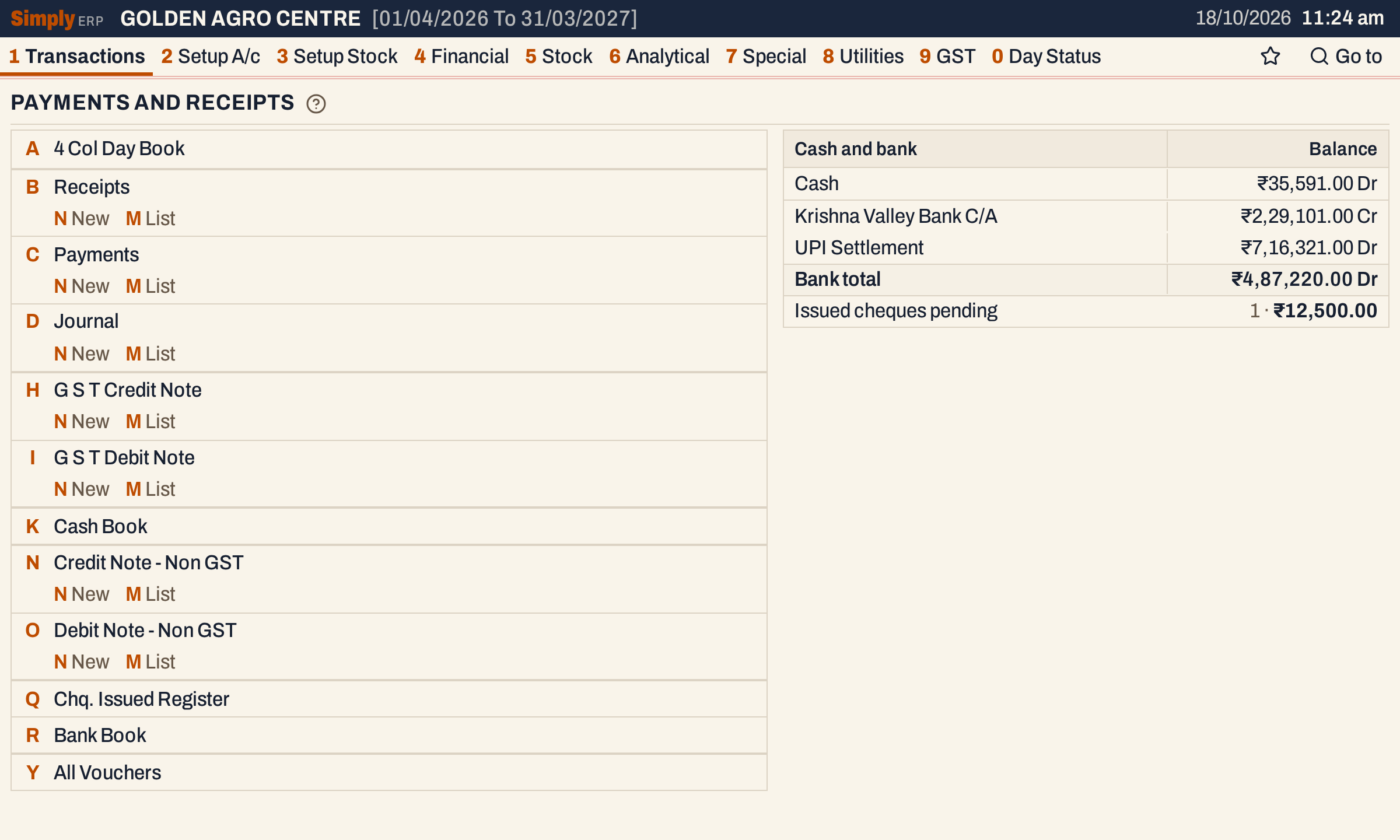 Money entries on the left, cash and bank balances on the right.
Read each account’s balance
Each cash account and each bank account has a line: the cash accounts first, then the bank accounts, each group in name order. A debit balance is marked Dr and a credit balance Cr. An account whose balance is nil shows ₹0.00 in grey.
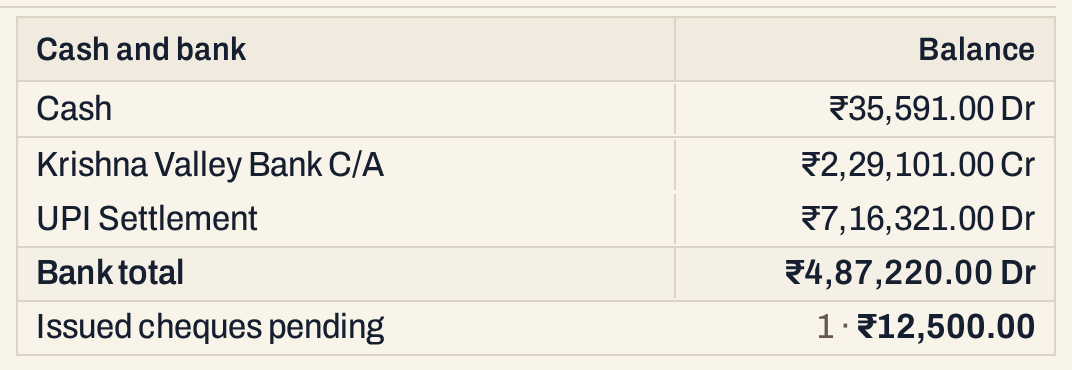 Two bank accounts add up to a Bank total. The last line counts the issued cheques not yet cleared.
A group that has more than one account ends with a Cash total or Bank total line. A group with one account has no total line.
Open an account’s book
Click an account’s name. A cash account opens the Cash Book and a bank account opens the Bank Book, already set to that account. Both print with F10 and export with F12; the balances themselves have no print or export.
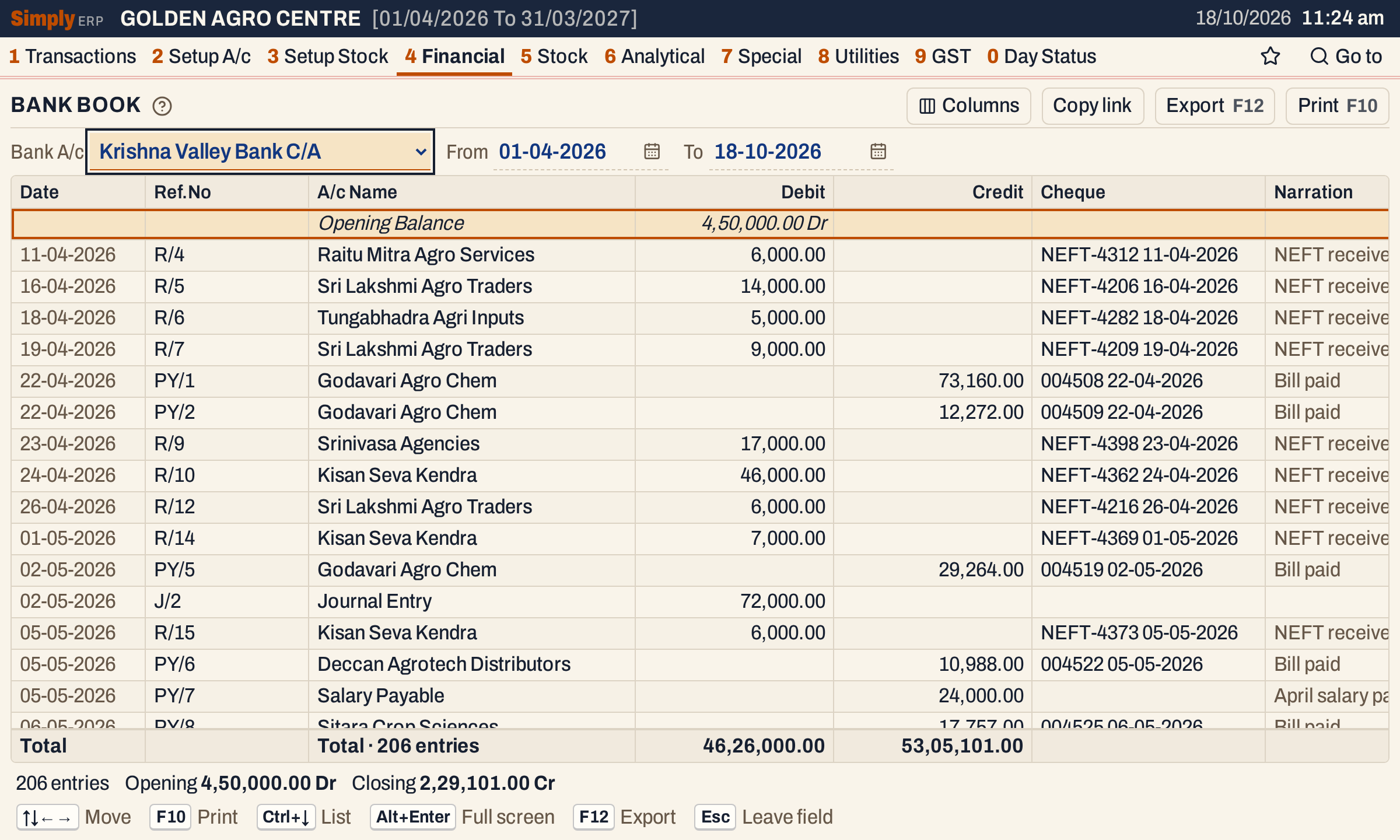 The Bank Book closes at the same ₹2,29,101.00 Cr as the balance on the Payments and receipts screen.
See the totals on Day Status
Press 0 on the main menu, or Alt+0 on any screen, to open Day Status. Cash in hand adds up the accounts of the Cash type and Bank the accounts of the Bank type, the same accounts as the balances above. Each figure opens its book.
 Cash in hand and Bank on Day Status, the same as on the Payments and receipts screen.
Issued cheques still pending
The last line counts the cheques you have issued, up to today, that are not yet cleared or cancelled, and adds up their amounts. Click its name to open the Chq. Issued Register at its pending view. With none, the line reads None.
A pending cheque does not change any balance, and saving a cheque in the register posts nothing. The bank balance changes when the payment is posted: by clearing the cheque with Post bank payment ticked, or by entering the payment yourself. See the issued cheques register.
How the balances are worked out
For each account SimplyERP uses its running totals:
- Balance = the opening balance + total credits − total debits, counting a debit opening balance as a minus. Every bill, receipt, payment, journal and note that posts to the account is in the totals.
- Dr or Cr: Dr when debits (with a debit opening balance) are more than credits, Cr when credits are more. A nil balance shows ₹0.00 with neither.
- Cash total and Bank total = the Dr balances less the Cr balances of the accounts in the group. For the bank accounts above: ₹7,16,321.00 Dr less ₹2,29,101.00 Cr is ₹4,87,220.00 Dr.
- Example: the Krishna Valley Bank C/A opens at ₹4,50,000.00 Dr. Its postings add ₹46,26,000.00 of debits and ₹53,05,101.00 of credits: ₹4,50,000.00 + ₹46,26,000.00 − ₹53,05,101.00 is ₹2,29,101.00 Cr.
- Which accounts are listed: every account whose type is Cash and every account whose type is Bank, in name order within each group.
- Amounts are rounded to the paisa.
Common questions
Why is there no Bank total? The total line appears only when the group has more than one account. With one bank account, its own line is the balance.
Why does the bank balance not drop when I issue a cheque? The cheque stays pending, and a pending cheque posts nothing. The balance drops when the payment is posted, as described above.
Why is an account in grey? Its balance is nil. It is still listed, so you can open its book.
Updated 4 November 2026.