Day Status
On this page
Day Status is the one screen for the end of the working day: the cash and bank balances, what customers owe and what you owe suppliers, today’s sales and purchases, every bill made today and the stock that needs attention. “Today” is the working date shown at the top of the window.
Open the screen
Press Alt+0 from anywhere, or press 0 on the main menu. Day Status is not on the home screen, so a screen facing customers never shows it.
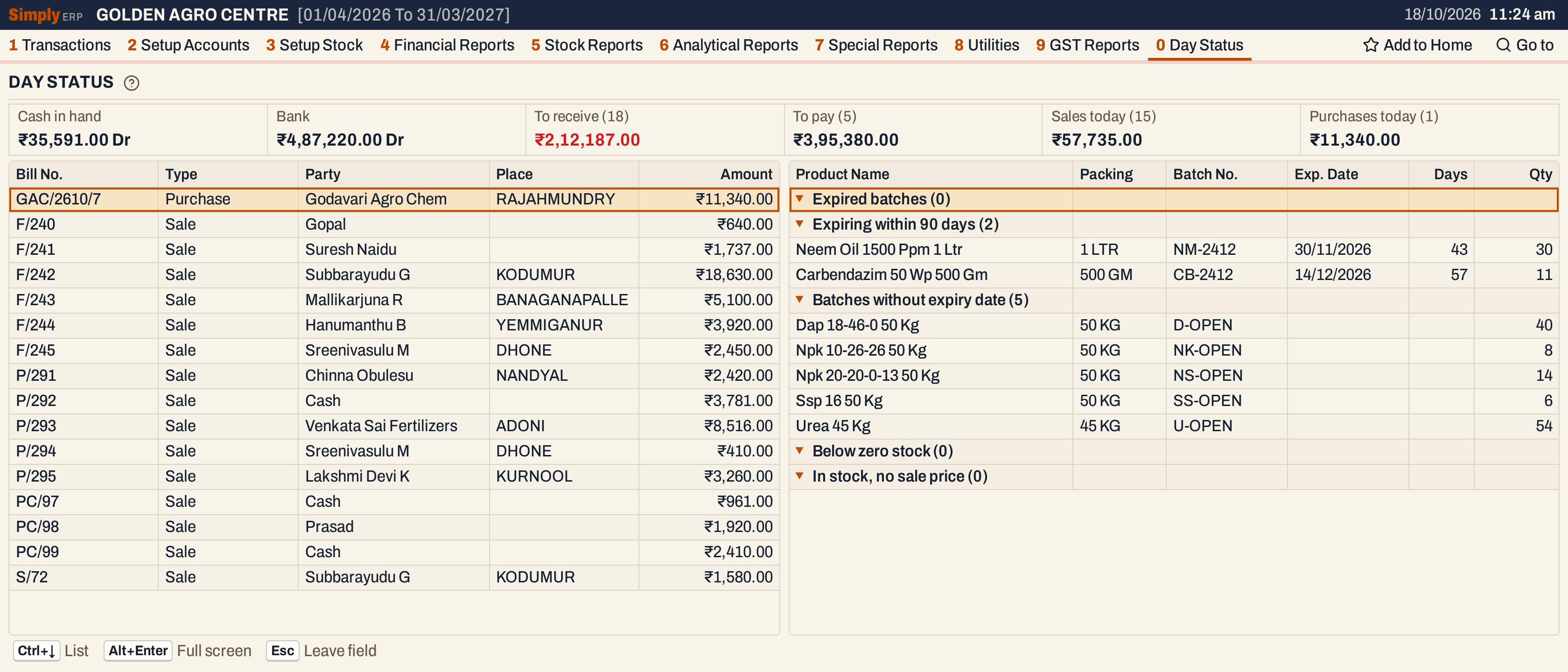 Day Status on the books’ last day, 18/10/2026. Each figure, bill and stock line can be opened from the keyboard.
The balances and today’s totals
The six figures across the top are each a link to the book or statement behind them.
 Cash in hand and Bank are money in hand (Dr). To receive is shown in red.
| Figure | What it adds up |
|---|---|
| Cash in hand | The balance of every Cash account. Opens the Cash Book. |
| Bank | The balance of every Bank account. Opens the Bank Book. |
| To receive (n) | The debit balances of the Customer, Farmer and Customer - Supplier accounts. n is how many of those accounts owe you money. Opens the Customer Outstanding statement. |
| To pay (n) | The credit balances of the Supplier and Customer - Supplier accounts. n is how many of those accounts you owe. Opens the Supplier Outstanding statement. |
| Sales today (n) | The net amounts of the sale bills of today. n is how many bills. Opens All Bills for today’s sales. |
| Purchases today (n) | The net amounts of the purchase bills received today. n is how many bills. Opens All Bills for today’s purchases. |
 Fifteen sales came to ₹57,735.00 and one purchase to ₹11,340.00 on the day.
Bills today
The list under the figures has every bill of the day: sales, purchases, sales returns and purchase returns. Each line shows the bill number, its type, the party, the place and the net amount. Sales and purchases are counted in the totals above; returns are listed but not added to them. Credit and debit notes and other purchases are not listed.
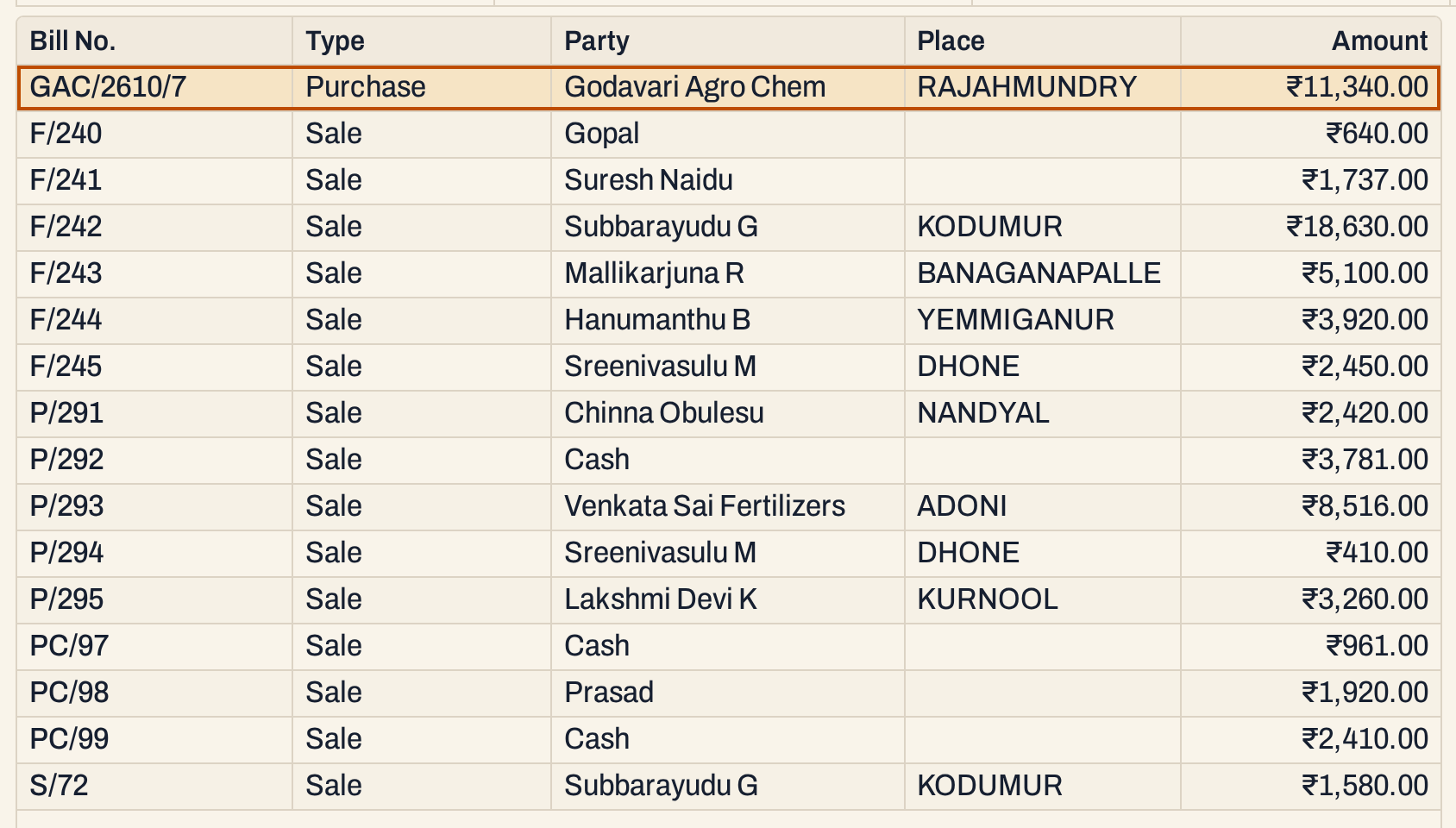 Enter on a bill opens it.
The list is in date order, then by type (purchases, purchase returns, sales, sales returns), then by bill series and number. That is why the purchase comes before the sales. A purchase is listed on the day it was received; the supplier’s own date stays on the bill.
Stock alerts
The stock alerts are five headings, each with its count. A heading with no lines shows (0).
| Heading | Lines for |
|---|---|
| Expired batches | Batches with stock whose expiry date is before today. |
| Expiring within 90 days | Batches with stock that expire from today to 90 days on. |
| Batches without expiry date | Batches with stock and no expiry date. |
| Below zero stock | Items whose stock on hand is below zero. |
| In stock, no sale price | Items with stock on hand and no sale price. |
Each batch line shows the product name, its packing, the batch number, the expiry date, the days left and the quantity. Days is negative for an expired batch, and an expired line is shown in red. For an item line (below zero stock or no sale price) the quantity is the item’s stock on hand, and a negative quantity is shown in red. Expired and expiring batches are listed by expiry date, the nearest first. Batches without an expiry date, and the items without a sale price, are listed by name. Below zero stock lists the most negative first.
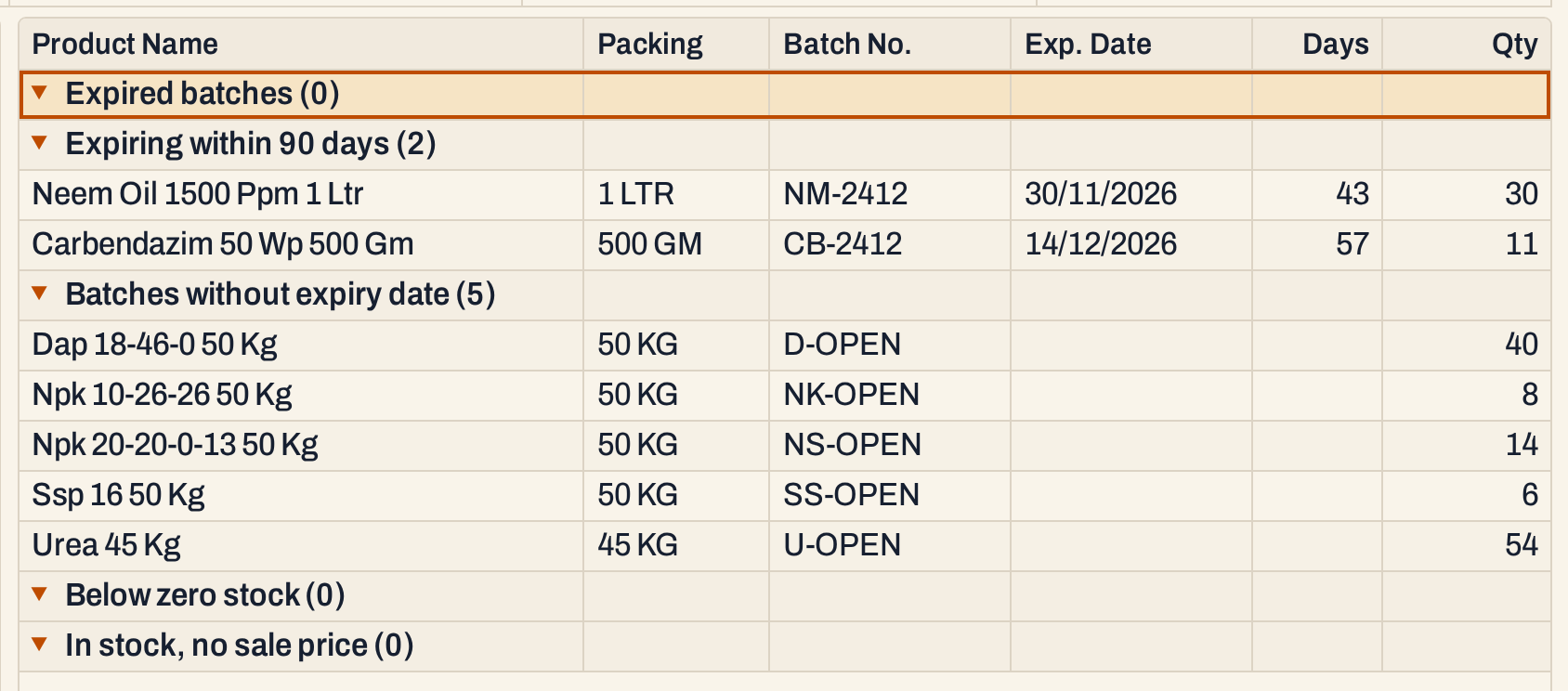 Neem Oil’s batch NM-2412 expires on 30/11/2026, in 43 days, with 30 in stock. Carbendazim’s batch CB-2412 expires on 14/12/2026, in 57 days, with 11 in stock.
How the figures are worked out
- Balance of an account: its credits less its debits, with the opening balance added as a credit or taken off as a debit, as the account was entered. A result below zero is a debit balance and is shown Dr. It counts every posting recorded so far, whatever its date, and is rounded to the paisa.
- Cash in hand and Bank: the balances of all the Cash accounts, and of all the Bank accounts, added together.
- To receive: the debit balances of the Customer, Farmer and Customer - Supplier accounts, added together, with the number of those accounts. An account with a credit balance is not counted.
- To pay: the credit balances of the Supplier and Customer - Supplier accounts, added together and shown without a sign, with the number of those accounts. An account with a debit balance is not counted.
- Sales today and Purchases today: the net amounts of the sale (SIN) and purchase (PIN) bills whose date is the working date. A purchase’s date is the day it was received, if that differs from the supplier’s date. The net amount is the bill’s net amount, as All Bills shows it.
- Bills today: every sale, purchase, sales return and purchase return with that same date.
- Expiring within 90 days: a batch with stock whose expiry date falls from the working date up to 90 days later, both days included. Days is the number of days from the working date to the expiry date.
Open and keys
- Tab moves between the bills and the stock alerts. Typing letters jumps to a party or a product.
- Enter on a bill opens the bill.
- Enter on a stock line opens that item’s Stock Ledger from the start of the financial year to the working date.
- Enter or a click on a stock heading folds its lines away or opens them again. ← folds a heading and → opens it.
- Ctrl+↓ moves into the list. Alt+Enter gives the list the whole window.
The screen does not print or export.
Updated 4 November 2026.