Changed Bills
On this page
Changed Bills keeps a copy of each saved bill as it was before someone changed or deleted it. Each line is one change, with the day and time it was made. Open a line to see the bill as it stood before the change. Use it to see what a bill said before it was changed, or to find a bill that was deleted.
Open the report
Press Alt+8 for Utilities, then S for Changed Bills (Audit). The list opens with Changed from at the financial year’s first day and To at the working date. Both are the dates of the changes, not the dates of the bills.
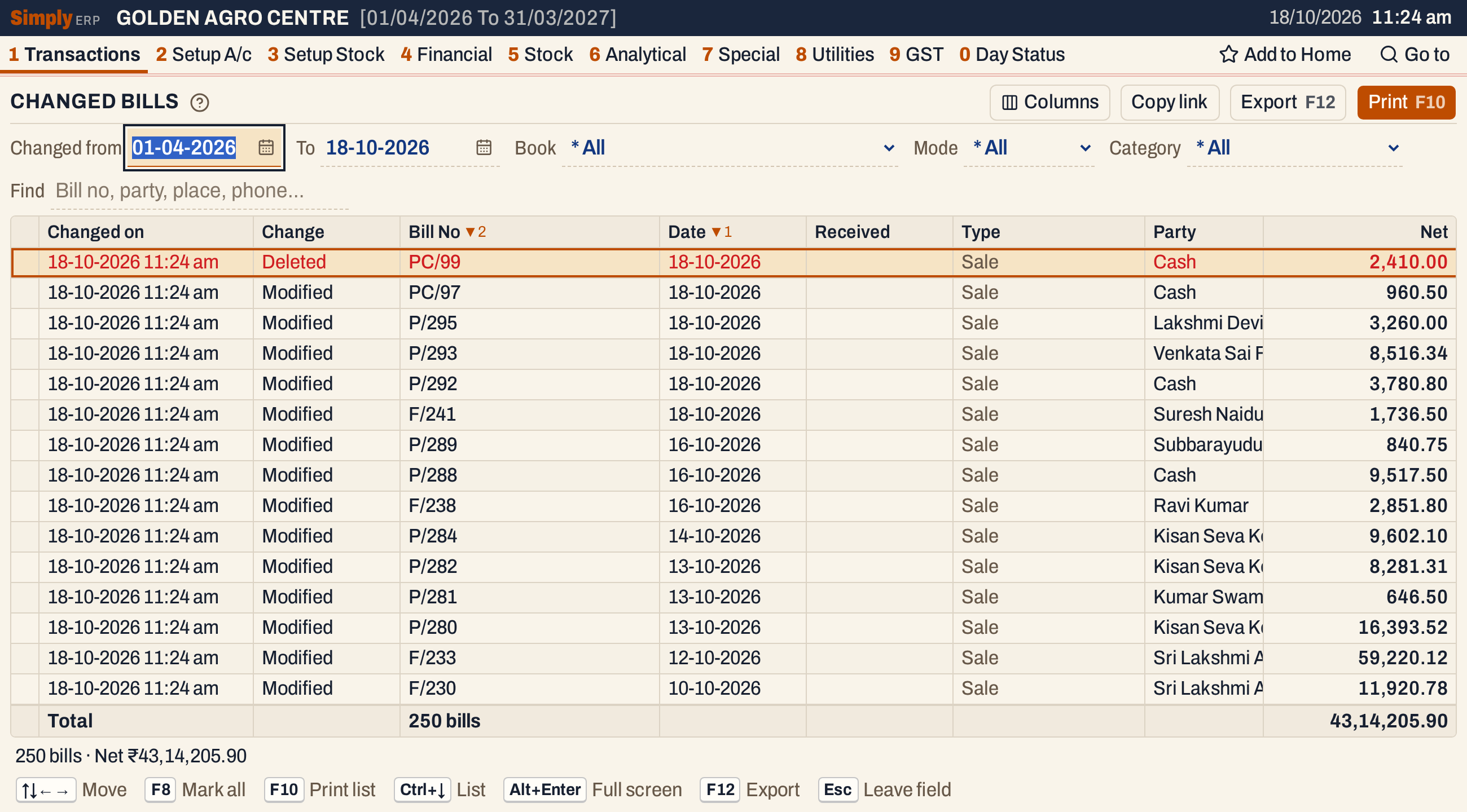 Changed Bills on the books’ last day. The total line gives the count and the net of the bills as they were before the changes: 250 bills, ₹43,14,205.90. Place, Mode, Category and the tax amounts come after Party, further right; Net stays at the right edge.
What it lists
One line for each change made to a saved bill. Every kind of bill is covered: sales, purchases, returns, credit and debit notes and other purchases.
- Modified: the bill was saved with a change. A change to its items, amounts or dates is recorded, and so is a change to the unit price of its lines alone. Saving a bill with nothing changed records nothing.
- Deleted: the bill was deleted. A deleted line is shown in red.
A bill changed three times has three lines. Each line shows the bill as it was before that change. The bill as it stands now is in All Bills.
Columns
The columns are the bill columns of All Bills, with two more at the left. A column appears only when some listed change fills it, and the Columns choice lists the ones the list can show.
| Column | What it shows |
|---|---|
| Changed on | The date and time of the change. Not sortable. |
| Change | Modified or Deleted. |
| Bill No | The bill’s number. Sortable. |
| Date | The bill’s date. For a supplier’s bill or a return, the party’s own date. Sortable. |
| Received | The day a supplier’s bill or return was received, when that is not its date. |
| Type | The kind of bill: Sale, Purchase, Sales return and so on. Shown when the list has more than one kind. |
| Party | The party’s name. Sortable. |
| Place, Mode, Category | The party’s place, how the bill was paid (Cash or Credit; another mode is shown as recorded), and the item categories of its lines. Place is sortable. |
| Taxable, CGST, SGST, IGST | The bill’s taxable value and tax. Each is shown when some listed bill has it. |
| Add, Less | Other charges added and other deductions taken off. Off by default; switch them on in Columns. |
| Net | The bill’s net amount. Always shown, and sortable. |
| Book, GSTIN | The bill book and the party’s GSTIN. Off by default; switch them on in Columns. |
IRN and EWB are not shown in Changed Bills.
 Changed on and Change come first. PC/97, between PC/99 and P/295, is another change in the same books.
Choices
| Choice | What it does |
|---|---|
| Changed from, To | The period of the changes, by the date each change was made. Both days are included. They start at the financial year’s first day and the working date. |
| Book | Shown when the changes are to bills of more than one bill book. * All (the default) or one book. |
| Mode | * All (the default), Cash or Credit, as the bill was saved before the change. A bill paid another way, such as by wallet, is listed under All only. |
| Category | Shown when the changes are to bills of more than one item category. * All or one category. |
| Find | Narrows the list as you type. Every word typed must match a bill’s number, party, place, phone number, GSTIN or book. |
| Columns | Switches columns on or off. |
There is no Show choice: the list covers every kind of bill. Every choice is kept in the page address, so Copy link gives a link that opens the same list.
Open a change
Enter on a line opens the bill as it was before the change. Its header is marked Earlier version. Current bill opens the saved bill as it stands now; a deleted bill has no current bill. Esc goes back to the list.
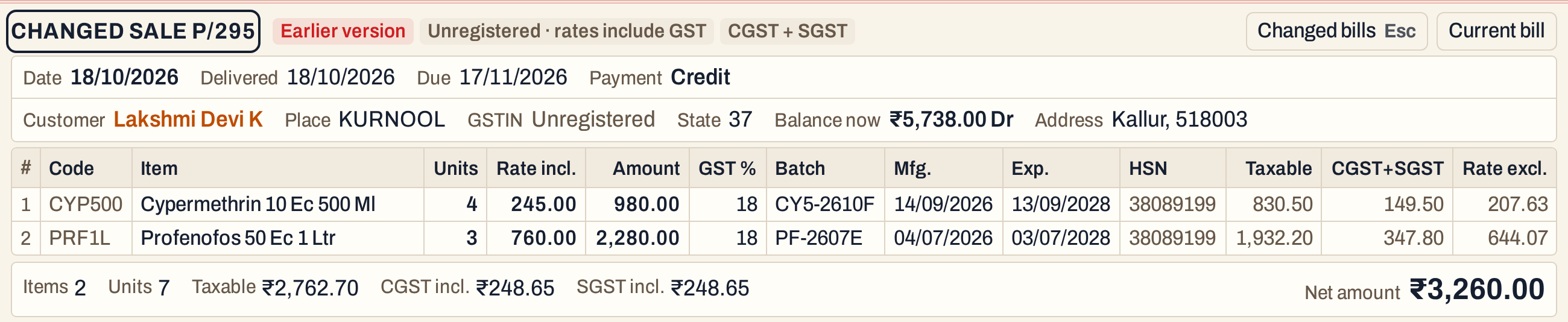 P/295 as it was before the change: four units of Cypermethrin on its first line, not the six it was changed to.
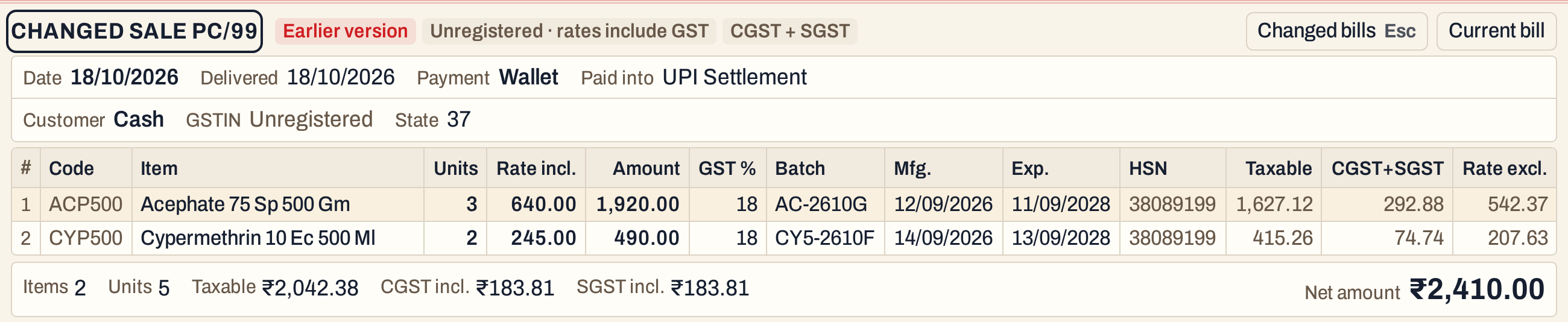 PC/99 as it was before it was deleted, from the same list. Its payment was by Wallet.
How the figures are worked out
- Which changes: a change is listed when its day is from Changed from to To, both days included. The books record a change at its time in UTC, which is 5½ hours behind Indian time, so a change made between midnight and 5:30 am counts for the day before.
- Changed on is the computer’s clock at the moment the bill was saved or deleted. It is not the working date.
- Each figure column shows the amount of the bill as it was before the change. The total line and the status line add up these figures for the changes listed, rounded to the paisa, as All Bills does.
- Find, Book, Mode and Category narrow the list before the totals are worked out.
- Sorting: click Bill No, Date, Party, Place or Net to sort by it. The list starts with the newest bill date first and, for the same date, the highest bill number first.
Open, print and export
- Enter opens the bill as it was before the change.
- F2 marks the change under the cursor and moves down. F8 marks every change listed; press it again to clear the marks.
- F10 prints the list: the marked changes, or every change listed when none is marked. It prints the list, not the bills. The print shows the change and its date in one column, without the time, and leaves out Book and Category.
- F12 exports the list to Excel, with Changed on and Change in separate columns. The file also has Book and Category.
Keys on this screen
| Key | What it does |
|---|---|
| Enter | Open the bill as it was before the change |
| F2 | Mark or unmark the change, and move down |
| F8 | Mark every change listed, or clear the marks |
| F10 | Print the list |
| F12 | Export the list to Excel |
| Alt+Enter | Give the list the whole window |
Common questions
Why does a line show a bill that is no longer in All Bills? A deleted bill stays in Changed Bills as it was when it was deleted. Its line is shown in red with the change Deleted.
Why does the Net here differ from the bill in All Bills? The line shows the bill as it was before the change. The bill in All Bills is the current version. Open the line and press Current bill to compare them.
Updated 4 November 2026.