Group Wise Stock Statement
On this page
An item group is one product in all its packings: Cypermethrin 10 Ec in 1 Ltr and in 500 Ml is one group. The Group Wise Stock Statement adds the packings together, so you see how much of each product you hold and move, in litres, kilograms or tonnes, rather than in packs of different sizes. Use it when the product matters more than the pack.
Open the report
Press Alt+5 for Stock Reports, then G. The statement opens for the financial year from its first day to today, for all categories, with one line for each group, in litres and kilograms.
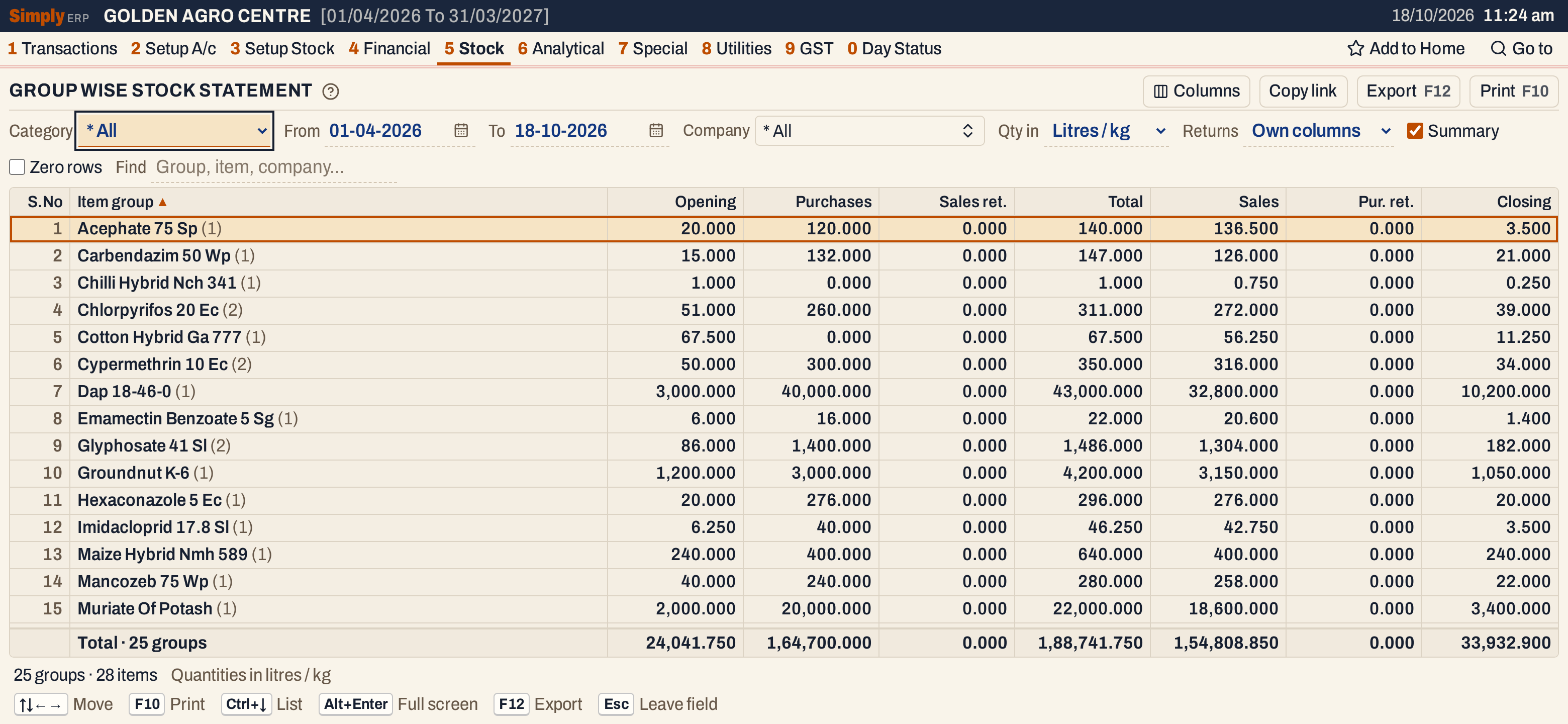 Each line is a group, with the number of packings in brackets. Acephate 75 Sp opened with 20.000 kg, took in 120.000 kg and sold 136.500 kg, which leaves 3.500 kg.
What it lists
The report takes the same figures as the Stock Statement for every item (opening stock and the period’s purchases, sales returns, sales, purchase returns and damage, from bills, goods entries and damage entries), converts them to litres or kilograms and adds the items of each group.
A group is named after the group the item belongs to (Setup Stock, Groups, 3 C). An item that belongs to no group is listed under * Undefined Group.
An item with no stock and no movement is left out, and so is a group whose figures are all nil. Tick Zero rows to list them.
Columns
| Column | What it shows |
|---|---|
| S.No | The line’s number: groups in Summary, items otherwise. |
| Item group | The group’s name, with the number of items in brackets. Without Summary, Item shows the items under each group. |
| Manufacturer | The item’s company. Shown for items, not in Summary. |
| Opening | The stock at the start of the From date. |
| Purchases | Purchased and received. (Own columns layout) |
| Sales ret. | Returned by customers. (Own columns layout) |
| Total | Opening plus everything that came in. |
| Sales | Sold and delivered. (Own columns layout) |
| Pur. ret. | Returned to suppliers. (Own columns layout) |
| Damage | Lost to damage or breakage. It appears only when some item listed has a damage entry in the period. (Own columns layout) |
| Inward | Purchases plus Sales ret. (In inward / outward layout) |
| Outward | Sales plus Pur. ret. plus Damage. (In inward / outward layout) |
| Closing | The stock at the end of the To date. |
A group’s line shows how many items it has in brackets, and how many of them are below zero when some are. A negative Total or Closing is red. The line under the grid adds up every column for the groups listed. The status line gives the number of groups and items, and, when some are, how many items are below zero.
Choices
| Choice | What it does |
|---|---|
| Category | One item category, or * All. Choosing a category whose name begins with FERT sets Qty in to Tonnes; choosing any other category sets it to Litres / kg. Choosing * All leaves Qty in as it is. Changing the category clears Company. |
| From, To | The period, both days included. Both dates must fall in the financial year. If you set From after To, the other date moves with it. |
| Company | One or more manufacturers. The statement then covers only their items. |
| Qty in | Litres / kg (the usual), Tonnes, Quintals or Units. |
| Returns | Own columns (the usual): purchases, sales returns, sales, purchase returns and damage in separate columns. In inward / outward: only Inward and Outward. |
| Summary | Ticked when the report opens: one line for each group. Untick it to see the items under their groups. |
| Zero rows | Lists items and groups with no stock and no movement. |
| Find | Shows only the items whose name, manufacturer, technical name, group, packing or page matches what you type. |
| Columns | Hides any of the S.No, Manufacturer or figure columns. The print leaves them out too. |
Click a column title to sort by it, and click again to reverse. Shift+click another title to sort within the first. Groups are ordered by their name, or by the total of the figure you sort by, and * Undefined Group comes last. Every choice is kept in the page address, so Copy link gives a link that opens the same statement.
 The choices that decide the unit, the columns and whether items show.
How the figures are worked out
For each item the report works out, in units, the same figures as the Stock Statement:
- Opening = the item’s opening stock + purchases + sales returns − sales − purchase returns − damage posted before the From date.
- Purchases, Sales ret., Sales, Pur. ret. and Damage = the units posted from the From date to the To date, both days included.
- Total = Opening + Purchases + Sales ret. Closing = Total − Sales − Pur. ret. − Damage.
Each figure is then multiplied by the item’s pack size: Litres / kg times the pack size (a 500 Gm pack is 0.5, a 50 Kg bag is 50), Tonnes the pack size divided by 1,000, Quintals divided by 100. An item whose pack size is not recorded shows zero, and the status line says how many items do. The figures of a group are the sums of its items’ figures, and the total line is the sum of the groups.
For Chlorpyrifos 20 Ec, which has a 1 Ltr and a 500 Ml pack: 32 litre packs and 14 half-litre packs close at 32 + 14 × 0.5 = 39.000 litres.
Items under their groups
Untick Summary to see each group’s items under it. A group is a heading with its figures, and its items follow, with their manufacturer.
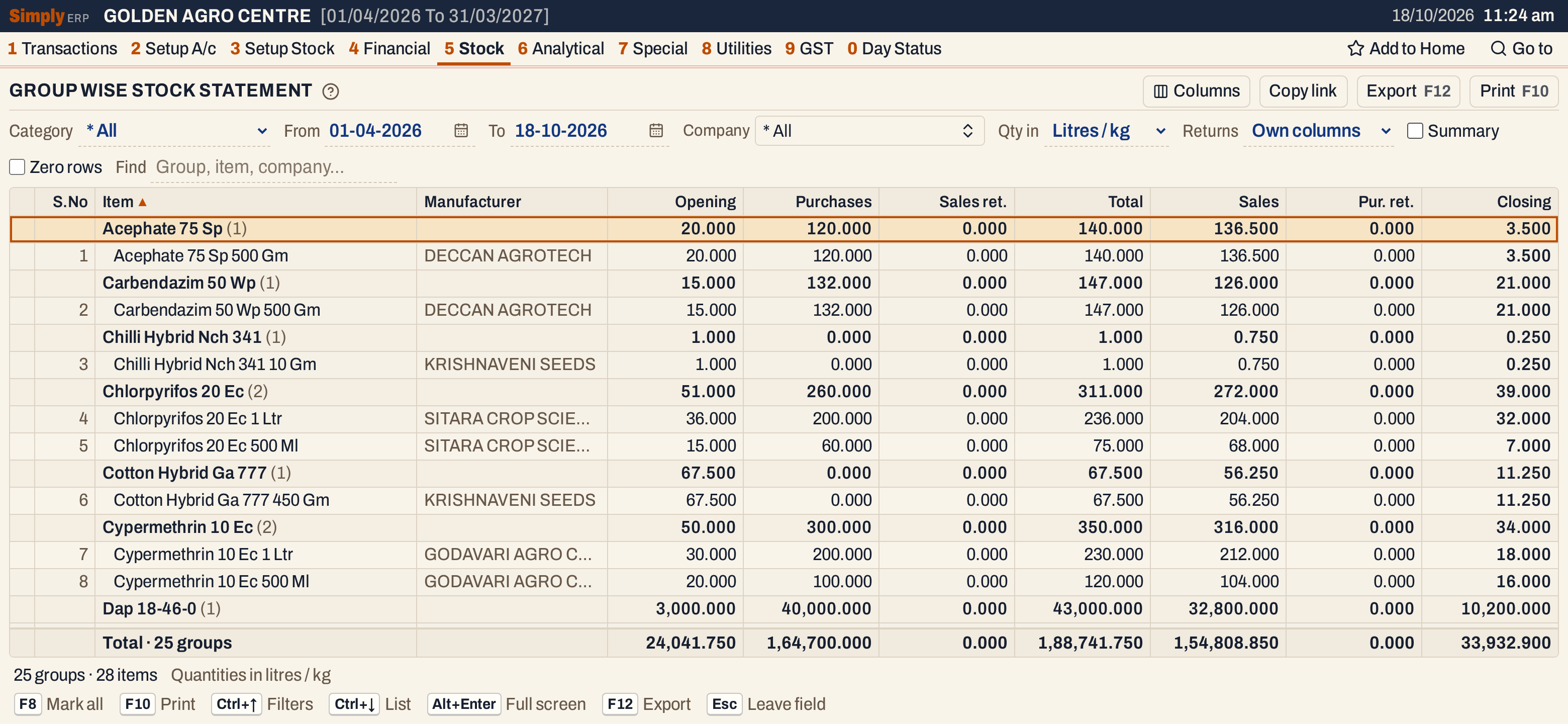 Chlorpyrifos 20 Ec has two items, a 1 Ltr pack closing at 32.000 and a 500 Ml pack at 7.000, which add up to 39.000.
Fertilizers in tonnes
Fertilizers are usually sold in bags of 50 kg and reported in tonnes. Choose the fertilizer category and Qty in switches to Tonnes.
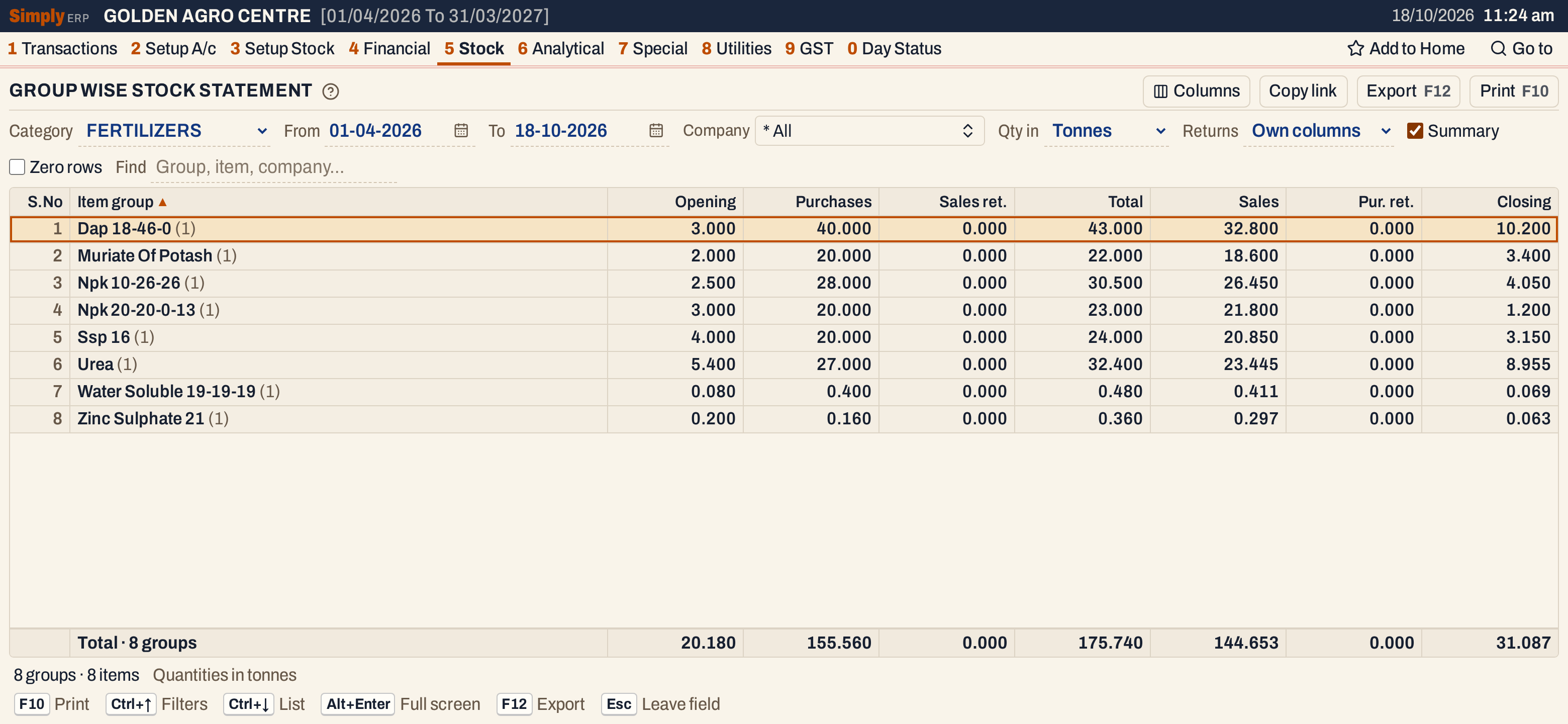 Dap 18-46-0 opened with 3.000 tonnes (60 bags of 50 kg), received 40.000, sold 32.800 and holds 10.200 tonnes, which is 204 bags.
Open, mark, print and export
- Enter on a group in the Summary unticks Summary, so every group shows its items, with the cursor on that group. Enter on an item opens its Stock Ledger for the same period.
- F2 marks an item and F8 marks them all. F10 then prints only the marked items. Marking is not offered in the Summary.
- F10 prints the statement as it is on the screen, titled GROUP WISE STOCK STATEMENT. The heading gives the category (* All when none is chosen) and, for a pesticide, fertilizer or seed category, the licence number from Company Details, then the period, a note such as (All Quantities in Lts/Kgs) and your choices.
- F12 saves it as an Excel workbook.
- Type letters in the list to jump to the next group that begins with them.
- Alt+Enter gives the whole window to the list.
Updated 4 November 2026.