Appendix B
On this page
Appendix B is the register of sale and distribution of insecticides, kept insecticide-wise, under sub-rule (2) of rule 15 of the Insecticides Rules. For each insecticide SimplyERP lists, date by date, what you received (supplier, batch, dates, invoice) and what you sold (bill number), with the balance in stock after every line. Print it for the inspector, or keep it up to date on screen.
Open the report
Press Alt+5 for Stock Reports, then N for Department Reports, then 3 for Appendix B. It opens for the financial year from its first day to today, for all categories, with the sales gathered by day.
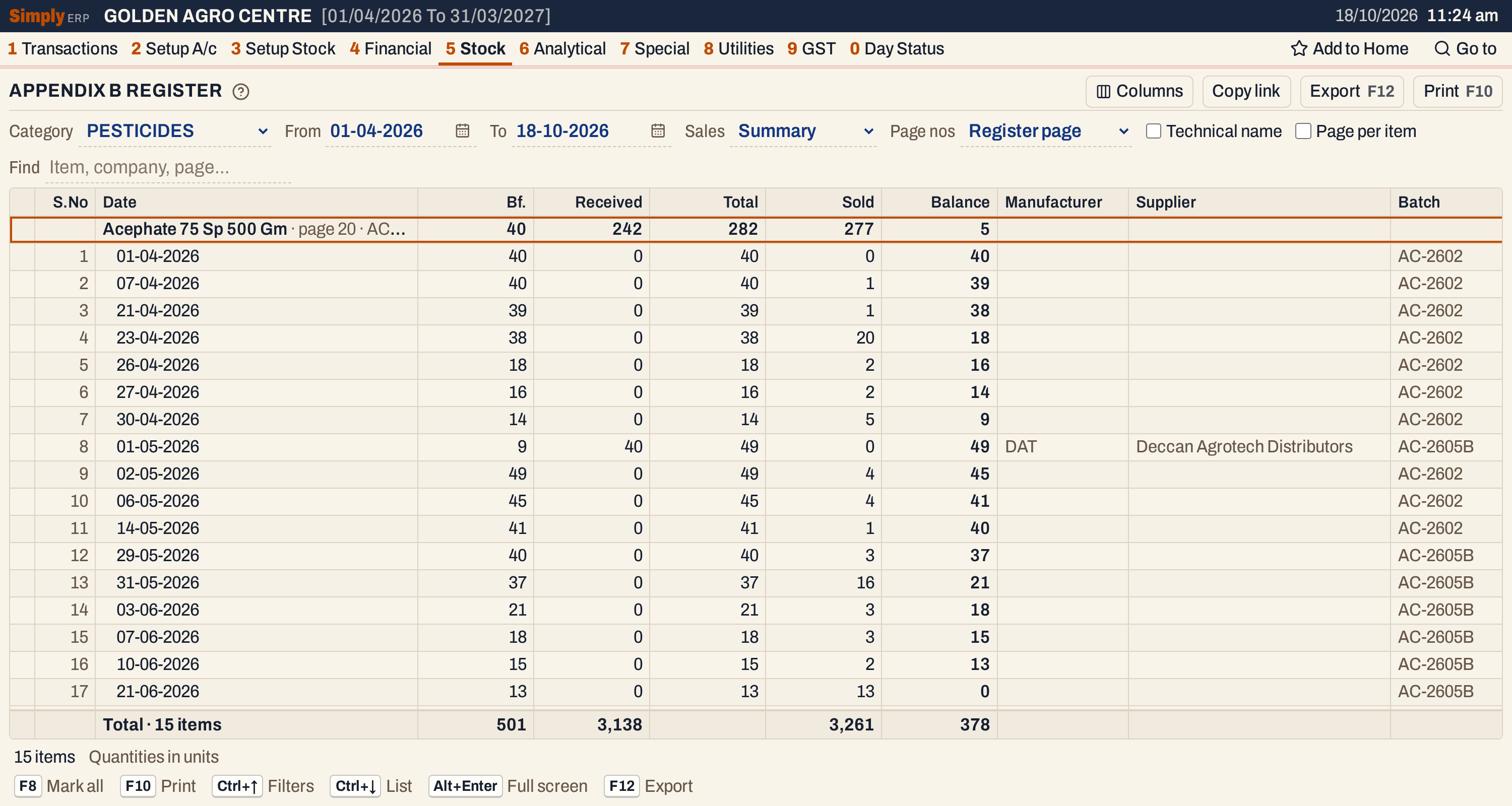 Each insecticide is a heading line with its totals for the period; its dated lines come under it. The total line counts 15 items.
The register lists every item in the category you choose, so choose PESTICIDES (or whichever category holds your insecticides): with All, fertilizers and seeds are listed too. The register keeps the items’ registration particulars from the group form: the CIB registration number and date, the manufacturer and its code (see Add a stock group), and each packing’s register page.
What it lists
One heading line for each item, with its dated lines under it. An item is listed when it has stock at the start of the period or any movement in it. An item with neither is left out.
The lines come from:
- Purchase bills (receipts) and sales returns, which add to stock.
- Sale bills and purchase returns, which take stock away.
- Goods In / Out entries (Receive goods before the bill): goods received before their bill count as received, goods sent out as sold. A bill that later covers them is counted only for the quantity not already entered.
The date of a line is the posting date of the bill. Quantities are in units (packs), as on the bill.
Damages and breakage (1 V) are not in this register, neither in the opening balance nor in the lines. After a damage entry, the register’s balance is higher than the stock on hand by the damaged quantity.
Columns
On screen the figures come first, then the particulars. The print puts the particulars before the figures, under the longer titles of the register’s form.
| Column | Print title | What it shows |
|---|---|---|
| S.No | S.No | The line’s number within its item, from 1. |
| Date | Date of Receipt / Sale Inv. Date | The date of the line. The item’s heading line shows its name, register page, technical name and registration number. |
| Bf. | Bf, if any | The balance before this line. On the heading line, the balance at the start of the period. |
| Received | Received | Units received on this line: a purchase, goods received, or goods a customer returned. |
| Total | TOTAL | Bf. plus Received. |
| Sold | Sold/ distributed | Units sold, goods sent out, or goods returned to a supplier on this line. |
| Balance | Balance | Total less Sold. |
| Manufacturer | Name of the manufacturer from whom received | The manufacturer’s code (Mnf. code on the group form), on a line that has a supplier or customer. |
| Supplier | Name of Supplier/distributor, if any, through whom received | The supplier of a receipt or purchase return, or the customer of a sales return. |
| Batch | Batch No. | The batch of the line. |
| Mfg. | Date of Manufacture | The batch’s manufacturing date. |
| Expiry | Date of expiry | The batch’s expiry date. |
| Invoice | Invoice details, number, date and quantity vide which supply received | The purchase bill number; for a return, the return’s number and date; Op. on the opening line. |
| Sold on bill | Bill Number (name and address to whom sold/distributed), date and quantity sold/distributed | The sale bill number; when several bills’ sales are on one line, their numbers separated by commas. Shown with Detailed sales only. |
| Remarks | Remarks | SRET on a sales return, PRET on a purchase return. |
A particulars column that no line fills is left out, on screen and in the print. Columns hides any of Manufacturer, Supplier, Invoice, Batch, Mfg., Expiry, Sold on bill and Remarks, on screen and in the print.
Choices
| Choice | What it does |
|---|---|
| Category | Lists only the items of that category. * All lists every category. |
| From, To | The period, both days included. Both must fall in the financial year. It opens from the first day of the year to today. |
| Sales | Summary (the usual): one line a day for an item’s sales. Detailed: one line for each sale bill and batch, with the bill number in Sold on bill. |
| Page nos | The page number in each insecticide’s printed heading. Register page: the page kept for the item (Reg. page on the group form). Automatic: the items numbered 1, 2, 3 … in the order they print. The item’s heading on screen always shows its register page. |
| Technical name | Lists only items that have a technical name, in technical-name order. |
| Page per item | In the print, starts each insecticide on a new page. |
| Find | Shows only the items whose name, technical name or register page matches what you type. |
Every choice is kept in the page address, so Copy link gives a link that opens the same register.
 The choices above the list.
How the figures are worked out
Opening. The balance at the start of the period is the item’s opening stock plus the units received (purchases, sales returns and goods received) before the From date, less the units sold (sales, purchase returns and goods sent out) before it. When it is above zero, the item gets a first line dated on the From date, marked Op. in Invoice. It carries the item’s opening batch with that batch’s dates; when the item has several opening batches, the one that comes first by batch number.
Lines in a day. Within one day the lines come in this order: receipts, sales returns, purchase returns, sales. Each line’s figures follow from the one before:
- Bf. = the balance after the line above (the opening for the first line);
- Total = Bf. + Received;
- Balance = Total − Sold.
Received counts purchases, sales returns and goods received; Sold counts sales, purchase returns and goods sent out. The heading line adds the movements of all the item’s lines: Bf. is the first line’s, Received and Sold the totals, Balance the last line’s, and its Total is Bf. plus Received.
Receipts. One line for each purchase bill, batch and day. A bill with two lines of the same batch is one line. The line shows the supplier, the batch with its dates and the bill number.
Returns. A sales return is a line with the customer in Supplier, the return’s number and date in Invoice, the units in Received and SRET in Remarks. A purchase return is a line with the supplier, the return’s number and date, the units in Sold and PRET in Remarks.
Sales. A sale takes the batch it was billed from. If an earlier line of the same item on the same day (a receipt, a sales return or the opening line) has the same batch and still has at least as many units unsold as the sale, the sale goes on that line, in Sold, instead of making a new one. Otherwise it makes a line of its own, without a supplier, with the bill number in Sold on bill when the sales are Detailed.
- With Detailed sales, there is one line for each bill and batch. When several bills go on one receipt, return or opening line, Sold on bill lists their numbers.
- With Summary, all of an item’s sales of one day are on one line, without bill numbers. When the day’s sales came from more than one batch, the line shows the batch of one of them only, so use Detailed when each sale’s batch must be on the register.
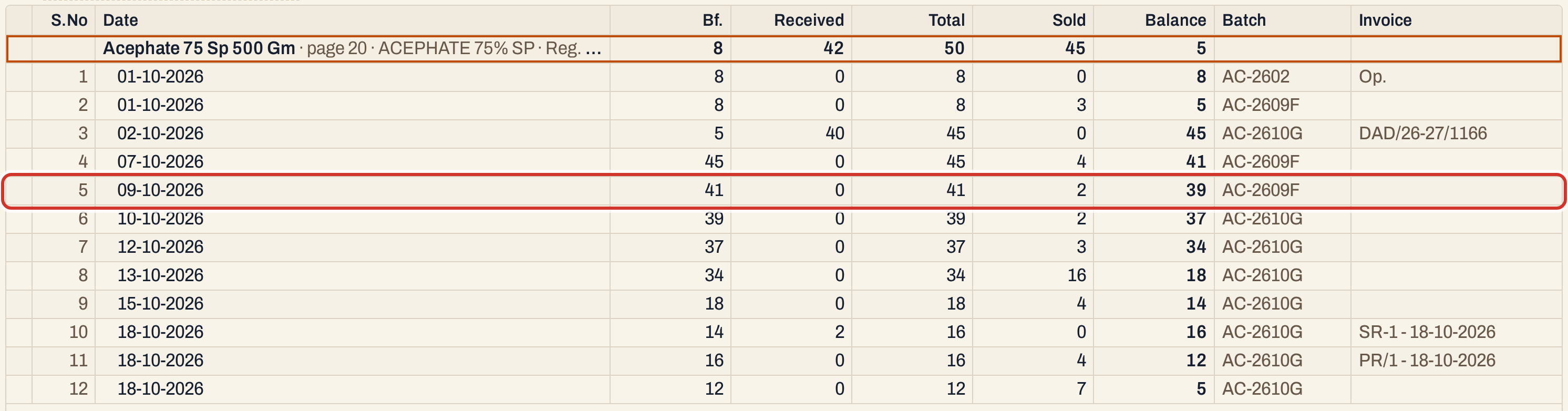 Summary: on 09-10-2026 two units were sold, and the line shows batch AC-2609F only.
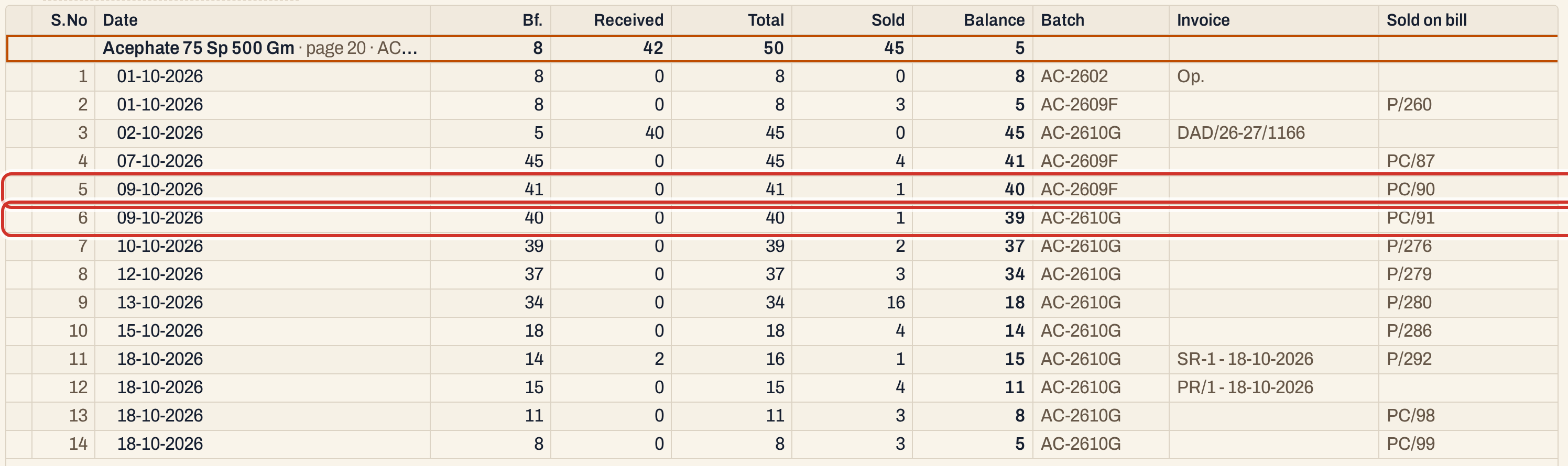 Detailed: the same day is two lines, one for each bill and batch. Each line’s bill number is in Sold on bill.
 A sales return (SR-1) and a purchase return (PR/1) on 18-10-2026. The sale of 1 unit on bill P/292 that day went on the sales return’s line, because it has the same batch.
Totals. The line at the bottom counts the items listed. It adds up the heading lines: the Bf. column is the sum of the items’ opening balances, Received and Sold their movements, and Balance the sum of their closing balances. The print’s total line gives only Received and Sold.
Print, mark and export
Press F10 to print. The print is the register’s own form on A4: the company’s name and address, the title APPENDIX-B with its description lines and “[See Sub Rule (2) of Rule 15]”, then the pesticide licence number when one is set (P.L. No. in Company Details), the category and the period. Every column has a ruled box. Each insecticide has a three-line heading above its lines:
- Particulars of the Insecticide: the technical name and the item’s name in brackets;
- Registration Number and the month and year of registration;
- Manufacture Name with its code in brackets, and the Page No (the register page, or the automatic number).
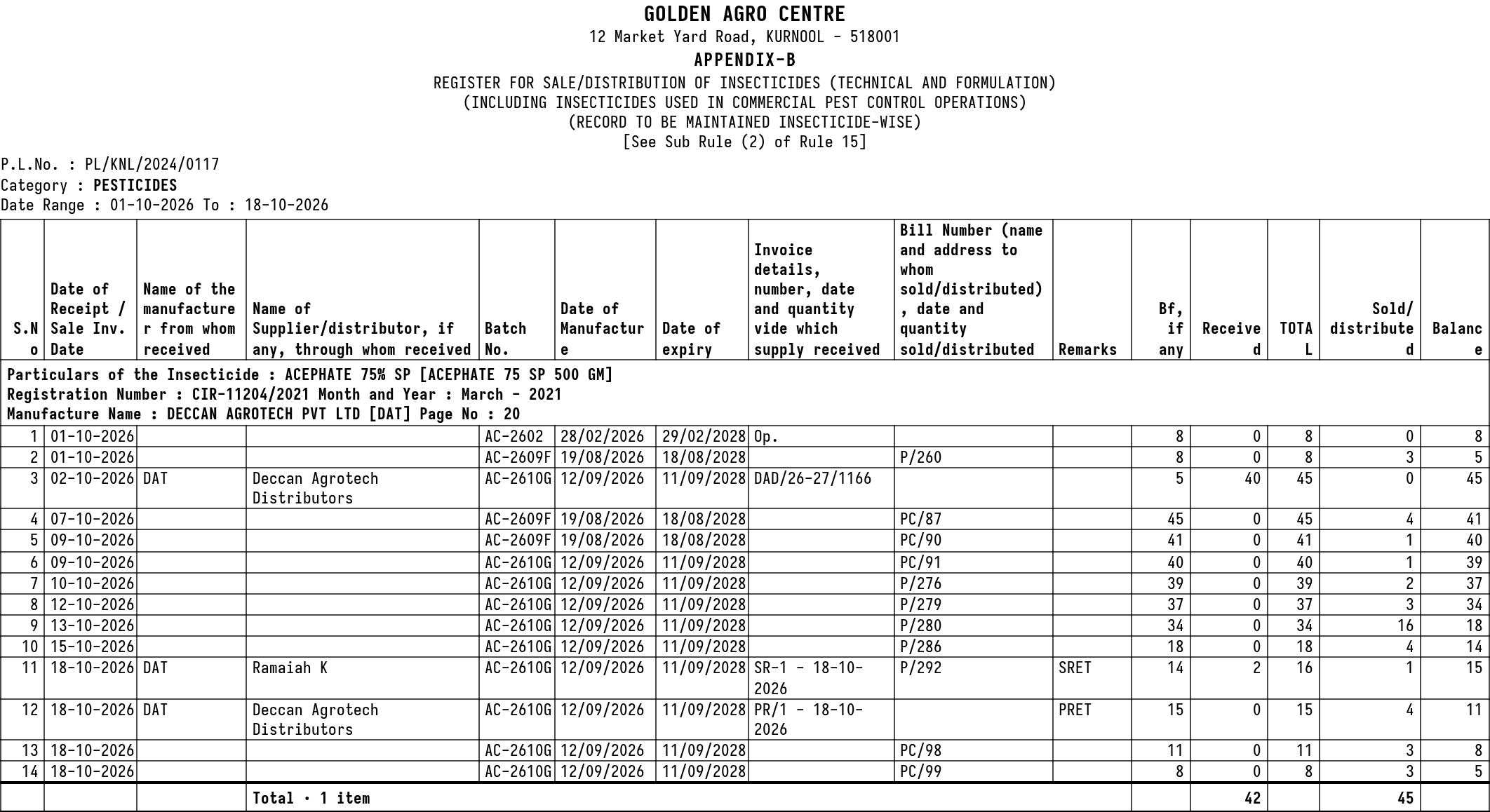 The print for Acephate in October, with Detailed sales.
- F2 marks an item, on its heading or on any of its lines. F8 marks them all. F10 then prints only the marked items, and the print says Marked items only.
- Enter on an item’s heading opens its stock ledger for the same period. It does nothing on a line.
- F12 saves the register as an Excel workbook with the same heading, columns and lines as the print.
- Alt+Enter gives the whole window to the list.
Form X and Form N are the other department forms in the same menu.
Updated 4 November 2026.