Godown Stock Board
On this page
If your shop keeps stock in more than one place, such as a godown and the counter, the Godown Stock Board tells you what each place holds. For every item it shows the stock in each godown on the date you choose, in units, in litres or kilograms and in cases. Stock that has not been placed in any godown is listed as Unassigned, so nothing is missing from the board.
Open the report
Press Alt+5 for Stock Reports, then Z for More Stock Reports and A. The board opens as on today, for all godowns and all categories. When stock is held in two or more places, each godown is a heading with its items under it.
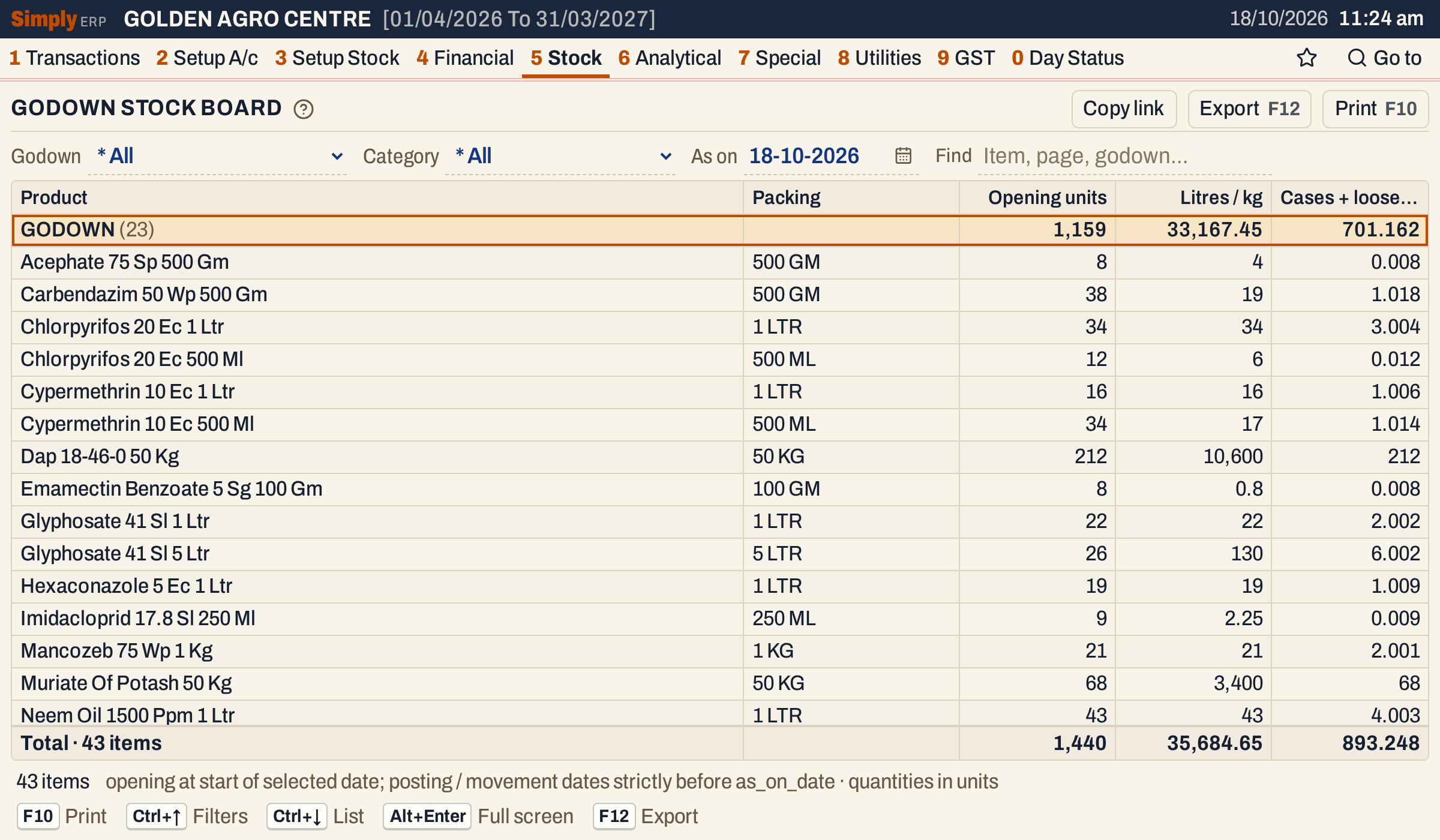 Each godown is a heading with the number of its items and their totals. GODOWN holds 23 items, 1,159 units in all.
What it lists
One line for each item in each godown where its stock is not nil. An item held in two godowns has a line under each. An item with no stock in a godown has no line under it, and a negative stock is shown in red.
Each item’s stock in a godown is built from what the books record about that godown:
- the item’s opening stock (3 G) placed in the godown;
- bills (purchases, sales, sales returns and purchase returns) and goods received or delivered (1 P) whose stock was placed in the godown, which is the godown chosen on the bill line (the Godown column, shown when the books have godowns) or given to the entry in 3 J;
- transfers into and out of the godown (3 J).
Anything that was not placed in a godown is Unassigned. A transfer between godowns only moves stock from one to the other, so the total of an item over all godowns does not change.
Two things are left out on purpose:
- damage and breakage entered in 1 V do not reduce the board;
- an opening balance placed in the retail pool in 3 J is not counted in a godown’s opening.
The date
The board is the stock at the start of the As on date. Documents counted on that day are left out, and so are transfers dated that day. Opening stock has no date and is always counted. The board opens on today, so today’s bills are not yet in it. To include a day’s bills, choose the next day.
A bill counts on the day it is posted: a sale or a purchase return on the bill date, a purchase or a sales return on the date in its Recd. field. Goods received or delivered count on their own date. A bill made from goods already received or delivered counts only the units those goods did not cover.
Columns
| Column | What it shows |
|---|---|
| Godown | The godown. When the lines fall in two or more godowns, each godown is a heading with the number of its items, in name order, and this column is not shown. With lines in one godown only, it is a column. Stock in no godown is under Unassigned. |
| Product | The item’s name, which is its product group’s name and its packing. |
| Packing | The item’s packing. |
| Opening units | The stock of the item in the godown at the start of the As on date, in units, rounded to a whole number. |
| Litres / kg | The units multiplied by the packing’s size in litres or kilograms. |
| Cases + loose / 1000 | The whole cases the stock makes, followed by the loose units after the decimal point: 0.008 is no case and 8 loose units, 3.004 is 3 cases and 4 loose units. Needs the item’s Per case figure (3 C). |
A godown’s heading line and the total line add up each column. Items are in name order within a godown; click a column title to sort them.
Choices
| Choice | What it does |
|---|---|
| Godown | One godown, or * All (the usual), which also lists Unassigned. |
| Category | One item category, or * All (the usual). |
| As on | The date, today at first. It must fall in the financial year. |
| Find | Shows only the lines whose godown, product or packing matches what you type. |
Click a column title to sort by it, and click again to reverse. Every choice is kept in the page address, so Copy link gives a link that opens the same report.
 The choices above the grid.
How the figures are worked out
For each item and godown, SimplyERP adds the stock placed in the godown and takes away what left it, using only documents dated before the As on date:
-
- the item’s opening stock placed in the godown;
-
- purchases and sales returns placed in the godown, and goods received into it;
- − sales and purchase returns placed in the godown, and goods delivered out of it;
-
- transfers into the godown and − transfers out of it.
The result is rounded to a whole number of units and shown if it is not nil. Litres / kg is that number times the packing’s size, with up to three decimals. Cases + loose / 1000 is the number of whole cases (units divided by the item’s Per case figure, without the remainder) plus the remaining units divided by 1,000. It shows 0 for a negative stock and when the item has no Per case figure. A column’s total is the plain sum of the figures above it, as shown.
An item’s units over all its godowns, with Unassigned, add up to its stock at the start of the As on date, except for the damage and the retail-pool opening the board leaves out. In the print below, Acephate 75 Sp 500 Gm has 8 units in GODOWN and 6 in SHOP, so its stock is 14.
One godown
Choose a godown to see only its stock.
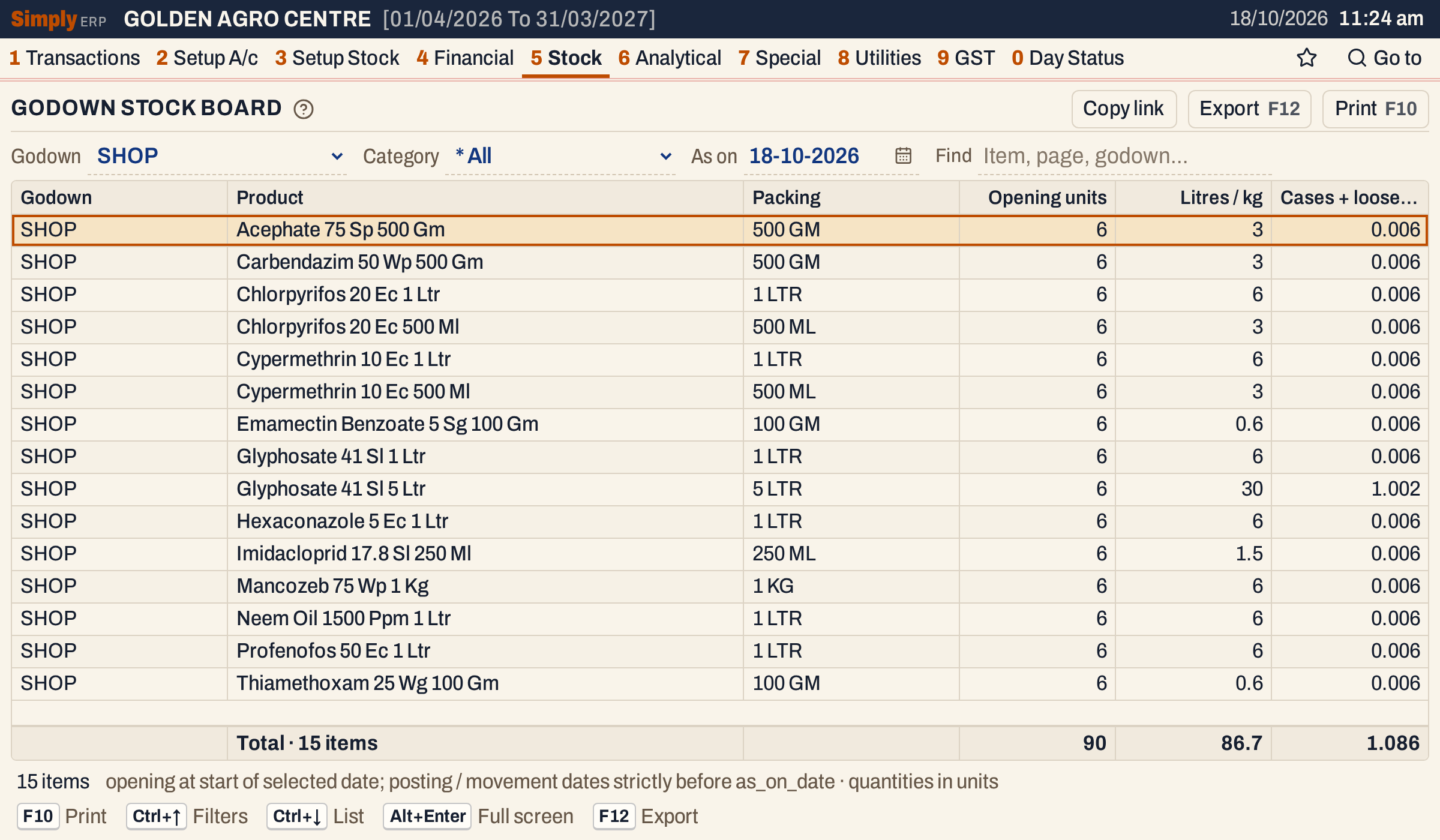 SHOP holds 6 units of each of fifteen pesticide items, after a transfer into it and the counter’s sales out of it. The Godown column is shown because only one godown is listed.
Stock in no godown
Stock that was never placed in a godown, such as the seeds here, is listed under Unassigned.
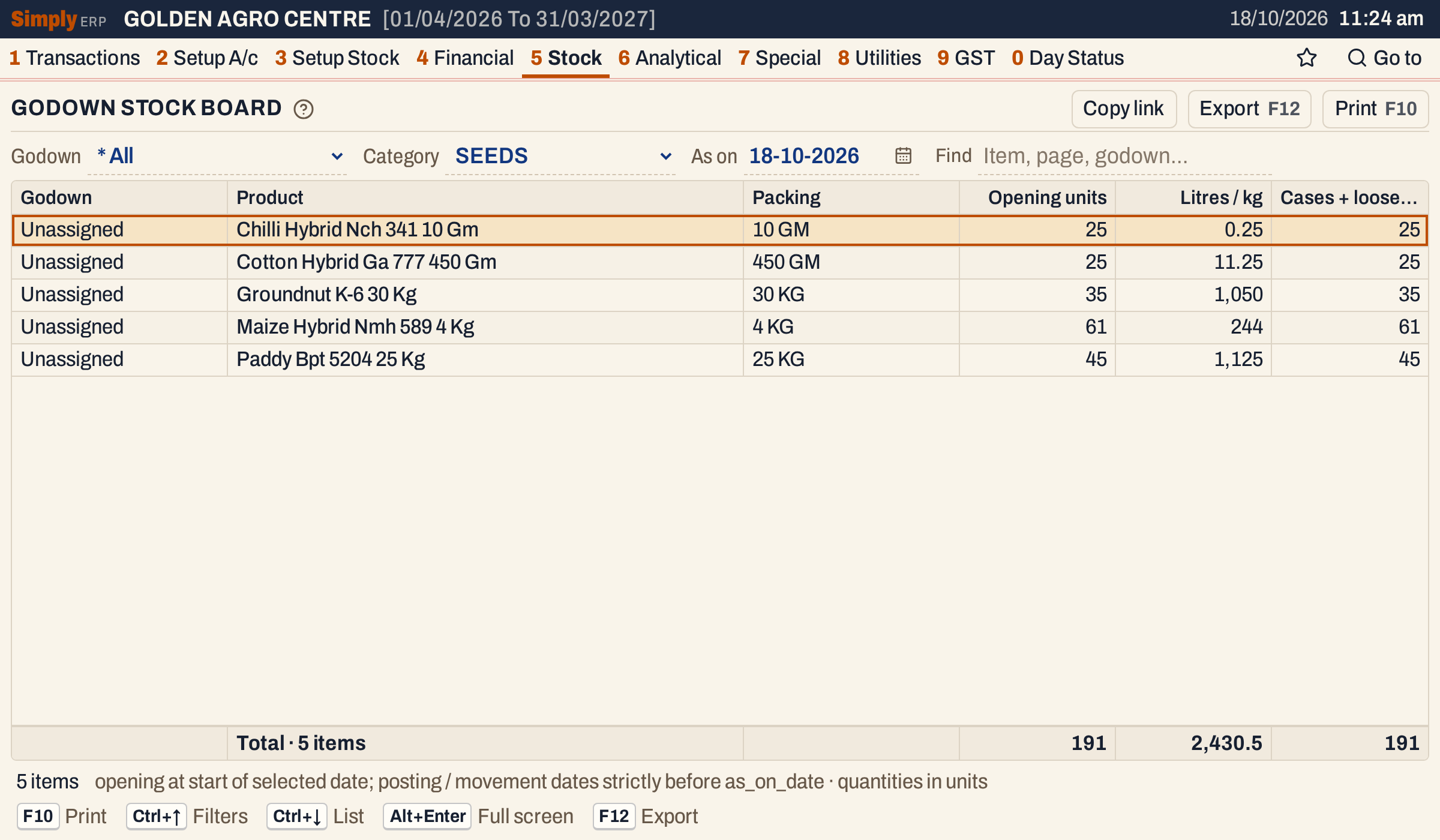 None of the seed stock has a godown, so each line shows Unassigned.
Open, print and export
- Enter on an item opens its Stock Ledger from the start of the financial year to the day before As on, for all godowns.
- Lines cannot be marked.
- F10 prints the board as it is on the screen, headed [ GODOWN - STOCK BOARD ] with the category, the godown (All godowns when none is chosen) and the As on date. Each godown is a heading with its count and totals, and the lines are numbered through the whole print.
- F12 saves it as an Excel workbook.
- Alt+Enter gives the whole window to the list.
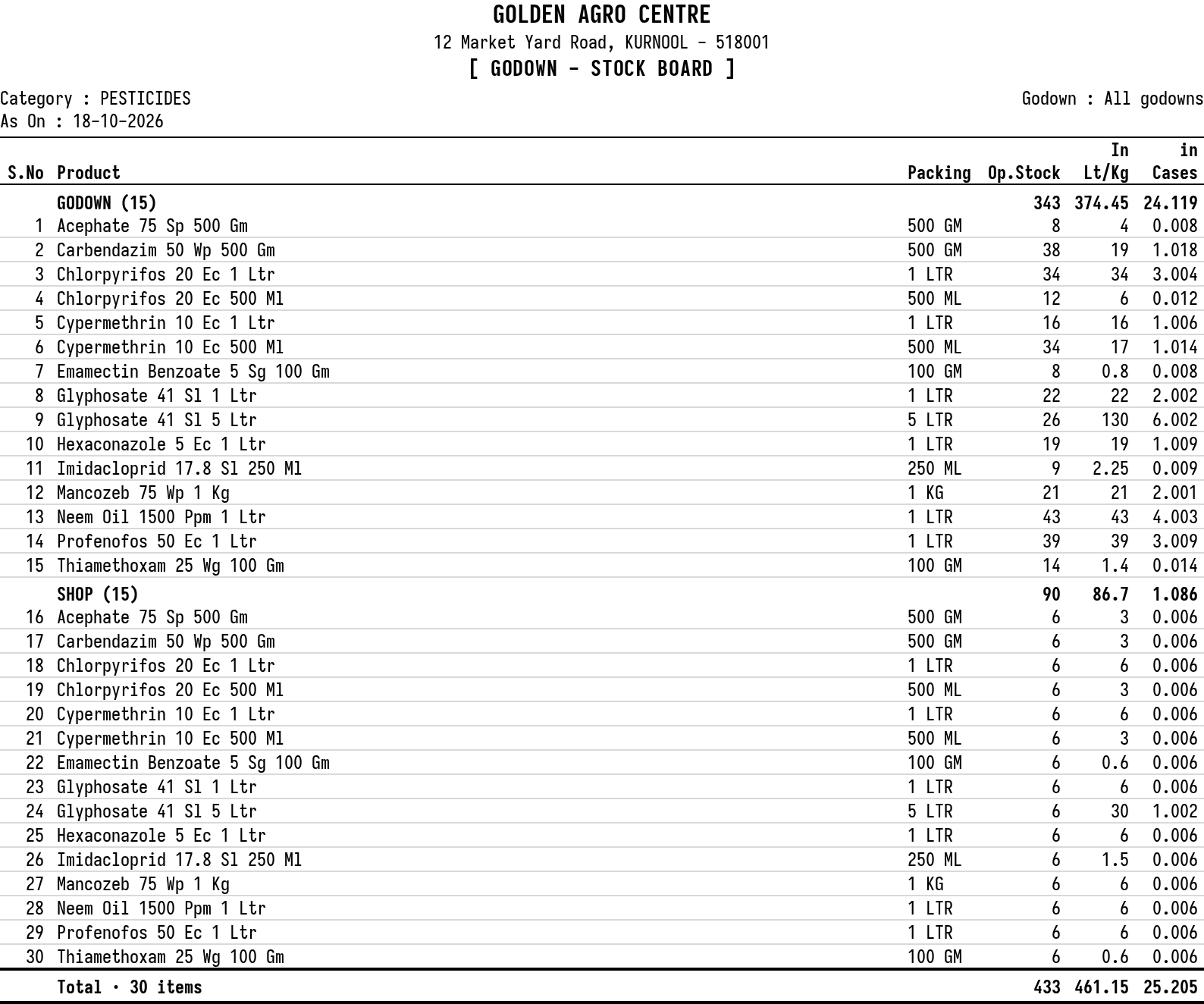 The print for one category, with godown headings and a running serial number.
Updated 4 November 2026.