GST Sales/Purchase Details
On this page
GST Sales/Purchase Details lists every item line of your sale bills, purchase bills, sales returns or purchase returns in a period, one line for each item on each bill, with the amount before GST, the CGST, SGST and IGST of the line, and its total. It is the line by line list behind the GST returns: use it to find which bill and which item a GST figure comes from, or to check one category’s GST.
Open the report
Press Alt+9 for GST Reports, then I. The report opens on sales, from the first day of the financial year to the working date, for all categories.
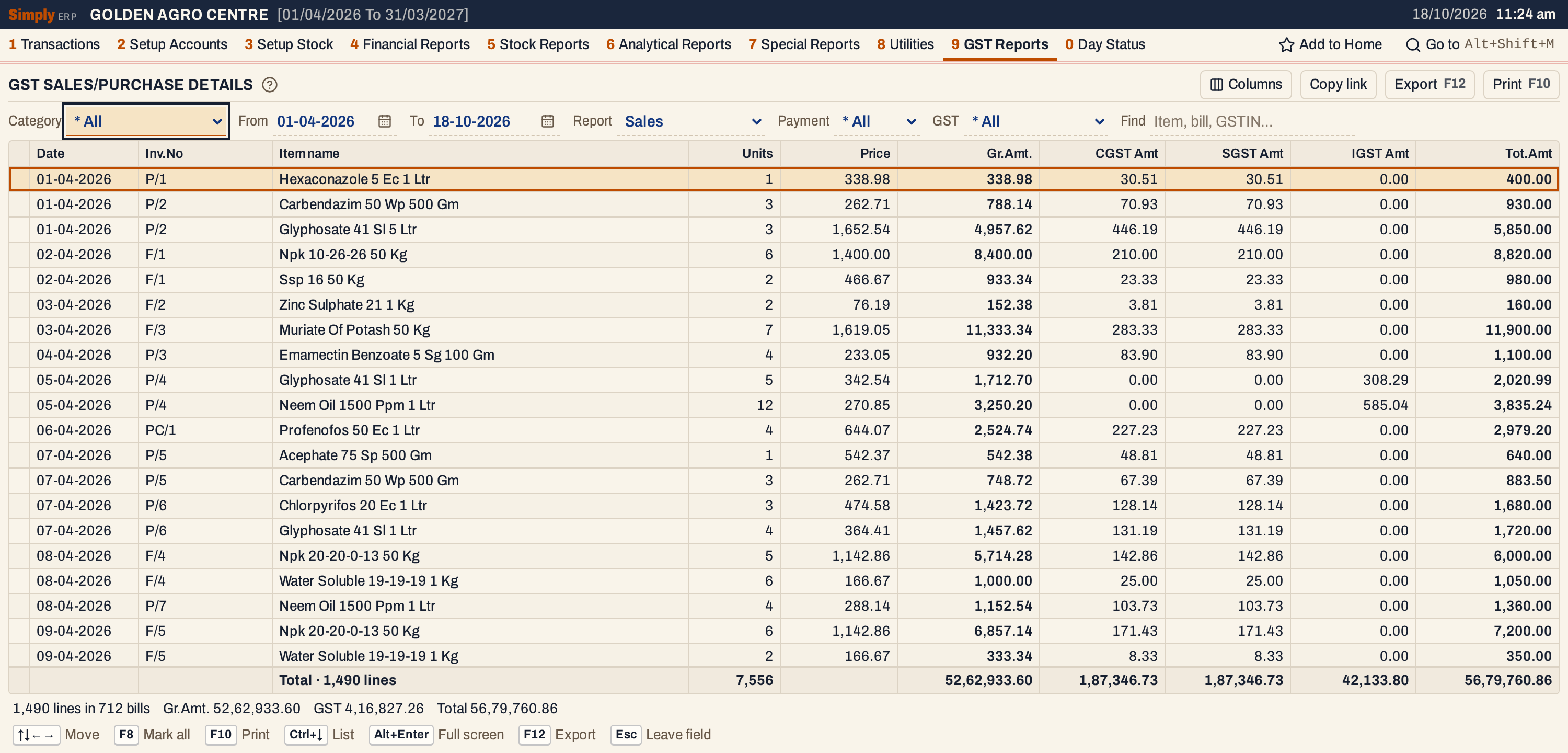 The sales of the year so far. Each line is one item on one bill. The totals line and the status line add up every line, not only the lines in view.
What it lists
- Sales (sale bills of every bill book), Purchases (purchase bills), Sales returns and Purchase returns: one kind at a time, chosen in Report.
- Only the item lines of the bills. The charge lines of a bill (freight, hamali and so on), credit and debit notes, other purchases and vouchers are not in this report.
- A bill is in the period by its own date: the bill date of a sale, and the supplier’s bill date of a purchase, the date the supplier’s GSTR-2B shows. A purchase or a sales return that was received on another day also shows that day under Recd.
- The category is the item’s category as it is now. Choose one in Category, or * All.
Columns
| Column | What it shows |
|---|---|
| Date | The bill date. |
| Recd. | The day the goods were received, when that is not the bill date. Shown only when at least one listed line was received on another day. Input tax belongs to the month of that day (GSTR-3B, GSTR-2 by Received date). |
| Inv.No | The bill number: your own for a sale, the supplier’s for a purchase. |
| GSTIN | The party’s GSTIN. Off until you choose it in Columns. |
| Item name | The item. |
| Category | The item’s category. Off until chosen. |
| Units | The units on the line. |
| Price | The unit price (see below). |
| Gross | The line’s amount before any discount, as saved: the units times the price, give or take a paisa on a bill whose prices include GST. Off until chosen. |
| Disc. | The discount on the line. Off until chosen. |
| Gr.Amt. | The amount before GST: the gross less the discount. |
| CGST Amt, SGST Amt, IGST Amt | The tax of the line. A column shows only when some listed line has a figure in it. |
| GST Amt | CGST + SGST + IGST. Off until chosen. |
| Tot.Amt | Gr.Amt. + GST. |
The totals line under the list adds up Units, Gross, Disc., Gr.Amt., each tax, GST Amt and Tot.Amt, for the columns that are on. Price has no total. The status line gives the number of lines and bills, the Gr.Amt., the GST and the Total.
Choices
 The choices above the list.
| Choice | What it does |
|---|---|
| Category | * All, or one item category. |
| From, To | The period, inside the financial year. The report opens on the year’s first day to the working date. |
| Report | Sales, Purchases, Sales returns or Purchase returns. |
| Payment | For sales and sales returns only: * All, Cash bills or Credit bills. |
| GST | For sales and sales returns only: * All, bills to Registered customers (with a GSTIN) or Unregistered ones. |
| Find | Keeps the lines that match what you type in the item name, bill number, GSTIN, category or dates. |
| Columns | Switches on GSTIN, Category, Gross (before discount), Discount and GST amount. The print leaves out the same columns. |
Click a column title to sort by it, and click again to reverse. Every choice is kept in the page address, so Copy link opens the same report again. Without a sort the lines are in the order of date, bill number and item name.
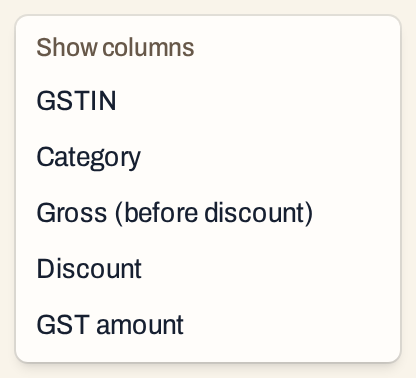 The five columns that are off until you choose them.
How the figures are worked out
- Lines. Each line’s units, price, discount, amount before GST, CGST, SGST and IGST are the figures saved on the bill. SimplyERP does not calculate the tax again.
- Gr.Amt. is the amount before GST. The tax columns are the CGST, SGST and IGST of the line as saved, and Tot.Amt is Gr.Amt. plus the three, to two decimals.
- Gross and Disc. In the October purchases below, a 40-unit line of Mancozeb at 380.00 has a Gross of 15,200.00 and a Disc. of 304.00, so its Gr.Amt. is 14,896.00.
- Price is the price entered on the bill. The exception is a sale to a customer without a GSTIN: the bill’s price includes GST, and SimplyERP shows the price before GST, the price divided by 1 plus the GST rate, to two decimals. The first line of the sales above, one litre of Hexaconazole sold for 400.00 including GST, shows 338.98, and its Tot.Amt. is 400.00.
- Returns are listed as positive figures, like the bills. They are not taken off in this report. Pick Sales returns or Purchase returns to see them.
- Same bill, several items. Each item is a line of its own with the bill’s number. Lines of one bill that has goods at two rates are separate lines with their own tax.
- Tax columns. A sale inside your state shows CGST and SGST, a sale to another state shows IGST. In the pictures P/4 has IGST only.
Purchases and the received date
A purchase is in the period of the supplier’s bill date, and Recd. shows the day you received it. The first purchase below, DAD/26-27/1166, is dated 01-10-2026 and was received on 02-10-2026.
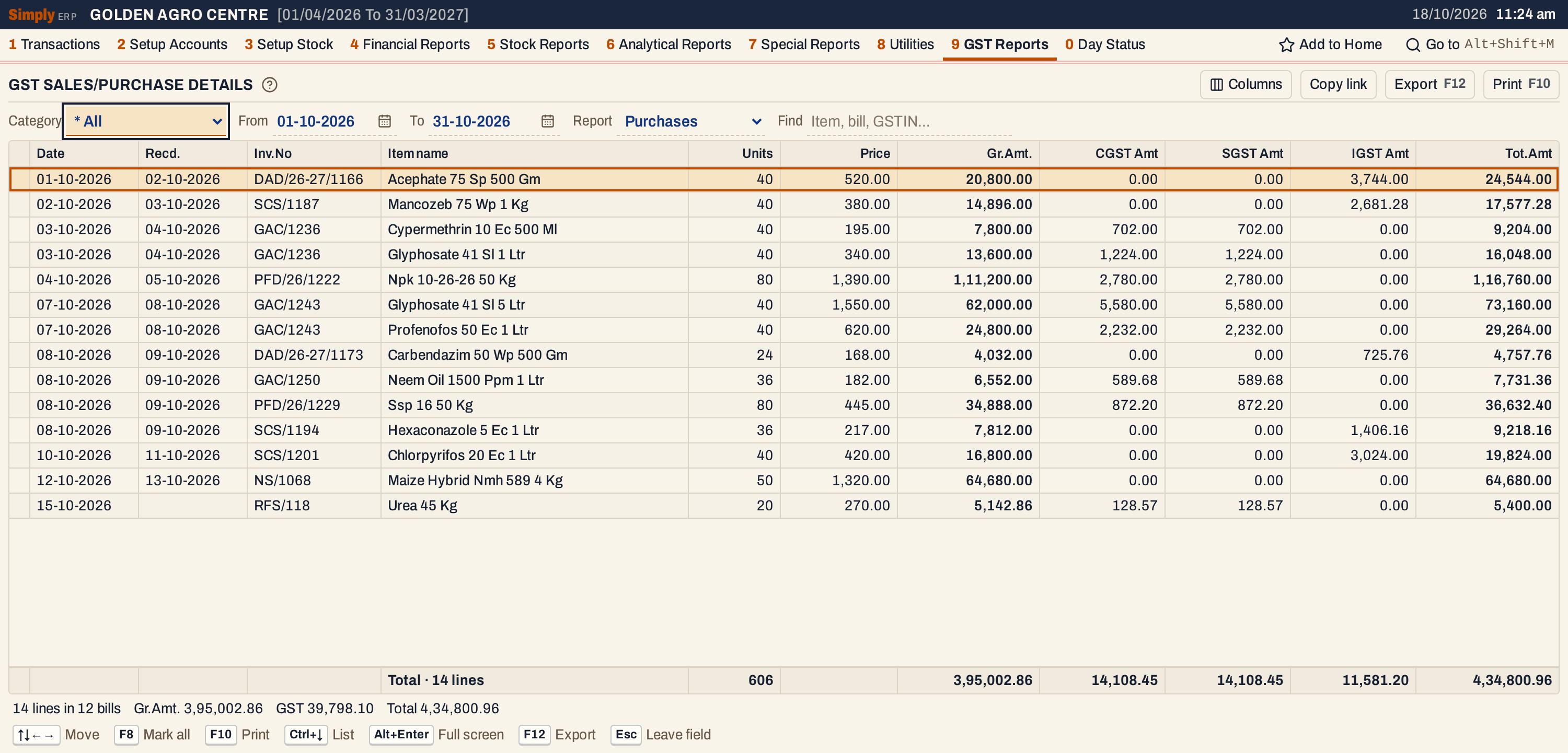 October’s purchases: 14 lines in 12 bills, Gr.Amt. 3,95,002.86 and GST 39,798.10. The last line is a cash purchase from a supplier without a GSTIN, which shows no Recd. because it was received on the day it is dated.
Switching on the columns that are off at first gives the supplier’s GSTIN, the category, and the gross and discount of each line:
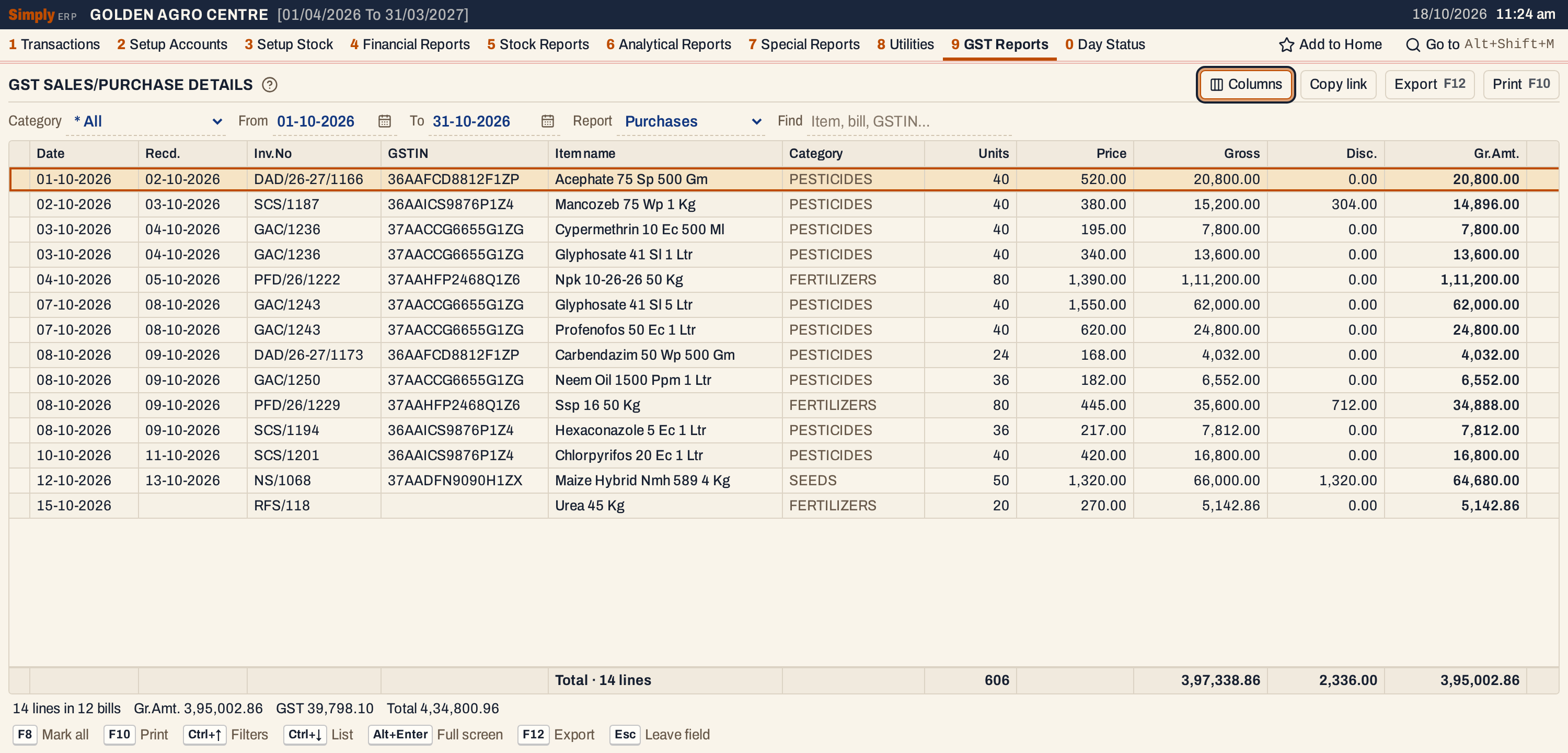 With GSTIN, Category, Gross and Discount on. The gross, 3,97,338.86, less the discount, 2,336.00, is the Gr.Amt., 3,95,002.86.
Because the bill date decides the period here, a purchase received on the 1st of a month but dated in the month before is listed in the month before. GSTR-2 and GSTR-3B count by the received date unless you ask for the invoice date.
Returns
 A purchase return of three litres to a supplier in another state: 1,260.00 before GST and 226.80 of IGST, 1,486.80 in all.
A purchase return is listed under your own return number (PR/1) with the date you made it. A sales return is listed under the number of the customer’s return as entered on it, with a Recd. date when the goods came back on another day.
Open, mark, print and export
- Enter on a line opens its bill.
- F2 marks a line, F8 marks them all, and F10 then prints only the marked lines.
- F10 prints the list as shown, with the period, the category, Payment and GST choices, and Find in its heading. The heading names the report: GST SALES DETAILS, GST PURCHASES DETAILS, GST SALES RETURNS DETAILS or GST PURCHASE RETURNS DETAILS.
- F12 saves it as an Excel workbook, with the figures as numbers.
- Alt+Enter gives the whole window to the list.
Updated 4 November 2026.