Invoice Series Status
On this page
Invoice Series Status checks the numbering of your GST bills. For each series it shows the first and last number used in the period, how many numbers that range covers, how many documents were issued, and how many numbers are missing. Check it before you file GSTR-1, which gives the first and last number of each series, so that a missing bill does not come as a surprise.
Open the report
Press Alt+9 for GST Reports, then F. The report opens from the first day of the financial year to the working date.
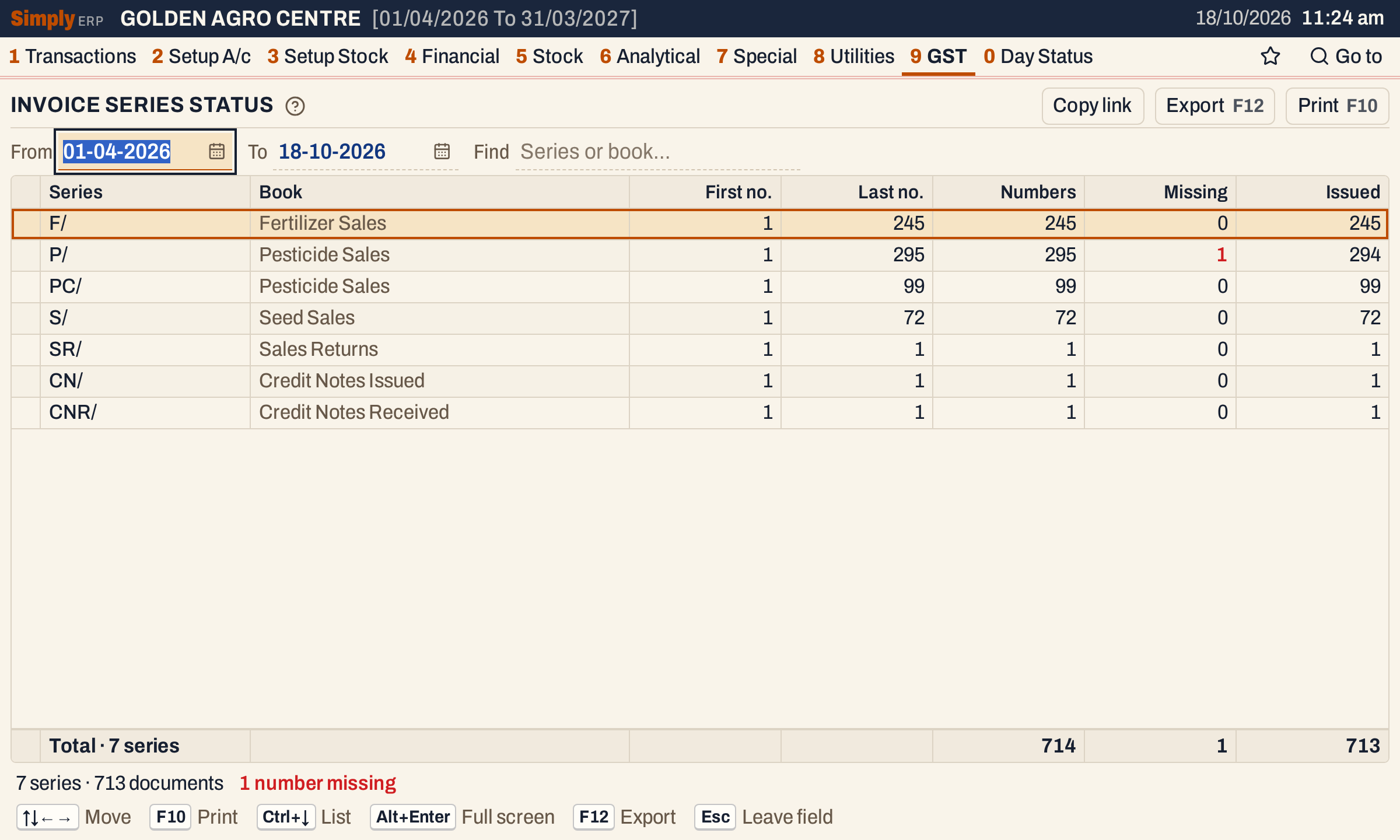 Seven series, 713 documents. In this picture one bill of the Pesticide Sales book, P/150, was deleted, so P/ has 295 numbers, 294 issued and 1 missing.
What it lists
One line for each document series that has at least one of these documents with a posting date in the period:
- sale bills;
- sales returns;
- GST credit notes issued;
- GST credit notes received.
A document counts only when it has at least one item line. Purchase bills, purchase returns, debit notes, other purchases, receipts, payments and journals are not in this report. A series is the numbering of a bill book: a prefix such as P/ and the number the next bill takes (set up in Bill Books & Series, 8 C). A book can have more than one series: in the picture, Pesticide Sales has P/ and PC/. Each series has its own line, even when two books use the same prefix.
The lines are in this order: sale series first, then the sales returns series, then the credit note series, each by the series name.
Columns
| Column | What it shows |
|---|---|
| Series | The series prefix: F/, P/, S/ and so on. |
| Book | The bill book the series belongs to (Fertilizer Sales, Pesticide Sales, Credit Notes Issued). |
| First no. | The lowest number of the series among the documents in the period. |
| Last no. | The highest number among them. |
| Numbers | How many numbers the range covers: Last no. − First no. + 1. |
| Missing | The numbers in the range that no document in the period holds: Numbers − Issued. Shown in red when it is above 0. |
| Issued | The number of documents in the period. |
The totals line adds up Numbers, Missing and Issued. The status line says how many series, how many documents and how many numbers are missing.
Choices
 The choices above the list.
| Choice | What it does |
|---|---|
| From, To | The period, inside the financial year. The report opens from the first day of the year to the working date. |
| Find | Keeps the series whose name or book matches what you type. |
Click a column title to sort by it, and click again to reverse. Every choice is kept in the page address, so Copy link opens the same report again.
How the figures are worked out
- Which date. A document is in the period by its posting date, From and To both included. A sale and a credit note issued are posted on their own date. A sales return and a credit note received are posted on the date in their Recd. field, which can be later than the document’s date.
- Issued counts the documents of the series in the period.
- First no. and Last no. are the smallest and largest numbers among those documents, taken from the number the series gave each of them.
- Numbers is Last no. − First no. + 1. A series with one document has Numbers 1.
- Missing is Numbers − Issued. It counts the numbers inside the range that have no document in the period. The usual cause is a bill that was deleted: its number is not given to another bill. A deleted first or last bill is not counted, because the range then starts or ends at the next number that exists.
- Totals add up the lines listed. The first and last numbers have no total.
So Missing 0 means every number from the first to the last has a document in the period. In the picture, Pesticide Sales P/ has numbers 1 to 295: 295 numbers, 294 documents, and 1 missing.
A period that starts later in the year has its own first number, so start at the first day of the year to check a series from its first bill.
Finding a missing bill
The report does not name the missing number. To find it, open All Bills (1 Y) for the series and look for the gap in the numbers, or check Changed Bills (8 S), which lists bills that were deleted or changed. The Documents issued table in the filing JSON of GSTR-1 works out the first number, last number and missing count in the same way, but it also lists debit notes issued, shows sales returns as credit notes, leaves out credit notes received, and counts documents that have no item lines.
Open, mark, print and export
- Lines do not open a bill. F2 marks a series and F10 then prints only the marked series.
- F10 prints the report under the heading GST - SALE INVOICE DOC. NUMBERS, with the period. The print names the columns St.No. (first number), En.No. (last number), Tot.Inv. (numbers), Cancel (missing) and Balance (issued).
- F12 saves it as an Excel workbook.
- Alt+Enter gives the whole window to the list.
Updated 4 November 2026.