GSTR-2
On this page
GSTR-2 lists what you bought in a period, in the tables of the GSTR-2 return: purchases from suppliers with a GSTIN (B2B), from suppliers without one (B2CL and B2CS), purchases with no tax (Exempt), the HSN summary, and returns and notes (CDNR). It also has a summary of each supplier’s bills. Each table is a view you choose, so you can check the figures against your purchase bills and the supplier’s own GSTR-1 or GSTR-2B.
Open the report
Press Alt+9 for GST Reports, then C. The report opens on the month of the working date, from its first day to its last, in the B2B view. The pictures on this page are October 2026 on the sample books, with a cash purchase from a supplier without a GSTIN, a purchase return and a credit note received added so that every view has a line.
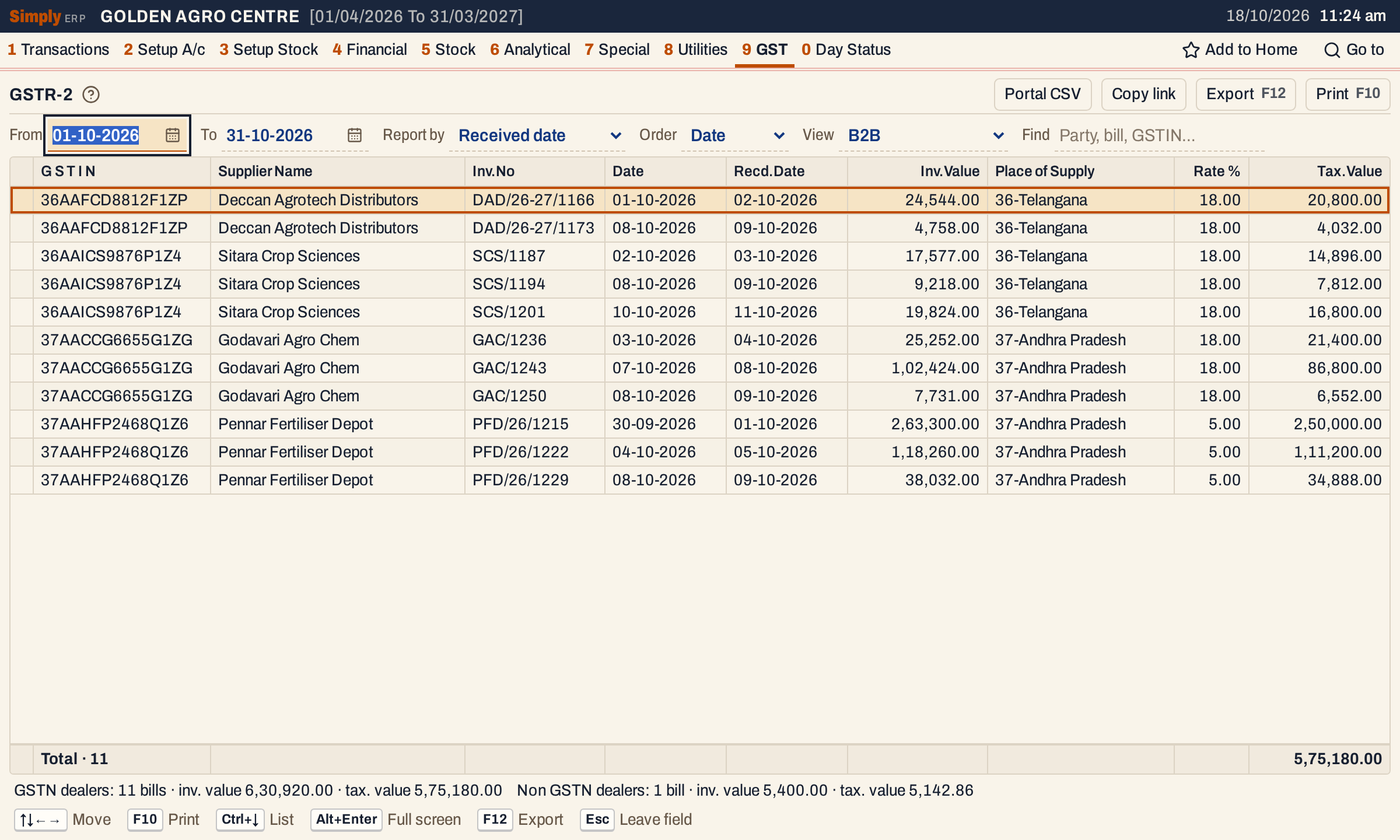 The B2B view. Each line is one purchase bill at one tax rate, under the supplier’s own bill number and date, with the day you received it beside it.
What it lists
GSTR-2 reads the purchase side of your books:
- purchase bills of every purchase book (their goods lines only);
- other purchases (1 L);
- purchase returns, and GST credit notes and debit notes received.
It does not read sales (see GSTR-1), receipts, payments, journals or the non-GST credit and debit notes (1 N and 1 O). The report works out no tax of its own: it adds up the amounts saved on the bills and notes. The charge lines of a purchase bill are not read here, so the GST on a purchase’s freight or other charges is in GSTR-3B but not in GSTR-2.
Where each document goes
| Document | Supplier | View |
|---|---|---|
| Purchase bill or other purchase | Has a GSTIN, line charges tax | B2B, for any state and any value |
| Purchase bill | Has a GSTIN, line charges no tax | Exempt only, by inter-state or intra-state |
| Purchase bill or other purchase | No GSTIN, line at a rate above 0% | B2CL, one line for each bill and rate |
| Purchase bill | No GSTIN, line charges GST (CGST or IGST not nil) | also B2CS, added up by place of supply and rate |
| Purchase bill | No GSTIN, line at 0% | Exempt only |
| Purchase return, credit note, debit note received | Any | CDNR, one line for each document, rate and original bill |
| Purchase bill, return and note | Any | HSN, added up by HSN code (other purchases are not in HSN) |
How the choices are made:
- Registered or not is whether the bill was made with a supplier that has a GSTIN.
- Inter-state is a bill charged IGST, which is a supplier in another state than your company’s.
- Exempt is decided by the line’s tax: a purchase bill line with no CGST, SGST or IGST at all. It does not need the rate to be 0%.
- B2CL here is not limited to large inter-state bills. In GSTR-2 every purchase line at a rate above 0% from a supplier without a GSTIN is listed in B2CL, whatever the state and value.
- A bill with several rates goes into its view once for each rate. The bill’s value is repeated on each of its lines and is counted once in the totals.
Choices
 The choices above the list.
| Choice | What it does |
|---|---|
| From, To | The period, inside the financial year. Changing From moves To to the day before the same date next month, so a first of the month gives that whole month. Setting To before From moves both dates to that day. |
| Report by | Received date (the default) counts a purchase bill on the day you received the goods. Invoice date counts it on the supplier’s bill date. See below. |
| Order | Date (the default): by the supplier’s bill date, then your series and number. GSTIN: by the supplier’s GSTIN first. It changes B2CL and CDNR; B2B is always listed by GSTIN, then date, and the other views have their own order. |
| View | B2B, B2CL, B2CS, Exempt, HSN, CDNR or GSTIN summary. Default B2B. |
| Find | Keeps the lines that match what you type in any of their columns: supplier, bill number, GSTIN, place and so on. |
Click a column title to sort by it, and click again to reverse. Every choice is kept in the page address, so Copy link opens the same report again.
The views
B2B
Columns: G S T I N, Supplier Name, Inv.No, Date, Recd.Date, Inv.Value, Place of Supply, Rate % and Tax.Value. Recd.Date appears only when at least one listed bill was received on another day than its bill date.
- Inv.No and Date are the supplier’s own bill number and date, as the supplier’s return and GSTR-2B show them. Recd.Date is the day the goods were received.
- Tax.Value is the taxable value of the bill’s goods at that rate, after discounts and before GST.
- Inv.Value is the bill’s total as saved, with its charges and round off, so it is not always the taxable values plus tax.
B2CL
 B2CL: a cash purchase from a supplier without a GSTIN, ₹5,400.00 in all.
Columns: Inv.No, Date, Recd.Date (when it differs), Inv.Value, Place of Supply, Rate % and Tax.Value.
B2CS
 B2CS adds up the purchases from suppliers without a GSTIN that charged GST, by place of supply and rate.
Columns: Place of Supply, Rate %, Tax.Value. The place of supply is the state of the supplier’s address on the bill. Only purchase bills are added; returns and notes are not taken off.
Exempt
 Exempt: October’s seed purchases, which charged no tax, from suppliers with a GSTIN in the shop’s own state.
Columns: Description, Nil Rated, Exempted, Non-GST. The description is one of four: Inter-State or Intra-State supplies from registered or Unregistered persons. The goods lines of purchase bills that charge no tax are added in Exempted. Nil Rated and Non-GST are always 0.00: SimplyERP does not tell nil-rated, exempt and non-GST goods apart.
HSN
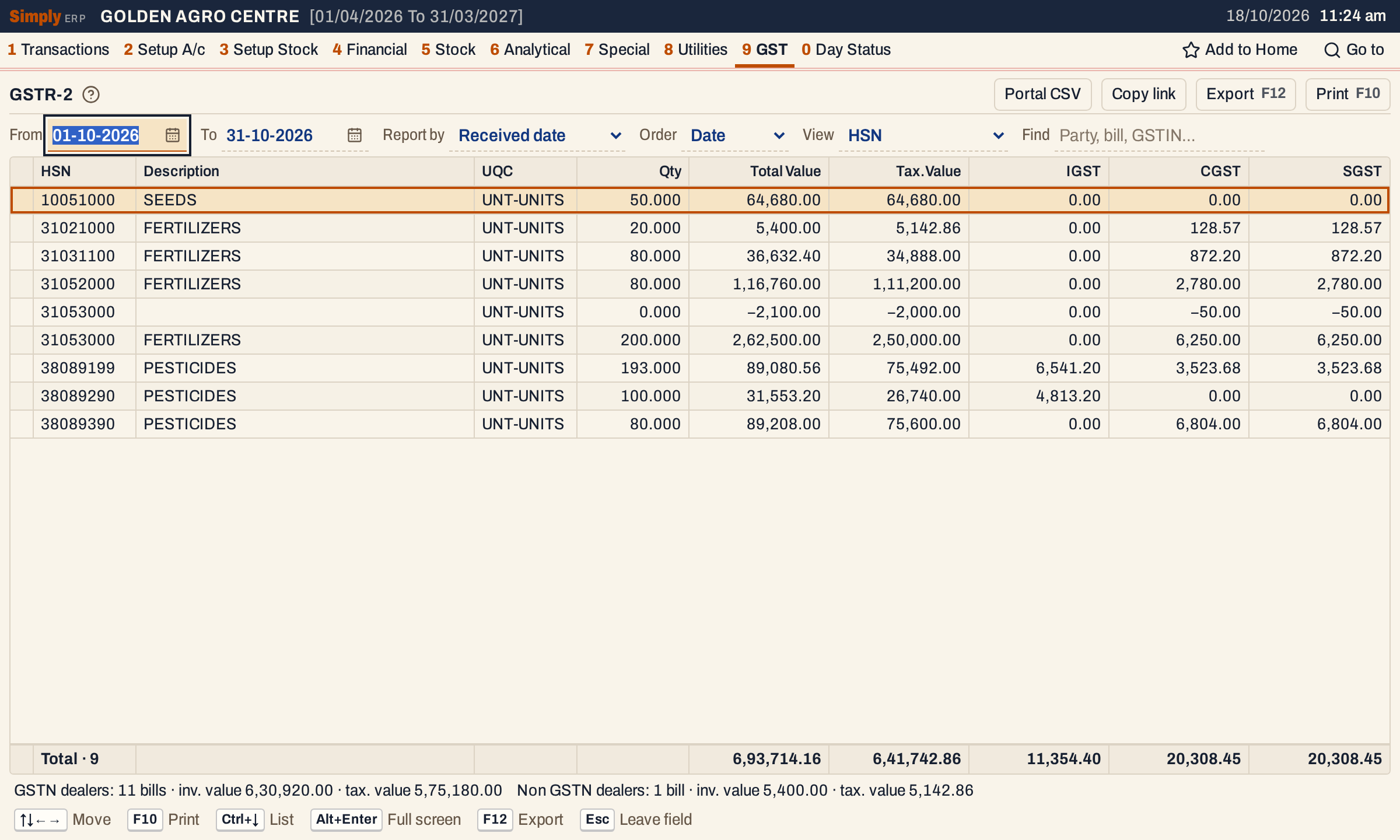 HSN: 9 lines, taxable value 6,41,742.86 in all. The credit note’s line 31053000 is its own line with no description and negative figures.
Columns: HSN, Description, UQC, Qty, Total Value, Tax.Value, IGST, CGST, SGST.
- One line for each HSN code and description, whatever the rate: a code bought at 5% and at 18% is one line (there is no Rate % column).
- The HSN code of a bill line is the item’s code as it is now. A note line has the code typed on the note.
- Description is the item’s category (Seeds, Fertilizers, Pesticides). A note line has no item, so it has a category only when the note covers one category; otherwise it shows the line’s narration, if it has one.
- UQC is always UNT-UNITS and Qty is the units bought. A purchase return takes its units off. Notes carry no quantity.
- Total Value is Tax.Value plus IGST, CGST and SGST.
- Returns and credit notes are included with minus signs, debit notes with plus. Purchases from suppliers without a GSTIN are included. Other purchases are not.
CDNR
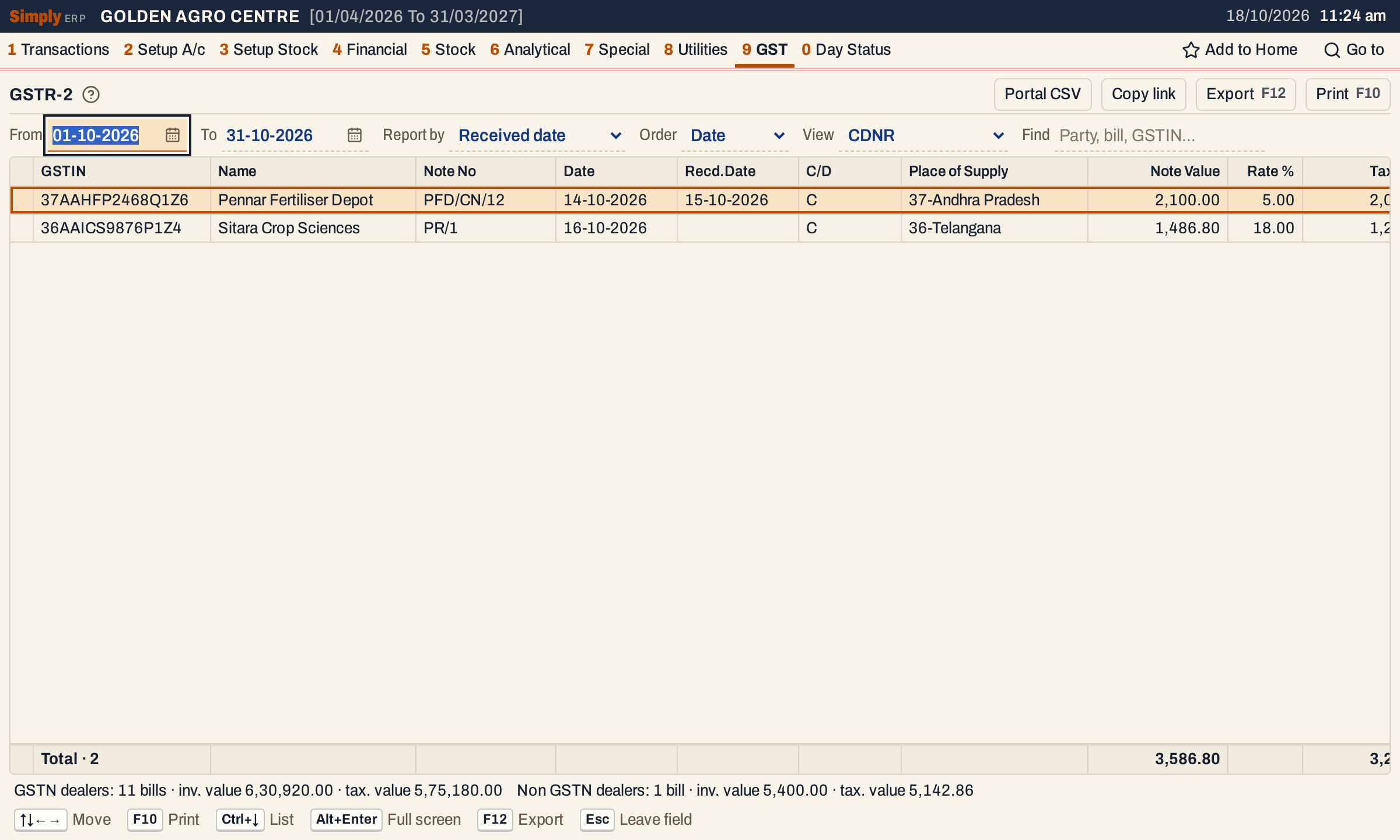 CDNR: a credit note received (PFD/CN/12) and a purchase return (PR/1), both credit notes.
Columns: GSTIN, Name, Note No, Date, Recd.Date (when it differs), C/D, Place of Supply, Note Value, Rate %, Tax.Value, Orig.Inv.No and Orig.Date.
- A credit note received has the supplier’s note number and date. A purchase return is listed as a credit note under your own series number (PR/1).
- C/D is C for a purchase return and a credit note received, D for a debit note received.
- Note Value and Tax.Value are shown without a sign. Note Value is the value of the note’s lines at that rate with their tax, not a bill total.
- Orig.Inv.No and Orig.Date are the bill and date the note refers to, when the note names them.
- Notes from suppliers without a GSTIN are listed here too, with no GSTIN.
 Scrolled to the right: the note’s value, rate and tax value, and the original bill it corrects. PR/1 refers to bill SCS/1201 of 10-10-2026. The original bill number of the first note is cut short on screen, and its date is 30-09-2026.
GSTIN summary
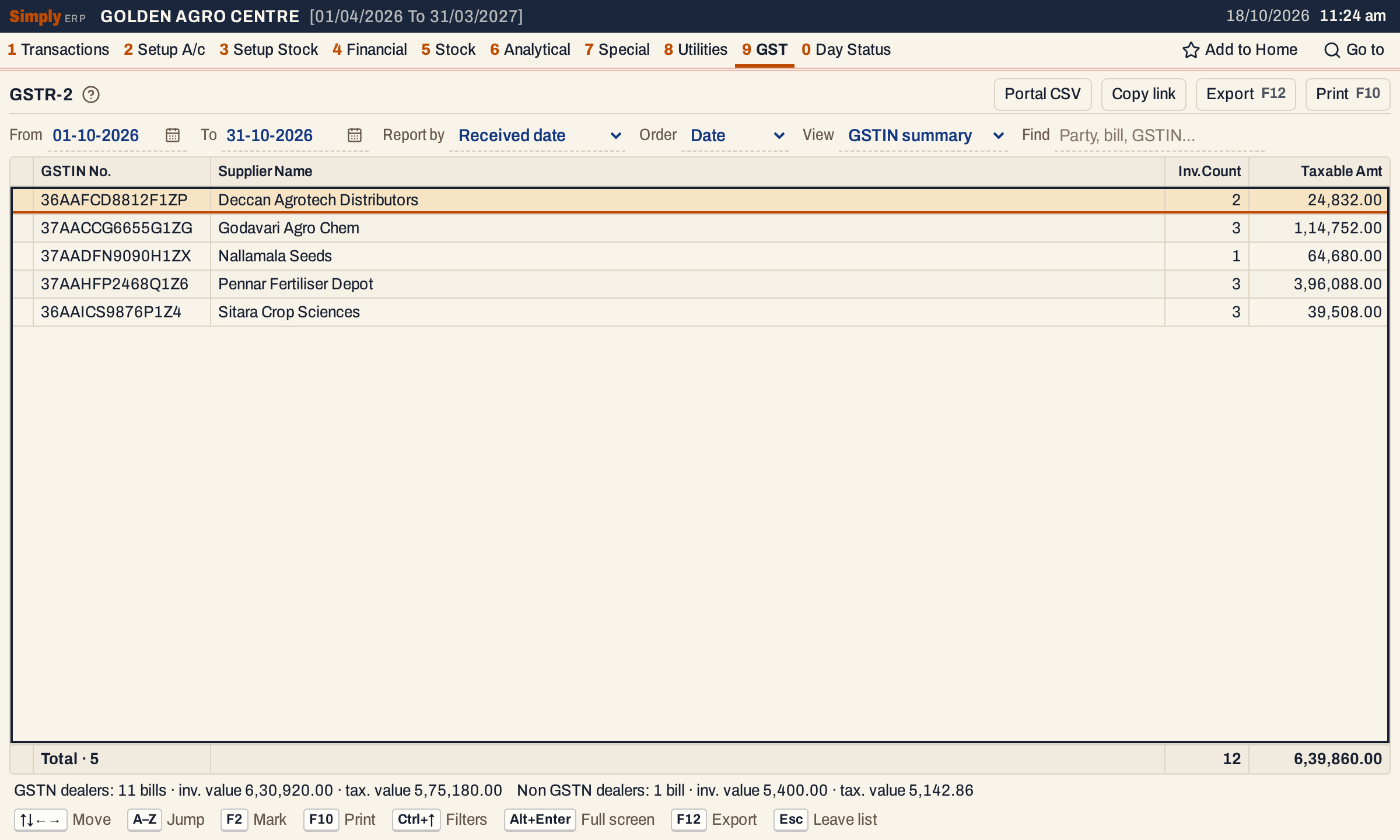 The summary has one line for each supplier with a GSTIN.
Columns: GSTIN No., Supplier Name, Inv.Count and Taxable Amt. Each supplier line counts its purchase bills in the period and adds up the taxable amount of each bill as saved, which includes any charge on the bill that carries GST (the B2B view leaves those out). Returns, notes, other purchases and suppliers without a GSTIN are not in it. Here the 12 bills and 6,39,860.00 are the 11 B2B bills (5,75,180.00) and the seed bill of Nallamala Seeds (64,680.00), which is in Exempt.
The totals under the list
The status line under the list, the same in every view, gives two sets of figures:
- GSTN dealers: the bills in B2B, each bill’s value counted once, and their taxable value.
- Non GSTN dealers: the bills in B2CL (a bill that is also in B2CS is counted once), the value of their lines with GST, and their taxable value. Notes from suppliers without a GSTIN are added with their sign, without counting as bills. Bills at 0% (Exempt) are not in this line.
In the October pictures there are 11 GSTN bills worth ₹6,30,920.00 with a taxable value of ₹5,75,180.00, and 1 non-GSTN bill worth ₹5,400.00 with a taxable value of ₹5,142.86.
How the figures are worked out
- Period. A document is in the period when its date is from the From date to the To date, both included. For a purchase bill and an other purchase, the date is the received date or the supplier’s bill date, as chosen in Report by. A purchase return and a note count on their posting date, whichever you choose. The HSN view counts a purchase return on its own document date instead.
- Dates shown. Every purchase and note is listed under the supplier’s own bill or note number and date. Recd.Date is the day you received it, and is shown when that is another day than the supplier’s date, whichever you choose in Report by.
- Lines. Each goods line is read with its saved taxable value, CGST, SGST and IGST. SimplyERP adds them as saved and rounds each total to two decimals.
- Tax.Value of a line in a view is the sum of the taxable values of the bill’s goods at that rate.
- Returns and notes are signed. A purchase return and a credit note received count as minus, a debit note received as plus. They are taken off or added in HSN, and listed without a sign in CDNR.
- Rate % is the line’s GST rate. A purchase line at any rate that has no tax at all goes to Exempt.
- Place of supply is the state in the supplier’s address on the bill.
- Check against GSTR-3B. When you have no other purchases and no purchase charges that carry GST, the Tax.Value total of the HSN view is the Gross Amt of Input Totals in GSTR-3B for the same period and the same Purchases by choice; GSTR-3B counts those two and the HSN view does not. In the October pictures both are 6,41,742.86.
Report by invoice date
SimplyERP counts input tax in the month you received the goods, so Received date is the default. Invoice date counts each purchase bill, and each other purchase, on the supplier’s date instead.
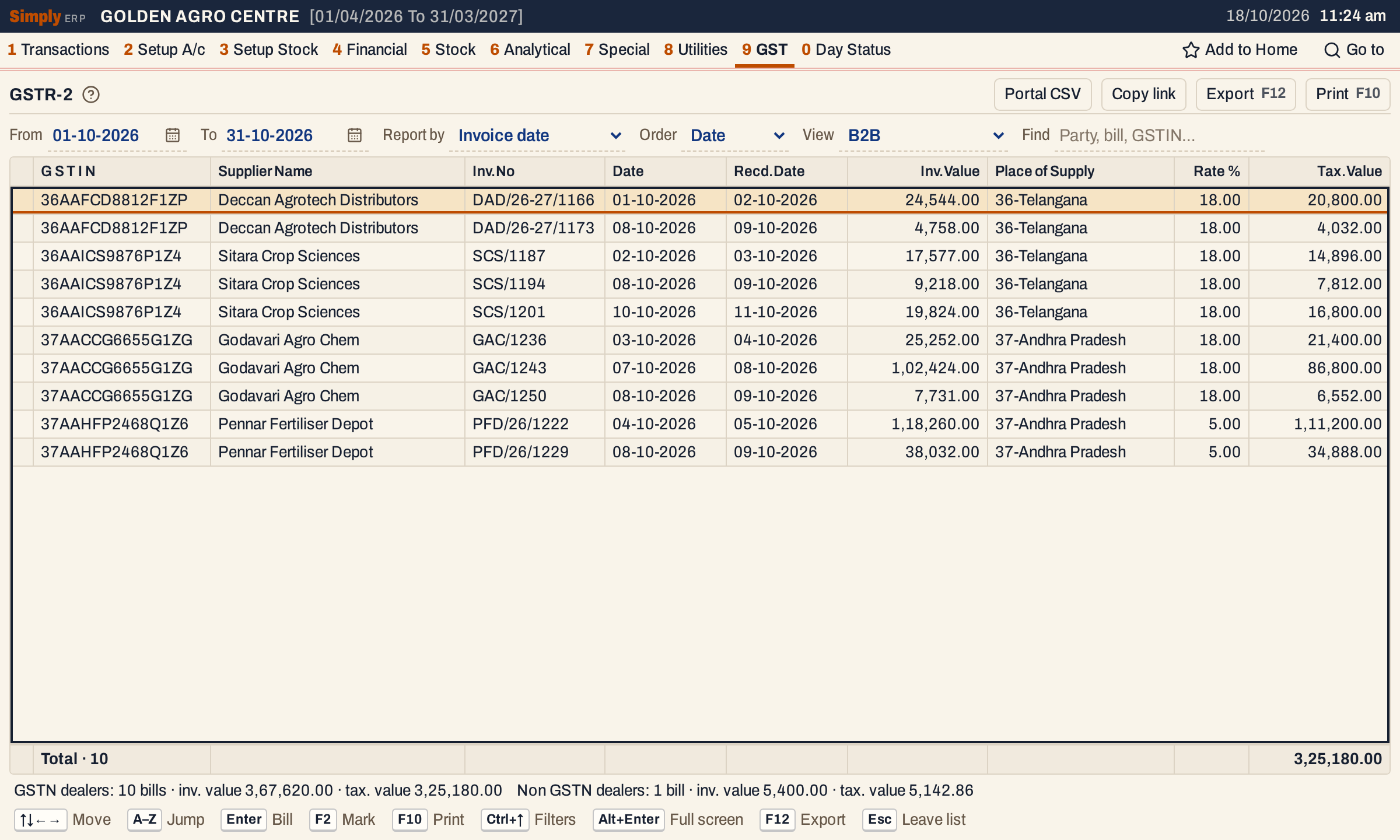 With Invoice date the bill PFD/26/1215 is out of October: it is dated 30-09-2026 and was received on 01-10-2026. The B2B view falls from 11 bills and 5,75,180.00 to 10 bills and 3,25,180.00.
Portal CSV
Portal CSV writes the lines of the view as a CSV file named by the return, the view and the period, for example gstr2-b2b-2026-10-01-2026-10-31.csv. The first row has the field names, every value is in quotes, dates are YYYY-MM-DD and amounts have no commas. It also has the fixed columns the screen leaves out, such as reverse charge N and the invoice type Regular. It leaves out Recd.Date, which is not part of the portal’s layout. It writes the lines that match Find, in the order shown, and is not available when the view has no lines.
What GSTR-2 does not cover
- No tables for imports, supplies from SEZ units, advances paid or reverse-charge purchases. Reverse charge is always N.
- Cess is empty or zero. Nil Rated and Non-GST are always 0.00.
- SimplyERP does not file the return. It lists the figures for you to check and enter.
Open, mark, print and export
- Enter on a line opens its bill or note. It works where a line is one document: B2B, B2CL and CDNR.
- Typing the first letters of a supplier’s name jumps to its line. In B2CL it is the bill number, in B2CS the place, and in Exempt and HSN the description.
- F2 marks a line and F10 then prints only the marked lines.
- F10 prints the view as listed, with the period, the view’s name and your choices (received or invoice date, GSTIN order, Find) in the heading. The summary prints under the heading [ GST PURCHASES - SUMMARY ].
- F12 saves the view as an Excel workbook, as it prints.
- Alt+Enter gives the whole window to the list.
Updated 4 November 2026.